macOS: How to Change the Color of Desktop Widgets - MacRumors
Skip to Content

macOS: How to Change the Color of Desktop Widgets

by

In macOS Sonoma, widgets don't have to be hidden offscreen and largely forgotten in the Notifications Center panel, like they were in previous versions of Apple's macOS. Instead, they can be placed right on your Mac's desktop – and they're interactive, too.
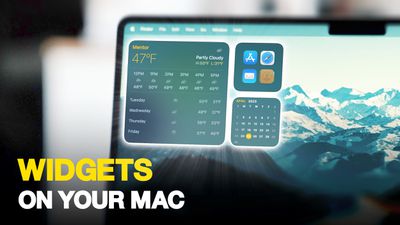
Widgets on Your Mac Thumb 3
When not in use, macOS desktop widgets fade into the background by taking on a monochrome style, which makes them less distracting and allow you to concentrate on the task at hand in the active app or window. When you click back on the desktop, however, their return to full color.

If you prefer the monotone look and would rather retain this aspect of uniformity on your desktop, there is a way you can make it permanent. The following steps show you how it's done.

  1. Open the System Settings app.
  2. Click Desktop & Dock in the side column.
  3. Scroll down to the "Widgets" section, then set the "Widget style" to Monochrome.
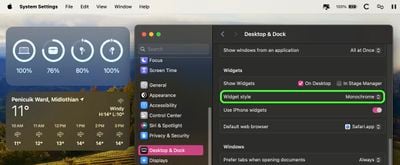
settings

That's all there is to it. If you want to revert back to full color widgets that change to monochrome when in the background, or you want widgets to appear in full color at all times, choose either the Automatic or Full-color "Widget style" option in System Settings, respectively.


Popular Stories

Four iPhone 18 Pro Colors Mock Feature

iPhone 18 Pro: Pre-Orders and Release Date

Thursday August 20, 2026 8:00 am PDT by
Apple has yet to reveal when the iPhone 18 Pro and iPhone Ultra will be announced and released, but the dates usually follow a familiar pattern. As usual, the iPhone event is expected to take place in the first half of September. Labor Day falls on September 7 this year. The last time the holiday was on that day was in 2020, but the iPhone event that year was delayed until October due to...

Foldable iPhone 2023 Feature 1

Gurman: iPhone Ultra Wows Early Testers, Except for Its Camera

Sunday August 23, 2026 11:19 am PDT by
Apple's upcoming foldable iPhone Ultra is winning over the few people who have had hands-on time with the device, though the camera setup may leave some users wanting, according to Bloomberg's Mark Gurman. Writing in his latest Power On newsletter, Gurman says people who have used the device – which is reportedly referred to internally as the iPhone Ultra – like how it fits in your...
macOS 27 next to MacBook Pro Running macOS 27

macOS Golden Gate Marks the End of an Era

Thursday August 20, 2026 2:19 pm PDT by
macOS 27 Golden Gate is not compatible with any Macs with Intel processors, marking the end of an era. The update, which is currently in beta ahead of a release later this year, is limited to Apple silicon Macs with an M1 chip or newer. Last year, Apple said that macOS 26 Tahoe would be the final macOS release compatible with Intel-based Macs, so this was an expected development. Intel...