AirPods Pro 2: How to Enable or Disable Charging Case Sounds - MacRumors
Skip to Content

AirPods Pro 2: How to Enable or Disable Charging Case Sounds

by

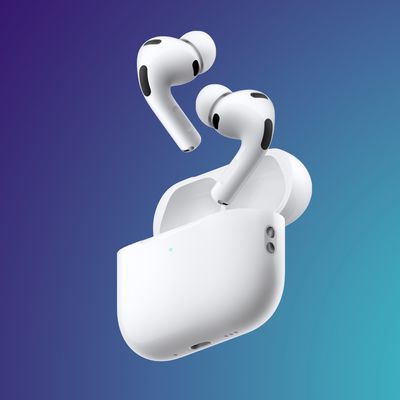
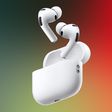
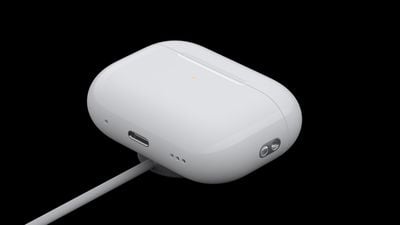
With AirPods Pro 2, Apple has improved the Charging Case by adding a U1 chip for Precision Finding with Find My. This means there is a speaker built into the case that can emit a sound to help you locate it.
airpods pro apple watch charger
However, the speaker also plays an audible chime whenever you start charging the Charging Case. The sound plays whether you connect the case to power via Lightning or place it down on a charging pad. If you find this distracting, here's an easy way to turn it off.

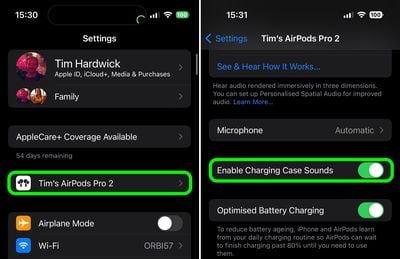
  1. Connect your AirPods Pro 2 to your iPhone.
  2. Launch the Settings app.
  3. Tap the AirPods Pro 2 tab just under your Apple ID.
  4. Scroll down and toggle off the switch next to Enable Charging Case Sounds.
settings

That's all you need to do. Note that the setting will remain grayed out if the Charging Case is currently connected to power.

Related Roundup: AirPods Pro 3
Buyer's Guide: AirPods Pro (Neutral)
Related Forum: AirPods

Top Rated Comments

51 months ago
My charging case only made sounds the first time I used it. Now sounds aren't working. Has anybody else run into this issue?
Score: 4 Votes (Like | Disagree)
51 months ago
I love the chime! I wish you could change it into the Tim “Good Moaaaarning” Cook chime every time you charge it.
Score: 2 Votes (Like | Disagree)
51 months ago
I like this feature. Reassures me Ive got it right!
Score: 2 Votes (Like | Disagree)
51 months ago

I have a serious problem with this feature. I do not want to hear a chime every time I am charging the case, but if I turn it off I think that means it is off for all purposes. I definitely want it active if I need to use Find My. Is there a solution for this? Thanks.
Thanks for help. That’s just what I wanted to hear. 🙂
Score: 1 Votes (Like | Disagree)
51 months ago

My charging case only made sounds the first time I used it. Now sounds aren't working. Has anybody else run into this issue?
Yes, I have the same problem. I made a reset on the Airpods Pro 2, then it worked again once and stopped making the sound right again after the repairing.
Score: 1 Votes (Like | Disagree)
noobinator Avatar
51 months ago

That option is greyed out on my APP 2.

Same here. What gives? Why is it grayed out in some and for others it’s fine?
Grayed out over here too.
Score: 1 Votes (Like | Disagree)

Popular Stories

airpods pro 3 orange

AirPods With Cameras Could Arrive Sooner Than Expected

Monday August 3, 2026 7:13 am PDT by
Apple's first camera-equipped AirPods could launch as soon as next month, according to Bloomberg's Mark Gurman. Apple has reportedly spent years working on camera-equipped AirPods under the code name "B798," as part of a broader AI wearables push that also encompasses smart glasses and a wearable AI pendant. That model had been on track for a 2026 release before slipping to 2027. In his...



Apple Skipping iPhone 18 This Year

Apple Skipping iPhone 18 Launch This Year

Wednesday August 12, 2026 6:59 am PDT by
Apple supplier Pegatron today indirectly confirmed that the standard iPhone 18 model will not be released until next year, according to a new report. Subscribe to the MacRumors YouTube channel for more videos. Pegatron held an earnings call for the second quarter of 2026 today. On the call, Taiwan's Economic Daily News said Pegatron indicated that one of its customers will be changing its...
iPhone 18 Pro Rumored Colors

What's Coming in September: New iPhones, Apple Watches and More

Thursday August 13, 2026 4:20 pm PDT by
Apple will introduce at least five new devices at its iPhone-centric event next month, and it's also possible we'll get devices waiting on Siri AI like the Apple TV. iPhone 18 Pro The iPhone 18 Pro is going to look like the iPhone 17 Pro, but with a smaller Dynamic Island. It's getting some internal updates, including a new Wide camera with a variable aperture for more control over lighting ...