With last year's launch of the iPhone 14 Pro series, Apple introduced its first always-on display, and it has continued to improve the feature with subsequent updates to iOS 16.
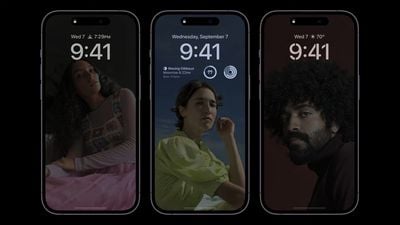
The first enhancement came with iOS 16.2, released in December 2022, which added the ability to hide darkened wallpapers and notifications, allowing users to have a more minimalistic always-on display that only shows the time and date.
Apple has since built on those customizations, and in iOS 16.4, it's now possible to link the activation of the always-on display with a Focus mode. In other words, users can now enable or disable the always-on display only when a specific Focus mode is turned on.
The following steps show you how it's done. Bear in mind that your iPhone will need to be running the iOS 16.4 beta for this feature to be available, otherwise you'll have to wait for the final version of iOS 16.4 to be released to the public.
How to Control iPhone's Always-On Display With a Focus
- Launch the Settings app on your iPhone, then tap Focus.
- Select the Focus mode that you want to add Focus Filters to.

- Swipe down, and under "Focus Filters," tap Add Filter.
- Under "System Filters," tap Always On Display.
- Since you're enabling the Always On Display, leave the switch in the default ON position.
- Tap Add to include the filter in your Focus mode.
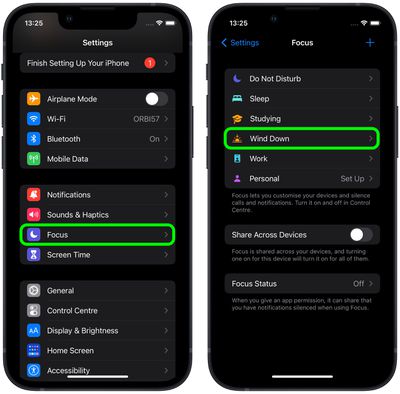
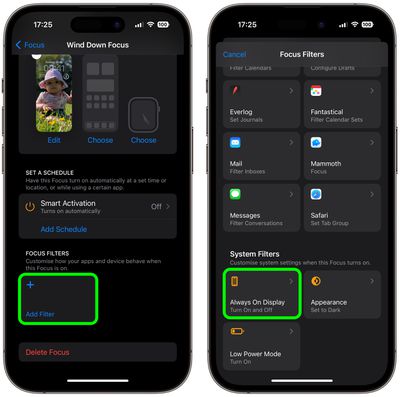
The always-on display will now be activated the next time you enable the associated Focus mode. When the Focus is disabled, the always-on display will be de-activated.
Note that you can also use Smart Activation to automatically turn on this specific Focus mode at opportune times throughout your day, based on signals like your location, app usage, and so on. Alternatively, you can set a schedule for your Focus based on time, location, or app.