Apple's MacBook Air with the M2 chip comes over a year and a half after its M1-based predecessor and, most recently, the company introduced a 15-inch model. The new MacBook Air features a complete redesign as well as several important under-the-hood improvements that could make it a major upgrade worth considering for many users, even though it may not be worthwhile for some.
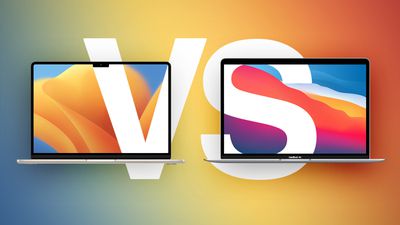
The MacBook Air is often chosen by those who require a portable, more affordable Apple laptop, with the device offering a lightweight design at a price well below the high-end MacBook Pro models. The M2 MacBook Air sits in the Mac lineup at a $1,099 price point – with the previous M1 model remaining on sale for the same $999 price tag that it debuted with in November 2020.
Whether you are weighing up the upgrade from the M1 MacBook Air to the M2 MacBook Air, or are in the market for a new MacBook Air and are mulling whether it's worth saving $100 by buying the M1 model, our buyer's guide helps you to work out which of the MacBook Air models currently on sale is best for you.
Comparing the M1 and M2 MacBook Air Models
Despite their different designs, there are still a large number of important parallels between the two MacBook Air models:
Similarities
- Retina display with P3 wide color and True Tone
- Ambient light sensor
- Touch ID
- Force Touch trackpad
- Fanless design with passive cooling
- Apple silicon chip with 8-core CPU
- Video encode and decode engines for hardware-accelerated H.264 and HEVC video
- 256GB, 512GB, 1TB, and 2TB SSD storage configurations
- Two Thunderbolt/USB 4 ports
- 3.5mm headphone jack
- Support for wide stereo sound and Dolby Atmos playback
- Three-mic array with directional beamforming
- 802.11ax Wi-Fi 6 and Bluetooth 5.0
- Up to 18 hours of battery life
- Available in Silver and Space Gray
Beyond their designs, there are crucial differences between the M1 MacBook Air and the new, M2 MacBook Air:
Differences
M1 MacBook Air
- 13.3-inch Retina display
- 400 nits brightness
- Apple M1 chip with up to 8-core GPU
- 68.25GB/s memory bandwidth
- 8GB and 16GB unified memory configurations
- 720p FaceTime HD camera
- Stereo speakers
- 3.5mm headphone jack
- 49.9-watt-hour lithium-polymer battery
- 30W USB-C Power Adapter
- Available in Gold
M2 MacBook Air
- 13.6-inch or 15.3-inch Liquid Retina display
- 500 nits brightness
- Apple M2 chip with up to 10-core GPU
- ProRes encode and decode engine for hardware-accelerated ProRes and ProRes RAW video
- 100GB/s memory bandwidth
- 8GB, 16GB, and 24GB unified memory configurations
- 1080p FaceTime HD camera
- Four-speaker sound system or six-speaker sound system with force-cancelling woofers
- 3.5mm headphone jack with advanced support for high-impedance headphones
- 52.6-watt-hour lithium-polymer battery
- 30W USB-C Power Adapter (with 8-core GPU model) or 35W Dual USB-C Port Compact Power Adapter (with 10-core GPU model)
- Supports fast charging with 67W USB-C Power Adapter
- Available in Starlight and Midnight
Design
The most noticeable difference between two MacBook Air models is their design. While the M1 MacBook Air mirrors the design of previous models with a tapered, "wedge" design, the M2 model takes design cues from the latest 14- and 16-inch MacBook Pro models with a uniform thickness and a flat top with rounded bottom edges.
 The tapered design of the M1 MacBook Air
It is ultimately a matter of personal preference which design you prefer, but the M1 MacBook Air features the exact same design that the device has been sporting since 2018, which itself carried over the tapered style Apple has used since 2010. The M2 MacBook Air uses Apple's latest design language and looks like a much more modern device.
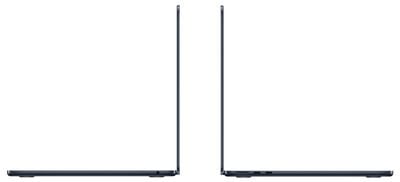 The uniform thickness of the M2 MacBook Air
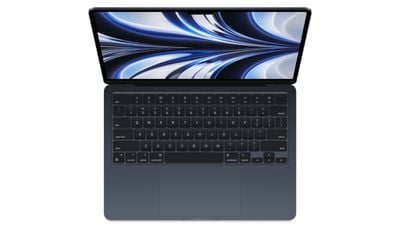
Another design difference worth highlighting is that the M2 MacBook Air features a full-height function key row, rather than the M1 model's half-height row, and has a different Touch ID scanner design. The Magic Keyboards are otherwise the same. The full-height function row is unlikely to influence any purchasing decisions, but it is still worth highlighting amid bigger improvements.
Dimensions and Weight
The 13-inch M2 MacBook Air is 0.19 inches (4.8 mm) thinner than the thickest point of the previous model. Both designs have the exact same width, but the M2 model is slightly longer. Despite not having a tapered design, the new 13-inch MacBook Air delivers a 25 percent volume reduction over the previous generation and should feel more slight in the hand.


True to its name, the 13-inch M2 MacBook Air is also 0.1 pounds (45 grams) lighter than the previous model.
M1 MacBook Air
- Height (at thickest point): 0.63 inches (1.61 cm)
- Height (at thinnest point): 0.16 inches (0.41 cm)
- Width: 11.97 inches (30.41 cm)
- Depth: 8.36 inches (21.24 cm)
- Weight: 2.8 pounds (1.29 kg)
M2 MacBook Air (13-Inch)
- Height: 0.44 inch (1.13 cm)
- Width: 11.97 inches (30.41 cm)
- Depth: 8.46 inches (21.5 cm)
- Weight: 2.7 pounds (1.24 kg)
While the 13-inch M2 MacBook Air does not deliver a massive change in terms of portability, its reduction in weight and volume are likely to be welcomed by users who often need to carry their device around. The M1 MacBook Air is by no means a large or overly heavy device, but the 13-inch M2 MacBook Air is more likely to fit easily into tight bag compartments and be very slightly less cumbersome. The new design may be more striking and visually appealing, but it is generally not worth buying the latest model purely for better portability.
For users who are less concerned about size and weight, and would prefer a larger display, Apple now offers a 15-inch variant of the M2 MacBook Air.
Color Options
Like many Apple devices, both models are available in Silver and Space Gray. The M2 MacBook Air is not available in Gold, but it offers Starlight and Midnight options.
If you have other Apple devices in Starlight and Midnight, such as an iPhone 14, iPad mini or iPad Air, or aluminum Apple Watch Series 8, you may prefer to get the M2 model to obtain a matching color. The unique champagne tone of Starlight or the navy-tinted hue of Midnight may also simply be more appealing, but Silver and Space Gray users have no reason to prefer the M2 model simply on the basis of color.
Display
Both models feature a high-resolution Retina display with P3 wide color and True Tone, but Apple boasts that the M2 MacBook Air features its latest "Liquid Retina display." This allows it to have slimmer borders, fitting a larger display in a similarly sized device, and the edges of the display curve around the top corners of the lid for a more modern appearance.
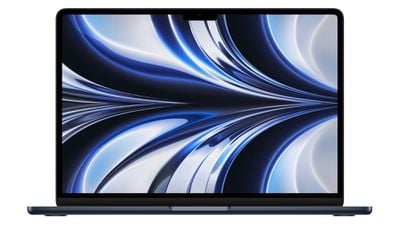
The 13-inch M2 MacBook Air's display provides an additional 0.3 inches of diagonal space, making slightly more space for on-screen content, and the display can get 25 percent brighter than the M1 model, making it better for use outdoors, in direct sunlight, or in bright environments.
The M2 MacBook Air features a "notch" to house the FaceTime HD camera that cuts into the top of the display. While the displays feature different resolutions, they have the same 16:10 aspect ratio below the notch, so it should not be an important consideration for most buyers, especially since macOS's menu bar takes advantage of this additional vertical space on the M2 model.
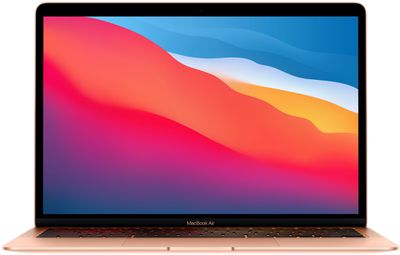
The M1 MacBook Air still has a more than serviceable LCD Retina display that will meet most customers' needs. There are few material differences between the displays in terms of specifications that make it worth buying one device over the other or upgrading, but the larger borders around the M1 model's smaller display certainly make it look more dated, which may sway some customers toward the newer model.
For users who require a bigger display or seek to replace a desktop setup with a MacBook Air, the 15-inch M2 MacBook Air is the perfect choice.
M1 vs. M2
One of the most important differences between the current and previous-generation MacBook Airs is their Apple silicon chip. The M1 chip, introduced in November 2020, is based on Apple's A14 Bionic chip. On the other hand, the M2 is based on the A15 Bionic chip from the iPhone 13.
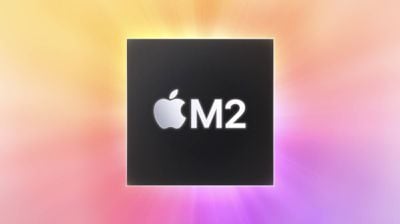
While both chips feature an eight-core CPU with four performance cores and four efficiency cores, the M2's cores offer moderate performance and efficiency improvements and up to two additional GPU cores. Apple says that with the M2 chip "intensive workloads like editing complex timelines in Final Cut Pro are nearly 40 percent faster than the previous generation... Applying filters and effects in apps like Adobe Photoshop is up to 20 percent faster than before."
Like the M1 Pro, the M2 features a media engine for hardware-accelerated ProRes and ProRes RAW video encode and decode. On the other hand, the M1 chip's dedicated media engine can only accelerate H.264 and HEVC video. Apple says that this dramatically speeds up video workflows on the latest MacBook Air, allowing users to play back up more 4K and 8K streams of video and convert video projects to ProRes considerably faster than before.
For casual users, the M2 chip is unlikely to make much difference over the M1 chip in day-to-day tasks, with improvements being more noticeable in professional workflows. For more information about the specific differences between the M1 and M2 chips, see our detailed guide:
Unified Memory
Both the M1 and M2 are configurable with 8GB or 16GB of unified memory, but the M2 offers an additional 24GB top-tier memory option. Multitasking and memory-hungry workflows, such as working with large assets, benefit from the higher memory option as a result.
In addition, the M2 has a 100GB/s memory bandwidth, compared to 68.25GB/s with the M1, meaning that the latest MacBook Air can access more memory faster.
Camera
The M2 MacBook Air includes a new 1080p FaceTime HD camera with twice the resolution and low-light performance of the previous generation, according to Apple. This is sure to substantially improve the video calling experience compared to the 720p camera of the M1 model.
Speakers
The M2 MacBook Air offers a four-speaker sound system integrated between the keyboard and the display, which Apple says "produce improved stereo separation and vocal clarity." The M1 MacBook Air retains a stereo speaker setup, which is likely to be good enough for most users. Both devices support wide stereo sound and Dolby Atmos playback.
Ports and Charging
The M2 MacBook Air ups the device's audio credentials further with support for high-impedance headphones like the high-end 14- and 16-inch MacBook Pros, which could be an important upgrade for some audio professionals.
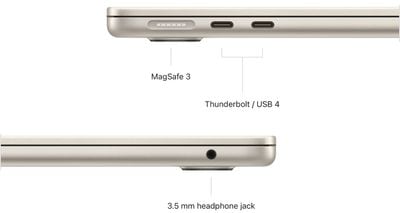
More noticeable is the presence of a MagSafe port on the M2 MacBook Air, allowing users to connect and release the charging cable from their MacBook Air more easily – especially if the charging cable is accidentally pulled, and see an LED indicator for the device's charging status.
Both models feature two Thunderbolt ports, so there is no outright difference when it comes to connecting accessories, but it is worth noting that the MagSafe port on the M2 model effectively frees up a Thunderbolt port for accessories that would otherwise need to be used for charging.
Though the M2 MacBook Air comes with a larger lithium-polymer battery, both devices have the same 18-hour battery life, regardless of whether you choose the 13- or the 15-inch M2 model. When using a 67W USB-C Power Adapter, the M2 MacBook Air supports fast charging.
M2 MacBook Air models configured with the 10-core GPU option come with a 35W Dual USB-C Port Compact Power Adapter, rather than the one-port 30W USB-C Power Adapter that comes with the M1 model and base M2 MacBook Air model.
Final Thoughts
In some senses, the M2 MacBook Air is similar to its predecessor, with the same Magic Keyboard and Force Touch trackpad, two Thunderbolt/USB 4 ports, a passive cooling system, and 18-hour battery life. The devices have a similar footprint, Retina display around 13 inches in size, up to 2TB of storage, can hardware-accelerate H.264 and HEVC video, and come with a 30W charger as standard.
That being said, there is no doubt that the M2 MacBook Air delivers a major redesign. Its uniform thickness, reduced volume and weight, larger display with slimmer borders, and full-height function row are sure to make for a more modern appearance. Yet there are also practical improvements such as the MagSafe port, fast charging, brighter display, 1080p FaceTime HD camera, and four-speaker sound system that meaningfully improve the user experience in many areas.
The new 15-inch model offers a new form-factor that offers the best balance of display area and portability for many users, for only $1,299 – $200 more than the 13-inch M2 MacBook Air. There is no 15-inch variant of the M1 model available.
Given that it has only been almost three years since Apple launched the M1 MacBook Air, it will be worth choosing the M2 model from the perspective of future-proofing.
For these reasons, if choosing between buying the M1 MacBook Air or the M2 MacBook Air, it is definitely worth spending the additional $100 for the M2 model's new design, better performance, and across-the-board improvements. That being said, if price is an issue, the M1 MacBook Air is still a very capable machine with plenty of similarities to the latest model. The M1 chip remains very capable and should offer sufficient performance for many users.
When considering an upgrade from the M1 MacBook Air to the M2 model, users should weigh up how much they would utilize specific improvements. The M2 chip is unlikely to eclipse the M1 for everyday users, but for some workflows, it could offer real enhancements. For example, the M2's ProRes encode and decode engine, 100GB/s memory bandwidth, and 24GB memory option may make it a much more powerful device for professionals.
M1 MacBook Air users who need more than 16GB of memory, make lots of video calls, or even those who are prone to accidentally tugging on their charging cable should consider upgrading. The combined advancements of the new design, M2 chip, four-speaker system, larger display, and faster charging make switching the M1 MacBook Air for the M2 model a more worthwhile action than many other generation-over-generation upgrades. Likewise, upgrading to the 15-inch model is a worthwhile step up simply due to its size.
The M2 MacBook Air may be best suited to those who are first-time MacBook Air buyers or are upgrading from an older machine, rather than 2020's M1 model. Nevertheless, the M2 MacBook Air is a significantly more appealing overall package with major improvements in almost all areas, making it a justifiable upgrade for almost everyone.