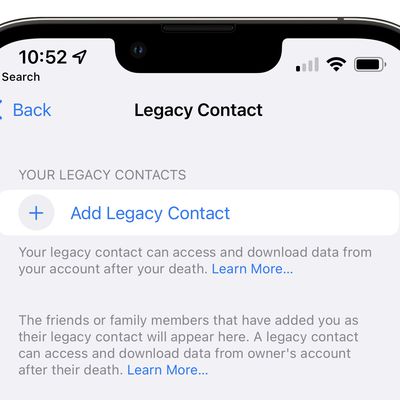
Apple in iOS 15.2 made it easier for your loved ones to access your personal data in the event of your death with the addition of a Legacy Contact feature. A person set as your Legacy Contact gets a special code that can be provided to Apple alongside a death certificate to unlock your device.
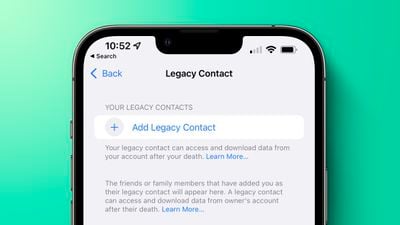
The Legacy Contact that you set will have access to your Messages, photos, notes, and other sensitive data, plus the ability to remove Activation Lock from your devices, so it is an opt-in feature and should be reserved for your most trusted contact. This how to walks you through how to enable Legacy Contacts, covers how to get to the data after a death, and outlines some of the data that will be accessible.
iOS 15.2 is available in a beta capacity at the current time, but it will launch to the public later this fall.
How to Add a Legacy Contact
Adding a Legacy Contact takes just a few steps, but both people involved in the process need to be running iOS 15.2 or later.
- Open the Settings app.
- Tap on your profile picture to get to your Apple ID settings.
- Tap on Password &Security.
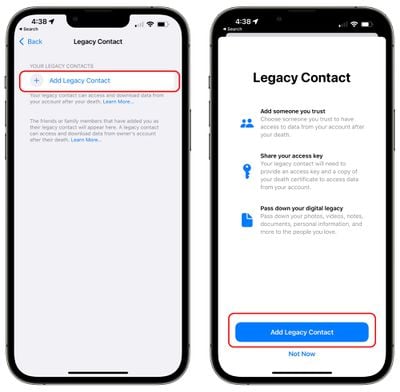
- Tap on Legacy Contact.

- Tap on Add Legacy Contact.
- At the pop up screen that describes the feature, tap on Add Legacy Contact.
- Authenticate with Face ID, Touch ID, or a password.
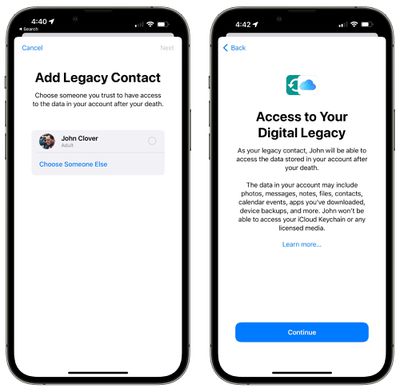
- Apple will suggest members of your family if you have Family Sharing enabled. Tap on a family member's name or select "Choose Someone Else" to pick from your contacts list.
- Once a person has been selected, tap Next.
- At the screen that describes how Legacy Contact works, tap Continue.
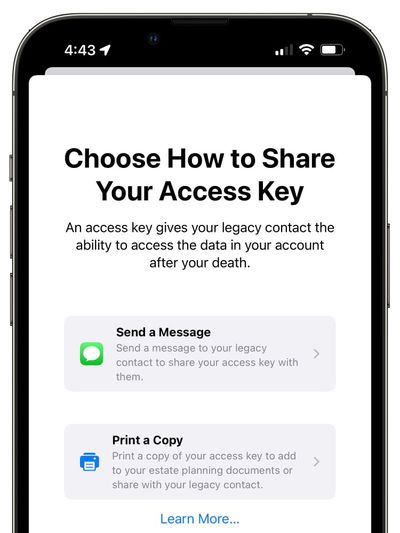
- Choose how to share your Access Key. You can send an iMessage to a contact with your key, or you can print a copy of it.
- Once you've sent a message or printed your Legacy Contact info, the person is officially set as the person who can request your data.
- Repeat the process if you want to set another Legacy Contact. You can have multiple.
Legacy Contact Access Key
For security purposes, Apple reviews all requests from legacy contacts before providing access to data. Your Legacy Contact will need access to your date of birth, your death certificate, and the access key that you set up.
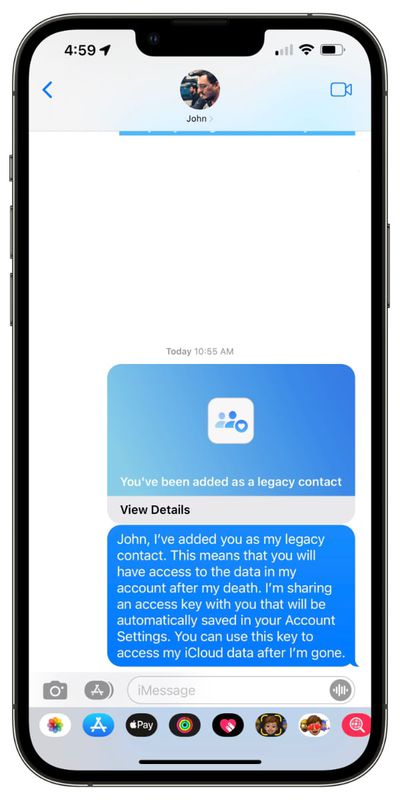
The access key is printed or sent in an iMessage, and it must be saved in a secure location by the person who you have set as your contact. Apple provides a very long multi-digit key that's a mix of letters and numbers and an easy-to-scan QR code. Apple provides the following information to your contact.
As [person]'s legacy contact, you will be able to access data from [person]'s account and remove Activation Lock on their devices after their death.
Because date of birth is used as an authentication measure, your birth date needs to be accurately set in your device's setting. You can ensure it's set by opening the Settings app, tapping on your profile picture, selecting "Name, Phone Numbers, Email" and adding or updating it by tapping on the "Birthday" listing.
How Your Legacy Contact Can Get Your Data When You Die
In the event of your death, your Legacy Contact will need to collect the access key that was provided to them when they were set as a contact as well as a copy of your death certificate.
Apple instructs your Legacy Contact to visit digital-legacy.apple.com to begin the authentication process. The Legacy Contact will need to sign in with their Apple ID and provide the necessary information to Apple.
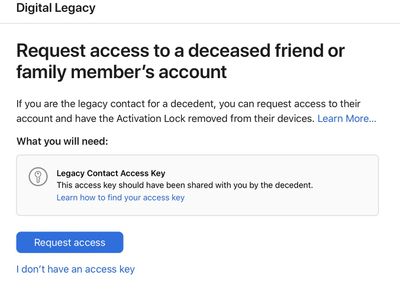
For getting access to your data, an access key is a must. If no access key is available, your family can still remove Activation Lock from your devices, but your account and data will need to be removed first and the process requires a death certificate.
There is a wait time to get approved through the Digital Legacy process that Apple has implemented, and status updates are available on the Digital Legacy website.
Data Available to Your Legacy Contact
Your Legacy Contact will have access to the following data on your devices.
- Photos
- Messages
- Notes
- Files
- Downloaded apps and their associated data
- Contacts
- Calendar Events
- Device Backups
iCloud Keychain logins and passwords will not be made available, or will any licensed media.
According to Apple, your Legacy Contact can view your data on iCloud.com, or download a copy from privacy.apple.com. Data can also be viewed directly on an Apple device.
How to Remove a Legacy Contact
You can remove a Legacy Contact that you've set at any time, revoking access to your data. Here's how:
- Open up the Settings app.
- Tap on your profile picture to get to your Apple ID settings.
- Tap on Password & Security.
- Tap on Legacy Contact.
- Tap on the name of the person whose access you want to remove.
- Select Remove Contact.
- At the warning that pops up telling you the person won't be able to access your data after your death, select Remove Contact.
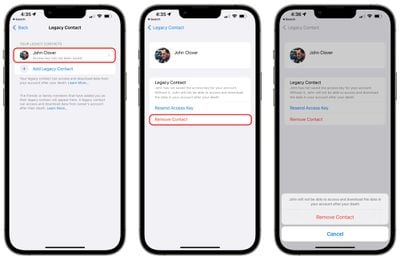
From there, the person will be removed and the access key that they were provided with will no longer work for accessing your data after your death.
Guide Feedback
Have questions about the Legacy Contact feature or want to provide feedback on this guide? Send us an email here.