

With the launch of the iPhone 18 Pro models and iPhone Duo, Apple has introduced several new camera features, including the ability to record time-lapse videos in 4K resolution.
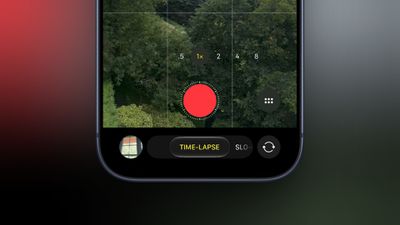
Up until now, time-lapse videos shot in Apple's native Camera app have only been 1080p. Now with a 4K option on iPhone Duo and iPhone 18 Pro models that supports Dolby Vision HDR, time-lapses are recorded in the same resolution as high-quality video.
On iPhone 18 Pro and iPhone Duo, there's also a new feature called "Adaptive" time-lapse, which slows the time-lapse down when it detects motion. To turn it on in Time-Lapse mode, tap the button with six circles inside in the bottom right corner of the Camera interface, then select Adaptive.
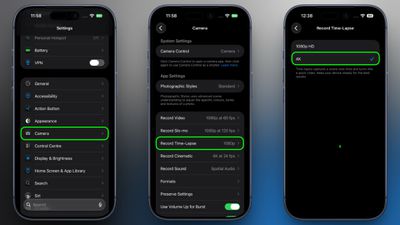
When you select Time-Lapse mode in the Camera app's carousel at the bottom of the screen, you can switch between HD and 4K resolution by tapping the current resolution above the viewfinder. To default to recording a time-lapse video in 4K resolution on iPhone 18 Pro and iPhone Duo, follow these steps:
- Launch the Settings app on your iPhone.
- Scroll down and tap through to Camera.
- Select Record Time Lapse.
- Choose 4K.
You can also save a video frame from a time-lapse as a still photo. To do so, tap the Edit button when viewing the time-lapse in the Photos app, then tap the icon with three dots in the top right corner. In the drop-down menu, choose Select Video Frame as Photo.















































