Apple Pencil Buyer's Guide: Which Model Should You Choose?

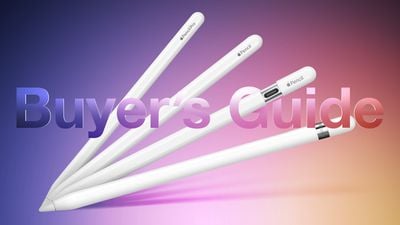
Apple now offers four different Apple Pencil models at $79, $99, and $129 price points, each with different feature sets and compatibility. Our guide helps you decide which ‌Apple Pencil‌ is best for you.

Apple Pencil Buyers Guide Graphic ft Pro
Which ‌Apple Pencil‌ you should buy is firstly determined by which iPad model you have. Some ‌iPad‌ models are only compatible with one kind of ‌Apple Pencil‌, while others are compatible with two. If your ‌iPad‌ model only supports one kind of ‌Apple Pencil‌, your buying decision is straightforward. Use the table below to find out which ‌Apple Pencil‌ models your ‌iPad‌ supports:

‌Apple Pencil‌ (first-generation, 2015) ‌Apple Pencil‌ (second-generation, 2018) ‌Apple Pencil‌ (USB-C, 2023) ‌Apple Pencil‌ Pro (2024)
iPad Pro 12.9-inch (first- and second-generation) ‌iPad Pro‌ 12.9-inch (third-, fourth-, fifth-, and sixth-generation) ‌iPad Pro‌ 12.9-inch (third-, fourth-, fifth-, sixth-, and seventh- generation) ‌iPad Pro‌ 13-inch (seventh-generation)
‌iPad Pro‌ 9.7-inch and 10.5-inch ‌iPad Pro‌ 11-inch (first-, second-, third-, and fourth-generation) ‌iPad Pro‌ 11-inch (first-, second-, third-, fourth-, and fifth-generation) ‌iPad Pro‌ 11-inch (fifth-generation)
iPad Air (third-generation) ‌iPad Air‌ (fourth- and fifth-generation) ‌iPad Air‌ (fourth-, fifth-, and sixth-generation) ‌iPad Air‌ (sixth-generation)
iPad mini (fifth-generation) ‌iPad mini‌ (sixth-generation) ‌iPad mini‌ (sixth-generation)
‌iPad‌ (sixth-, seventh-, eighth-, ninth-, and tenth-generation) ‌iPad‌ (tenth-generation)

Simply put, if your ‌iPad‌ features a Lightning connector, it is only compatible with the first-generation ‌Apple Pencil‌, providing it has ‌Apple Pencil‌ support at all. It will not work with the second-generation ‌Apple Pencil‌ or the ‌Apple Pencil‌ with USB-C. If your ‌iPad‌ features a USB-C port, it is compatible with the second-generation ‌Apple Pencil‌ and the ‌Apple Pencil‌ with USB-C, except the tenth-generation ‌iPad‌, which supports the first-generation ‌Apple Pencil‌ and ‌Apple Pencil‌ with USB-C, and the M2 ‌iPad Air‌ and M4 ‌iPad Pro‌, which support the ‌Apple Pencil‌ Pro and ‌Apple Pencil‌ with USB-C.

It is worth noting that the first-generation ‌Apple Pencil‌ is only compatible with the tenth-generation ‌iPad‌ using a USB-C cable and USB-C to ‌Apple Pencil‌ Adapter. It is not possible to use the first-generation ‌Apple Pencil‌ this way with any other ‌iPad‌ model that has a USB-C port.

All four ‌Apple Pencil‌ models feature "pixel-perfect" precision, low latency, and tilt sensitivity, but feature different designs, pairing and charging methods, pressure sensitivity capabilities, and more. The below table lists all hardware and feature differences between the different ‌Apple Pencil‌ models.

‌Apple Pencil‌ (first-generation, 2015) ‌Apple Pencil‌ (second-generation, 2018) ‌Apple Pencil‌ (USB-C, 2023) ‌Apple Pencil‌ Pro (2024)
Glossy finish Matte finish Matte finish Matte finish
Weighted to prevent rolling Flat edge to prevent rolling and snap to the side of an ‌iPad‌ Flat edge to prevent rolling and snap to the side of an ‌iPad‌ Flat edge to prevent rolling and snap to the side of an ‌iPad‌
Attaches magnetically for storage, pairing, and charging Attaches magnetically for storage Attaches magnetically for storage, pairing, and charging
6.92-inch length 6.53-inch length 6.1-inch length 6.53-inch length
Removable cap Non-removable sliding cap
Lightning connector USB-C port
Pair and charge via Lightning port or USB-C cable and USB-C to ‌Apple Pencil‌ Adapter Pair and charge wirelessly Pair and charge via USB-C cable Pair and charge wirelessly
Pressure sensitivity Pressure sensitivity Pressure sensitivity
Barrel roll
Supports ‌Apple Pencil‌ hover Supports ‌Apple Pencil‌ hover Supports ‌Apple Pencil‌ hover
Double-tap to change tools Double-tap to change tools
Squeeze control
Haptic feedback
Find My support
Free engraving option Free engraving option
$99 $129 $79 $129

First-Generation Apple Pencil vs. Apple Pencil With USB-C

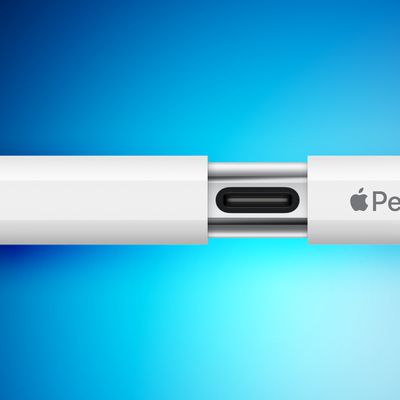
Most users should choose the ‌Apple Pencil‌ with USB-C. For a price of just $79, the ‌Apple Pencil‌ with USB-C provides a good balance of features with a more modern design. It also has the added advantage of being compatible with a wide range of models and will likely work with all new ‌iPad‌ models for many years to come.

It is only worth opting for the first-generation ‌Apple Pencil‌ if you specifically want pressure-sensitivity for activities like illustration, since the ‌Apple Pencil‌ with USB-C does not have this feature. Buyers should be aware that this model comes at a $20 premium, requires a USB-C to ‌Apple Pencil‌ Adapter with the tenth-generation ‌iPad‌, and will not be compatible with any future ‌iPad‌ models. It also cannot be magnetically attached to an ‌iPad‌ for storage, features a larger and older design, and has a removable cap over the Lightning connector that's easy to lose.

Second-Generation Apple Pencil or Apple Pencil Pro vs. Apple Pencil With USB-C

If choosing between the second-generation ‌Apple Pencil‌ or ‌Apple Pencil‌ Pro and the ‌Apple Pencil‌ with USB-C, the second-generation and Pro models are a better choice on account of their superior feature set, but this requires spending an additional $50. Double-tap to change tools and pressure-sensitivity may be particularly useful additions for illustrators, while the easy pairing and charging on the side of an ‌iPad‌ provides a much better experience than a wired connection with a USB-C cable.

If you have only basic needs for activities like handwriting notes and marking up documents, the ‌Apple Pencil‌ with USB-C is still a great option at a much more affordable price point. It even supports ‌Apple Pencil‌ hover on the newer ‌iPad Air‌ and ‌iPad Pro‌ models.

Related Forum: iPad Accessories

Popular Stories

2024 iPhone Boxes Feature

Apple Adjusts Trade-In Values for iPhones, iPads, Macs, and More

Thursday November 6, 2025 11:12 am PST by
Apple today updated its trade-in values for select iPhone, iPad, Mac, and Apple Watch models. Trade-ins can be completed on Apple's website, or at an Apple Store. The charts below provide an overview of Apple's current and previous trade-in values in the U.S., according to its website. Maximum values for most devices either decreased or saw no change, but the iPad Air received a slight bump. ...
Liquid Glass General Feature

Apple Shares Liquid Glass Design Gallery

Thursday November 6, 2025 2:45 pm PST by
Apple is promoting the new Liquid Glass design in iOS 26, showing off the ways that third-party developers are embracing the aesthetic in their apps. On its developer website, Apple is featuring a visual gallery that demonstrates how "teams of all sizes" are creating Liquid Glass experiences. The gallery features examples of Liquid Glass in apps for iPhone, iPad, Apple Watch, and Mac. Apple...
airtag purple

Apple's Website Lists AirTag 4-Pack at Shockingly Low Price [Updated]

Friday November 7, 2025 6:40 am PST by
Apple's online store in the U.S. is suddenly offering a pack of four AirTags for just $29, which is the same price as a single AirTag. This is likely a pricing error, and it is unclear if orders will be fulfilled. Apple has not discounted the AirTag four-pack in any other countries that we checked. Delivery estimates are already pushing into late November to early December, suggesting...
Early Black Friday Deals 1

The Best Early Black Friday Apple Deals on AirPods, Apple Watch, iPad, and More

Saturday November 8, 2025 6:16 am PST by
We're officially in the month of Black Friday, which will take place on Friday, November 28 in 2025. As always, this will be the best time of the year to shop for great deals, including popular Apple products like AirPods, iPad, Apple Watch, and more. In this article, the majority of the discounts will be found on Amazon. Note: MacRumors is an affiliate partner with some of these vendors. When ...
iOS 26

iOS 26.1 Available Now With These 8 New Features

Monday November 3, 2025 5:54 am PST by
Following more than a month of beta testing, Apple released iOS 26.1 on Monday, November 3. The update includes a handful of new features and changes, including the ability to adjust the look of Liquid Glass and more. Below, we outline iOS 26.1's key new features. Liquid Glass Toggle iOS 26.1 lets you choose your preferred look for Liquid Glass. In the Settings app, under Display...
ikea smart home devices

IKEA Debuts 21 HomeKit-Compatible Smart Bulbs, Sensors, and Controls

Thursday November 6, 2025 4:08 pm PST by
IKEA today announced the upcoming launch of 21 new Matter-compatible smart home products that will be able to interface with HomeKit and the Apple Home app. There are sensors, lights, and control options, all of which will be reasonably priced. Some of the products are new, while some are updates to existing lines that IKEA previously offered. There are a series of new smart bulbs that are...
Apple fitness plus feature

Future of Apple Fitness+ 'Under Review'

Sunday November 9, 2025 5:30 am PST by
The future of Apple Fitness+ is "under review" amid a reorganization of the service, according to Bloomberg's Mark Gurman. In the latest edition of his "Power On" newsletter, Gurman said that Apple Fitness+ remains one of the company's "weakest digital offerings." The service apparently suffers from high churn and little revenue. Nevertheless, Fitness+ has a small, loyal fanbase that...
maxresdefault

In-Depth iPhone Battery Experiment Pits Slow Charging Against Fast Charging

Friday November 7, 2025 1:19 pm PST by
HTX Studio this week shared the results from a six-month battery test that compared how fast charging and slow charging can affect battery life over time. Using six iPhone 12 models, the channel set up a system to drain the batteries from five percent and charge them to 100 percent over and over again. Three were fast charged, and three were slow charged. Another set of iPhones underwent...
apple watch se 3 always on

Apple to Remove iPhone-Apple Watch Wi-Fi Sync in EU With iOS 26.2

Thursday November 6, 2025 4:37 am PST by
Apple in iOS 26.2 will disable automatic Wi-Fi network syncing between iPhone and Apple Watch in the European Union to comply with the bloc's regulations, suggests a new report. Normally, when an iPhone connects to a new Wi-Fi network, it automatically shares the network credentials with the paired Apple Watch. This allows the watch to connect to the same network independently – for...

Top Rated Comments

nt5672 Avatar
27 months ago
OMG, only an Ivy League MBA could dream up this product mess.
Score: 94 Votes (Like | Disagree)
TigerNike23 Avatar
27 months ago
Apologies to the writers and editors here, they’re just doing their job.

But the fact we’re having a debate about what the best stylus is instead of what the best new iPad is is to me a huge indictment on Tim Apple and his leadership of this company.

They’ve missed product deadlines, half-baked some products, poor software quality. But, if you don’t care about Apple’s customers and only care about shareholder $$$$, then I guess he’s a great CEO, right?

End rant.
Score: 55 Votes (Like | Disagree)
Fuzzball84 Avatar
27 months ago
Its now a nightmare...

Apple... you only had to make one to rule them all... it's what you used to do!

Steve jobs famously dissed the stylus... and now the same company makes three of the damn things.. one is ancient, one is purposely restricted and the other is good/great, but not quite there.

Why?

Edit: And now there is four of the damn things... ?
Score: 48 Votes (Like | Disagree)
karranz Avatar
27 months ago
this is the company that used to have one or two products for a whole category, they used to know the product and the customer so much that they were sure that the new version would hit in every spot, old models were retired on the spot. Now we have 3 different versions of a ***** pencil.

edit: 4 different **** pencils!
Score: 38 Votes (Like | Disagree)
klasma Avatar
27 months ago

Most users should choose the ‌Apple Pencil‌ with USB-C.
No, most users should, if they don’t need pressure sensitivity, choose a $20 clone which basically does the same, while still also working on older iPads, like for example https://www.amazon.com/dp/B0BW8LQKL4/. You even get different colors!
Score: 31 Votes (Like | Disagree)
Attirex Avatar
27 months ago
When a behind of the scenes book is written about this time period in Apple, the Pencil matrix/comparison chart will be featured prominently as a big ole red flag that Apple learned nothing, and promptly returned to 1990s product line bloat.
Score: 26 Votes (Like | Disagree)