

Tim Hardwick

Tim is a Senior Editor at MacRumors and has been writing for the site since 2016. Formerly a magazine journalist, his work has appeared in over 30 newsstand print publications and online brands covering a range of topics, from the latest trends in technology to the mysteries of ancient history.
Based in the UK, Tim's current role at MacRumors involves editorial oversight and how tos, in addition to covering daily news and contributing occasional reviews. Tim can be reached at tim@macrumors.com, Telegram (@waxeditorial) or Twitter.
Based in the UK, Tim's current role at MacRumors involves editorial oversight and how tos, in addition to covering daily news and contributing occasional reviews. Tim can be reached at tim@macrumors.com, Telegram (@waxeditorial) or Twitter.
Tim Hardwick's Articles

Apple Nixes Plan to Boost iPhone 14 Series Production Due to Lower Demand
Apple is calling off plans to increase production of its latest iPhone 14 series after an anticipated surge in demand failed to materialize, Bloomberg reports, citing sources familiar with the matter.
Apple has reportedly told suppliers to rein in efforts to increase iPhone 14 assembly by as much as 6 million units in the second half of the year. Apple had upgraded sales projections in the...
Read Full Article • 153 comments

iPhone 14 Pro Users Can Switch Between Two Live Activities in Dynamic Island
Apple earlier this month announced that iOS 16.1 will enable a new Live Activities feature which allows iPhone users to stay on top of things that are happening in real time, such as a sports game or a food delivery order, right from the Lock Screen. On the iPhone 14 Pro and Pro Max, Live Activities also integrate with the Dynamic Island.
On Monday, we learned that when following a sports...

These Awesome Photos of the Milky Way Were Taken on an iPhone 14 Pro
One iPhone 14 rumor that never panned out was some sort of astrophotography feature, but that hasn't stopped users from showcasing just what the camera on iPhone 14 Pro models can do when pointed at the night sky.
These fantastic shots shared by MacRumors forum member ToddH were taken using an iPhone 14 Pro Max in Night Mode with the maximum available exposure time of 30 seconds in the...

iPhone 14 Pro: How to Turn Off Dynamic Island Content
When Apple unveiled its latest iPhone 14 Pro models, many people were surprised by its innovative integration of software functions with the pill-shaped cutout at the top of the screen, which Apple calls the "Dynamic Island."
Display pixels around the Dynamic Island merge it into one pill-shaped area that changes size and shape to accommodate various types of alerts, notifications, and...

Apple Watch Ultra Praised by Watch World Tastemaker John Mayer
Apple Watch Ultra has been endorsed by American musician and famous watch collector John Mayer, who has been showing off the new device on his Instagram account.
"Been wearing the Apple Watch Ultra for a week... and it's great," writes Mayer over a photo of the watch. "The first Apple Watch that excited me as a mechanical watch collector."
"It's loaded with capability and what I call...

Video Demos Apple Watch Ultra's Depth App in Underwater Test Chamber
Apple Watch Ultra comes with a stock Depth app for underwater recreational activities like snorkeling and underwater pool swims, but most casual users probably won't get to see how the Depth app responds during the more committed activity of open water free-diving.
For anyone curious, tech reviewer and YouTuber DC Rainmaker has posted a video in which he demonstrates the Depth app in action ...

Some Apple Watch Series 8 and Ultra Users Experiencing Microphone Issues
A growing number of user reports online suggest the microphone on some new Apple Watch Series 8 and Ultra models can become persistently unresponsive after an unspecified amount of time, causing apps that rely on the mic to throw up errors and stop working.
Photo shared by MacRumors forum member 2259 depicting the issue
Users have taken to the MacRumors forums and the Apple Support Community...

How to Use Heart Rate Zone Tracking on Apple Watch
With the debut of watchOS 9, Apple introduced new workout features that aim to take your personal fitness to the next level. One of these new features is heart rate zones. This article explains what they are for and how to use them.
Apple has leaned further into fitness with the release of each new version of watchOS, and the latest version, watchOS 9, adds more metrics to your wrist than...

How to Set Up AirPods Personalized Spatial Audio
With iOS 16, Apple made available a new feature for AirPods users called Personalized Spatial Audio. This article explains what it is and how to set it up on iPhone.
According to Apple, Personalized Spatial Audio is designed to create an even more precise and immersive listening experience than standard Spatial Audio, which uses Dolby Atmos to create a richer, more immersive soundstage when...

How to Use Precision Finding to Locate AirPods Pro With Your iPhone
With AirPods Pro 2, Apple improved the Charging Case by adding a U1 chip for Precision Finding with Find My. With AirPods Pro 3, Apple added a U2 chip to improve the feature. This article explains how to use Precision Finding to locate your AirPods Pro if you've misplaced or lost them.
Find My uses Bluetooth signals from lost AirPods to relay their location back to you. Apart from...

Six New Apple Watch Features Coming Later This Year
With new Apple Watch Ultra and Series 8 models now in the hands of customers, Apple has brought a host of smart new features to many people's wrists. But there's more to come.
Apple has a handful of additional features in store for Apple Watch Series 8 and Apple Watch Ultra owners before the year's end, and some of them are watchOS 9 functions, which means they will even work on older Apple ...

AirPods Pro 2: How to Enable or Disable Charging Case Sounds
With AirPods Pro 2, Apple has improved the Charging Case by adding a U1 chip for Precision Finding with Find My. This means there is a speaker built into the case that can emit a sound to help you locate it.
However, the speaker also plays an audible chime whenever you start charging the Charging Case. The sound plays whether you connect the case to power via Lightning or place it down on a ...

AirPods Pro 2 Charging Case Can Broadcast Battery Status With or Without AirPods Inside
Apple's second-generation AirPods Pro are now in the hands of customers, and one notable new tidbit that has come to light is that the MagSafe Charging Case can broadcast its charging status to the iOS Battery widget even when the AirPods are in your ears.
With other AirPods models, including the first-generation AirPods Pro, users have to place the earbuds in the Charging Case to get a...

Popular Climbing App Redpoint Updated With Apple Watch Ultra Support
Popular climbing app Redpoint has been updated for Apple Watch Ultra, bringing Action Button support into the mix for all climbing disciplines.
As a fitness tracker for bouldering and climbing, Redpoint tracks climbing routes and altitudes using the barometric sensor in your Apple Watch or iPhone, generating an automatic logbook of your ascents.
The app comes with full Apple HealthKit...

Apple Watch Ultra: How to Use the Depth App for Underwater Activities
Apple Watch Ultra features a Depth app that's exclusive to the device. This article tells you what it does and how to use it.
The Apple Watch Ultra can be used for dives up to 40 meters deep (130 feet), and the new Depth app for the watch is designed to make the most of recreational underwater activities like snorkeling, underwater pool swims, and shallow free-diving.
The Depth app...

Strong iPhone 14 Pro Sales Could See Apple Hold 60% Market Share for High-End Smartphones
Strong sales of iPhone 14 Pro models could see Apple stabilize its market share for high-end handsets at 60%, if the enthusiastic consumer response continues through the year.
According to DigiTimes, so far this year Apple's market share for high-end handsets with unit prices of over $500 has reached 55% in off season and 60% in peak season, but iPhone 14 Pro sales could see its peak season...

Apple Watch Ultra: How to Activate Night Mode
Apple Watch Ultra comes with a built-in Night Mode that puts a red filter on the display. Keep reading to learn how to use it.
To optimize for evening conditions, Apple Watch Ultra features a Night Mode that turns the interface red and removes retina-altering blue light from the display to ease strain on your eyes in the dark.
On other Apple Watch models, if you look at your watch or...

Apple Watch Ultra: How to Activate, Cancel, and Disable the Siren
If you ever become lost, injured, or have some other emergency situation and want to draw attention to your location, Apple Watch Ultra includes an 86-decibel siren that you can use.
The siren uses a unique sound signature that incorporates two distinct alternating patterns, which can repeat for several hours. The first pattern suggests distress, while the second mimics the universally ...

Apple Watch Ultra: How to Use the New Optimized Charge Limit Feature
All Apple Watch models running watchOS 7 or later include a Battery Health feature called Optimized Battery Charging that extends the total battery life of your Apple Watch by learning from your habits and waiting to finish charging all the way up until you need your Apple Watch.
Apple Watch Ultra can last up to 36 hours on a single charge – the longest battery life of any Apple Watch ...
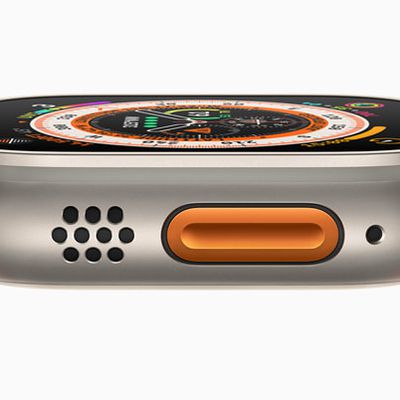
Apple Watch Ultra: How to Customize the Action Button
Apple Watch Ultra features a customizable Action button on the left side of the case that is capable of performing a variety of functions. This article explains what it can do, and how you can configure it.
Apart from activating the Siren, the Action Button on Apple Watch Ultra can be customized to perform a number of functions, offering quick access to them without you having to tap through ...













