MacRumors
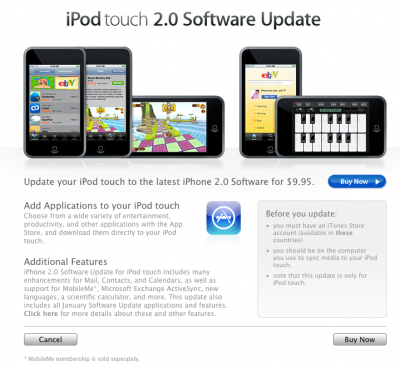
After a long day of waiting, Apple has finally posted the official iPod Touch 2.0 Firmware update. The update is a $9.95 download that is available through the iTunes Store (link).
iPhone 2.0 Software Update for iPod touch includes many enhancements for Mail, Contact, and Calendars, as well as support for MobileMe, Microsoft Exchange Active Sync, new languages, a scientific calculator, and more. This update also includes all January Software Update applications and features.
The 2.0 Update also allows the iPod Touch to download and run applications from the App Store. Apple first posted the link to the update at 7:30a.m. EST, but the software only just became available.
Touch owners should visit our iPod touch forums, App Store forum or TouchArcade for App Store game coverage.
Several people have described a problem with App Store applications after restoring from a backup. When your applications are launched on your new iPhone 3G, they will only show the start screen and then immediate quit.
The issue may lie in the Digital Rights Management embedded in each of the applications. In order to restore functionality, you simply need to delete the applications from the iPhone itself, and then resync the applications from iTunes. Once restored, the applications should launch properly.
To delete applications from your iPhone, you simply press and hold on one of the icons. All the icons will then start jiggling. Simply click the "X" in the top left hand of the application and it will ask you if you want to delete it.
Note that even if you delete an application entirely from both your iPhone and your iTunes install, you can still re-download it for free. This is true no matter what the price of the application was.
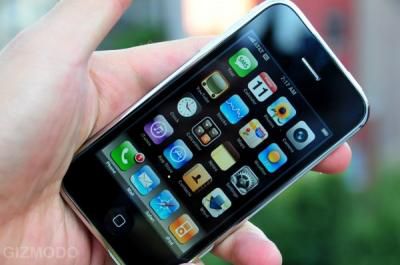
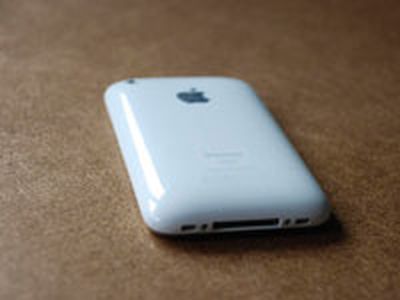
Image from Gizmodo
With the worldwide release of the iPhone complete, numerous publications are releasing their reviews of Apple's latest gadget.
Gizmodo provides some interesting observations about the iPhone 3G. They comment on the plastic backing, and acknowledge that the device feels cheaper than the original aluminum backed iPhone. This "cheaper" feeling, however, has been somewhat debated by individual observations. The trade-off in using plastic, of course, is improved signal strength. Gizmodo found that Wi-Fi reception was a bit better in the new iPhone. In their testing, they were able to walk up to 120 feet away from an access point before losing a connection. In the same test, the original iPhone dropped the connection at 100 feet.
The screen is also described as warmer, slightly brighter and better for daylight viewing. This "warmer" quality has generated some complaints about a yellow-tint to the 3G's screen that is most noticeable when compared directly to the first iPhone.
Audio quality in the 3G phone has been said to be much clearer, with Gizmodo describing it as the difference between "someone with their hand over their mouth and with their hand taken away." This improvement was also mentioned by a number of earlier reviewers. iLounge had a dissenting opinion on this and found that with the exception of Bluetooth calls, in which the iPhone 3G was superior, the handset and speaker audio were comparable.
Engadget notes that the GPS acquisition is "surprisingly fast for a cellphone" and credits this to the iPhone's use of both GPS, cellphone towers and Wi-Fi access points to help determine location.
One point of confusion is whether or not 3rd parties will be able to offer a turn-by-turn GPS solution for the iPhone. Questions about SDK conditions and antenna size have been raised in previous reviews, but TeleNav confirmed to Gizmodo that they will be launching a 3D moving map GPS application with turn-by-turn voice guidance.
Additional iPhone 3G first impressions have been posted by MacRumors readers in this discussion thread.
Despite activation issues, the iPhone 3G appears to have had strong sales with reports of it selling out in Europe as well as AT&T stores. Apple is again providing an iPhone Availability tool that will be updated at 9 p.m. nightly.
Yesterday, we published a link to what appeared to be the release version of the iPhone 2.0 Firmware. This version of the firmware was successfully installed on a number of original iPhones and readers were able to start using Apps from the iTunes App Store.
Today, Apple released the official 2.0 Firmware. While it carries the same build number, the file sizes are different and the iPhone model designation is different. One unconfirmed poster explains that the "iPhone1,2" firmware that was leaked yesterday was only intended for use on the iPhone 3G.
The details of the post are up for debate, as the current iPhone 3G will download and use the "leaked" 5a347 firmware upon restore. Still, due to this possibility, we recommend all readers who upgraded to the pre-release firmware to take the time to upgrade to the official firmware. The process is exactly the same. Remember, with any firmware upgrade, there is the possibility that you may lose your data, and we can't take any responsibility.
Before you begin, remember that the phone will have to be reactivated after firmware installation. This normally takes a few seconds when connecting to iTunes, but with the high number of activations today, Apple's iTunes servers have been unresponsive, leaving many waiting to activate. It appears activations have just now started to run smoothly, but you may want to wait even longer before "upgrading" just to be safe.
1. Sync your iPhone with iTunes 7.7 to make sure all data is backed up.
2. Download iPhone1,1_2.0_5A347_Restore.ipsw (Official firmware). You should get a single ".ipsw" file. If your browser renames it to a .zip file, you should rename it to ".ipsw"
3. In iTunes click on the "Check for Updates" while holding the Option key on the Mac (Shift key on Windows)
4. Select the firmware you downloaded in step #2
5. Wait for your iPhone to update and restore.
All your App Store applications and data should be moved over, and all applications should run.
Unrelated to this procedure, there have been sporadic reports of people having Applications quitting immediately after launch. This has happened both with original iPhone and iPhone 3G versions. The solution is to simply delete the application and redownload it from the App Store. Apple allows you to re-download any application for free.
Note: This is not for the iPod Touch. Touch owners need to wait until Apple releases the official Touch 2.0 firmware.
Note 2:: If you never installed the pre-release firmware, you can upgrade to the latest firmware just by clicking on "Check for Updates" in iTunes 7.7. iTunes will take care of the rest.
The official iPhone 2.0 Firmware is now available through iTunes 7.7. The new upgrade file carries the same build number (5A347) as yesterday's early leak:
iPhone1,1_2.0_5A347_Restore.ipsw
The "1,1" designation is different, however. The significance of this difference is not entirely clear. Despite the same build numbers. the file sizes of the two builds are different. For those who are concerned, you will likely be able to crossgrade to the official release using the same technique as yesterday. We'll post details of this after some testing. The iPhone 2.0 Firmware provides a number of new features and also provides support for the App Store.
Update: Readers should NOT upgrade to the 2.0 Firmware until Apple resolves their server activation issues. If you do upgrade and are unable to connect to the iTunes servers, your iPhone will be left in an unusable state.
Apple has updated their iPod Touch App Store page with a link to the iTunes Stores for iPod Touch owners to upgrade to the 2.0 Firmware. The $9.95 upgrade brings all of the 2.0 Firmware features to the iPod Touch.
For iPod Touch owners who never upgraded to the previous January pay update, Apple announced that the latest $9.95 update includes the January update as well.
On June 9, 2008, Apple announced the iPhone 2.0 Software Update for iPod touch which includes all features previously included in the January Software Upgrade, the App Store, and much more (also on June 9, the iPod touch January Software Upgrade was also removed from the store). For information about iPhone 2.0 software, visit www.apple.com/ipodtouch/appstore.
The 2.0 iPod Touch firmware link currently does not lead anywhere.
Some iPhone owners were able to download the free iPhone 2.0 Firmware early, but Apple has asked us to pull the link. We expect the official iPhone 2.0 Firmware upgrade (which is free) will be distributed shortly.
This morning marked the U.S. launch of the iPhone 3G, and it is proving to be an impressive launch indeed. Our members have been meeting up at various Apple and AT&T stores and sharing their impressions and photos.
Turnout appears to be heaviest at Apple's retail locations, however many AT&T locations still be managing to sell out in under an hour. At stores where stock has run out AT&T is accepting orders that will arrive within the next few days. Alleyinsider surveyed 10 AT&T stores in the New York City area. All 10 were out of iPhone stock today.


Apple is having major delays with their iTunes activation servers and a number of people have reported that Apple has simply let them go home to finish the activation process. Overnight, U.K. customers had similar problems with activation.

iTunes unable to connect to servers
Notice: The server problems extend to users who are trying to upgrade their iPhones and iPod Touches to the latest firmware update. In fact, readers should avoid upgrading to iPhone 2.0 until these issues are resolved. Until you are able to connect to the iTunes servers, your iPhone will be left in an unusable state after the 2.0 upgrade.
The Standard consolidates many reports of the widespread activation issues.
More Discussion:
- First Impressions of iPhone 3G
- Unboxing/Setup Photos
- Regional Meetups
- App Store discussion
- MobileMe discussion - new forum
- TouchArcade.com - iPhone Games and Apps
Images have been slow to trickle in from other countries from their respective iPhone 3G launches. The images above have been found on Flickr and linked to their full sets.
The iPhone 3G launch will take place in Japan and U.K. over this evening with the U.S. launch kicking off at 8:00 a.m. local time. We've organized a discussion thread for individuals to post their own unboxing/setup photos and if you have already gotten your iPhone 3G, please feel free to post your images. Other areas for discussion, including First impressions, App Store discussion, and Regional Meetups.
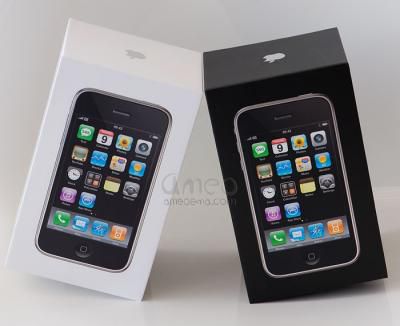
Ameoema.com posts a high quality unboxing set comparing the Black iPhone to the White iPhone.
More Discussion:
- First Impressions of iPhone 3G
- Unboxing/Setup Photos
- Regional Meetups
- App Store discussion
- TouchArcade.com - iPhone Games and Apps
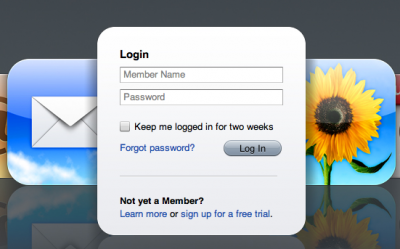
After a full day of ups and downs, it appears that Apple has finally gotten their new MobileMe (Me.com) service online. The service was expected to launch around 2am Pacific Time on Thursday morning, but actually first came online at around 4am PT.
Since then, the service has been alternating between being online and offline amidst what appeared to be heavy traffic with slow load times. Regardless of the problem, the online service is now up and running. The $99/year service replaces the .Mac service and offers web-based email, addressbook, calendar, photos and storage. It also integrates with both Mac OS X and the iPhone to provide "push" services that allows all your devices to be synchronized.
Based on an earlier iPhone review, there was some confusion about being able to mix both business (Exchange) and personal schedules and contacts. According to Gizmodo, as long as the personal side is handled by MobileMe, it should integrate cleanly with Exchange.
Update: We unlinked the site because it wasn't working. We'll post an update when it appears to be up again.
For those of you still interested in untethering your iPhone from its designated carrier, Gizmodo reports that the iPhone Dev Team has already managed to both jailbreak and unlock the latest iPhone 2.0 release.
The team plans on releasing their Pwnage tool so that everyone can unlock and jailbreak their iPhones.
Apple has posted an iPhone Enterprise support page to assist corporate customers looking to take advantage of the new capabilities of the iPhone 2.0 software. The page includes a link to a detailed Enterprise Deployment Guide (PDF) providing setup assistance for these enterprise users.
Apple has also released a configuration utility to assist system administrators with creating configuration profiles that will allow users' devices to communicate with their enterprise systems.
Configuration profiles are XML files that contain device security policies, VPN configuration information, Wi-Fi settings, APN settings, Exchange account settings, mail settings, and certificates that permit iPhone and iPod touch to work with your enterprise systems.
Three versions of the configuration utility are available, a standalone OS X application and web-based applications for both Mac and Windows:
- iPhone Configuration Utility 1.0 for Mac OS X (8.77 MB)
- iPhone Configuration Web Utility 1.0 for Mac (2.29 MB)
- iPhone Configuration Web Utility 1.0 for Windows (5.18 MB)
Apple has not yet officially released the final version 2.0 Firmware for original iPhone owners, but the App Store does appear to have gone live, and now appears as a link in the iTunes Store. Based on some early experiences with the App Store, we've consolidated these notes and observations.
Application screenshots can be taken by everyone running Firmware 2.0. By simply holding down the home button and the on/off button simultaneously, you will see a "flash" of white appear on the screen, and a screenshot will have been saved to your Photo roll. Simply syncing your photos to iPhoto will transfer them to your computer. Some forum members have taken advantage of this feature to create a screenshot thread in our App Store forum where they are collecting screenshots from various applications. Additional screenshots are also available at Ars Technica, OrchardSpy, Engadget and AppleInsider.
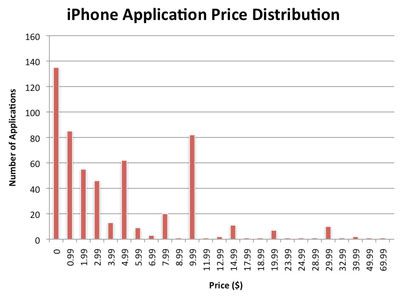
The pricing of iTunes Applications will likely remain in flux as the market establishes itself. ReadWriteWeb points us to the above graph by PinchMedia which breaks down how iTunes Apps are being priced at this time. There are clear spikes at Free, $4.99 and $9.99, but there are a number of apps that fall under the $4.99 price.
What's most interesting, however, is Phill Ryu's observation that every iTunes App publishes their download stats on their info page as seen on the iPhone. For example, AOL's free AIM client has already logged over 12,000 downloads:
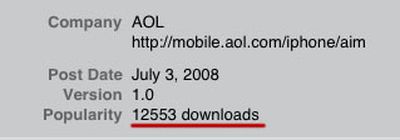
Now, when we look at a highly publicized application, such as Super Monkey Ball, we see it has attracted 3927 customers at $9.99/download. This means they've netted $27,462 so far today after Apple's 30% cut. Hard to draw too many conclusions, especially since the App Store only officially launched this moment, and the official 2.0 Firmware has not been released. Meanwhile, less publicized apps have only seen downloads in the double digits so far.
Update: Sales numbers increased abruptly for Super Monkey Ball immediately after publishing, so we've adjusted the numbers.
While some of us may still be distracted by installing iPhone 2.0 software onto our existing iPhones, we should remember that the worldwide launch of the iPhone 3G is underway. iFixit.com actually flew to New Zealand to be amongst the first to buy and disassemble the iPhone 3G. They have posted a log and gallery of their trip and subsequent disassembly:
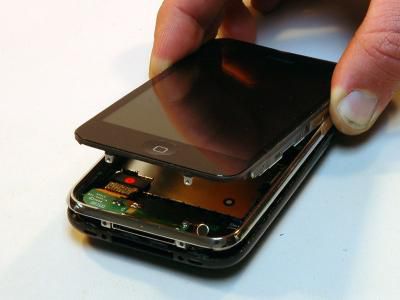
A couple of notes for future repairs and replacements:
- LCD and Glass components are no longer glued together
- Battery is not soldered on
Meanwhile, according to iPhoneBuzz, the first person in line in New Zealand posted photos of the event.
Apple issued a press release today reminding us that the iPhone 3G would launch tomorrow in the U.S. Both AT&T and Apple Retail stores will open at 8 a.m. for the launch.
Once again, digging through Apple's XML files has revealed the url to the iPhone 2.0 Firmware that is presently available on Apple's servers. One of our readers found this new firmware image:
Link removed at request of Apple
This build is slightly higher than the one of the latest iPhone Firmware Beta (5A345) which was also spotted on shipping iPhone 3Gs. Despite the filename appearing in the XML file, the actual firmware has not yet been released officially. As well, the firmware carries a "1,2" designation while all previous firmwares, including the beta firmwares carried a "1,1" number.
Apple has posted an updated guide about firmware upgrades and warns:
Normally if you choose to update, the iPhone or iPod touch software is updated but your settings and media are not affected. If your device currently has a software version prior to 2.0 (1.x) and you are updating to software version 2.0 or later, all data on your device will be erased in order to perform install the new software. In this case, iTunes will offer to create a one-time media backup of your device depending on what content is on your device and what content is stored in the iTunes Library you are connected to. You should ensure that you have enough free space on your Mac or PC to accommodate a backup that matches the capacity of your iPhone or iPod touch (4 GB, 8 GB, 16 GB, or 32 GB) if you proceed with the this backup.
Be sure to fully sync prior to proceeding. In order to install this firmware, you will have to do it manually by pressing the Option key (Shift under Windows) when pressing the "Check for Update" button in iTunes version 7.7. Then select the .ipsw file manually. If for some reason your download is a ".zip" file, rename it to ".ipsw" before proceeding.
We expect the firmware to be officially released shortly and will appear in your iTunes software update. If you don't wish to wait, you can use this method, but should proceed with caution and at your own risk. That being said, there are reports of people having successfully used this firmware on the original iPhone, and are successfully downloading and running App Store apps.
Note: Can not be used for iPod touch.
Apple has finally launched their MobileMe service at Me.com. The web-based service replaces .Mac and offers web-based email, calendar, addressbook, online storage as well as sync services. Apple has also a few other updates to provide additional support for MobileMe:
- Apple TV version 2.1 is available. This update incorporates MobileMe support as well as iPhone/iPod touch Remote capabilities.
- iTunes 7.7 was released last night.
Finally, a MobileMe Updater for Mac OS X can be found in your Software Update:
The Mac OS X Update For MobileMe is recommended for users running Mac OS X Leopard 10.5.4 and includes general system fixes that enhance your Mac for MobileMe.
For detailed information about MobileMe, please visit this website: http://www.apple.com/mobileme/
For some the update does not appear until you go into System Preferences -> .Mac -> Account Details. Then you will be prompted to go to Software Update which will show the updater.
Apple has had a busy night with multiple releases, including the partial launch of the iTunes App Store.
Update: We've received confirmation that Push services are now working under iPhone 2.0 Firmware.
Update 2: Apple pulled Me.com offline for now.
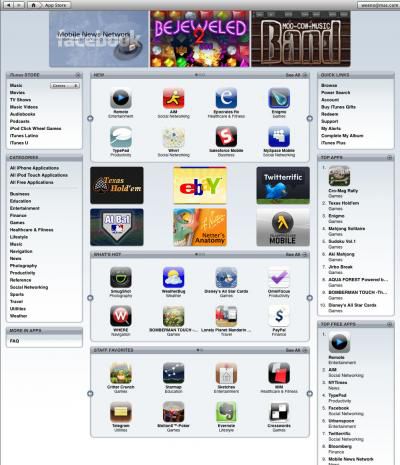
Apps have already appeared in the iTunes App Store and can be found and downloaded by searching for their names. AOL's AIM Application (iTunes Link), for example, is available as a free download.
Apple's free Remote Application (iTunes Link) is also available and allows you to "control the music on your computer or Apple TV from your iPod touch or iPhone. Play, pause, skip, shuffle. See your songs, playlists, and album art on your iPod touch or iPhone as if you were right in front of your computer. Remote works with your Wi-Fi network, so you can control playback from anywhere in and around your home."
Over 500 applications are on the iTunes App Store at launch. The App Store is not directly accessible from iTunes at this time. We've compiled a collection of iTunes links to let you browse through them. You will need to use iTunes 7.7 which was released tonight.
iTunes Links
- Top Apps
- Top Free Apps
- Other categories: Business, Education, Entertainment, Finance, Games, Healthcare & Fitness, Lifestyle, Music, Navigation, News, Photography, Productivity, Reference, Sports, Travel, Utilities, Weather
- Most Expensive App: ForeFlight Mobile - $69.99
- Notable Apps: Super Monkey Ball, Aqua Forest (demo video), Bomberman Touch (demo video), Chopper, ePocrates, Exposure, Facebook
We've started a new forum: iPhone App Store Forum to handle additional questions and discussion about the App Store.
Notes: App Store working with 2.0 Firmware. Background notifications not yet working. Apple had promised this to be coming in September. For now, AOL's AIM application only shows new messages after you relaunch the application.
Apple has released iTunes 7.7. This latest version of iTunes is required for the iPhone 3G, Firmware 2.0, App Store and MobileMe.
Use iTunes 7.7 to sync music, video, and more with iPhone 3G, and download applications from the iTunes Store exclusively designed for iPhone and iPod touch with software version 2.0 or later. Also use the new Remote application for iPhone or iPod touch to control iTunes playback from anywhere in your home a free download from the App Store.
It is available in your Mac OS X Software Update at this time. Apple is expected to also released the 2.0 Firmware and App Store shortly, as well as launching MobileMe.
The update description confirms the iPhone/iPod touch remote application that will be available as a free download from the App Store. At present, the App Store is not yet functional.
Update: Nike + iPod setting (screenshot) for iPhone in preference files, indicating iPhone integration for running.
Update 2: Now available for Windows.