

Here's Everything New in macOS Tahoe Beta 2 - MacRumors
Skip to Content

Here's Everything New in macOS Tahoe Beta 2

The second developer beta of macOS Tahoe is now available for testing, and it includes a handful of smaller new features and changes on the Mac.
macos tahoe
Below, we recap everything new that has been found in macOS Tahoe beta 2 so far.

Redesigned Finder App Icon
Fi vs Fi
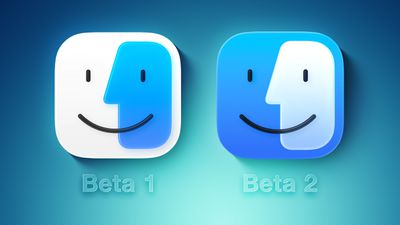
Crisis averted: Apple has restored the Finder icon's design to its former glory on the second beta.

On the first macOS Tahoe developer beta, the app icon's colors were inverted, with blue appearing on the right side and white appearing on the left side. That change disappointed some people, and Apple has evidently listened to that feedback.

Redesigned Migration Assistant App Icon

Migration Assistant Feature
The second beta also gives a fresh coat of paint to the Migration Assistant app icon.

Menu Bar Background Option
Frosted vs Unfrosted Menu Bar
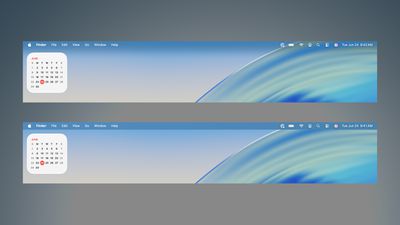
Apple removed the frosted background from the menu bar by default on macOS Tahoe, as part of the Liquid Glass redesign. If you miss it, though, the second beta adds a "Show menu bar background" option to the System Settings app under Menu Bar.

AirPods Beta Firmware
AirPods Beta Updates Feature
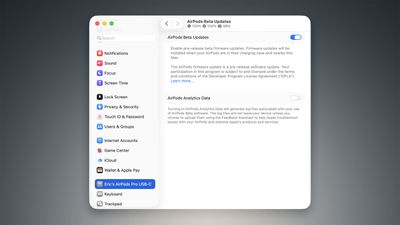
As spotted by Federico Trevisani, the second macOS Tahoe beta lets you enroll in beta testing of AirPods firmware updates directly on a Mac.

First, connect your AirPods to your Mac. Next, open the System Settings app and click on the Bluetooth menu. Then, select the (i) symbol next to your AirPods. On the ensuing page, scroll down to the bottom and click on "AirPods Beta Updates. Finally, there is a toggle to enable beta firmware updates on your AirPods. Firmware updates will be installed when your AirPods are in their charging case and near the Мас.

Apple currently offers AirPods beta firmware updates to developers only. However, that will soon change. Apple plans to start offering public betas of AirPods firmware updates in July for the first time, beginning with the AirPods 4 and AirPods Pro 2.

The latest firmware beta for the ‌AirPods 4‌ and AirPods Pro 2 adds support for improved audio quality for phone calls and video calls, plus studio-quality audio recording for interviews, podcasts, and videos. There is also an option to use AirPods as a camera remote with the Camera app to take photos or start a video recording, and these AirPods models can automatically pause audio if it is detected that you fell asleep.

Other Changes

The first macOS Tahoe public beta will be available in July, and the update will likely be released to the general public in September.


Related Roundup: macOS Tahoe
Related Forum: macOS Tahoe

Popular Stories

macOS Tahoe 26 Thumb 2

Second macOS Tahoe 26.6 Beta Now Available for Developers

Monday June 15, 2026 10:09 am PDT by
Apple today provided the second beta of an upcoming macOS Tahoe 26.6 update to developers for testing purposes, with the update coming almost three weeks after Apple seeded the first beta. Developers can download the macOS Tahoe 26.6 update by opening up the System Settings app, selecting the General category, and then choosing Software Update. Beta Updates will need to be enabled, and a...
iOS 26

Apple Seeds Second Public Betas of iOS 26.6, macOS Tahoe 26.6 and More

Tuesday June 16, 2026 10:18 am PDT by
Apple today provided public beta testers with the second betas of iOS 26.6, iPadOS 26.6, macOS Tahoe 26.6, watchOS 26.6, and tvOS 26.6, with the software coming a day after Apple seeded the betas to developers and three weeks after the first public betas. After signing up to beta test the software updates on Apple's beta site, public beta testers can download the new software using the...
Apple Logo Top Half

Have One of These 16 Apple Devices? Software Support Ends This Fall

Saturday June 13, 2026 8:00 am PDT by
Apple will end software support for 16 devices this fall across four product lines, with the Apple Watch seeing the most sweeping cull in the product's history. The full extent of this year's software drops became clear with the announcements of macOS 27 Golden Gate, iPadOS 27, tvOS 27, and watchOS 27 at WWDC this week. The one bright spot is that iOS 27 features identical device support to...

Top Rated Comments

TheDailyApple Avatar
14 months ago
Reverting the colors back to the original ones was a good move for the finder icon, but I think the border they added is still way too large. I'd prefer it if it looked more like this:


Attachment Image
Score: 14 Votes (Like | Disagree)

HighwaySnowman Avatar
14 months ago

Reverting the colors back to the original ones was a good move for the finder icon, but I think the border they added is still way too large. I'd prefer it if it looked more like this:


There's already a much nicer version they could use:


Attachment Image
Score: 5 Votes (Like | Disagree)
14 months ago
Sad, the biggest thing to talk about on Apple OS’s is the design language.

Least Apple could do is recognize the existence of ultra wide monitors. The top menu bar for apps is annoying on 49” monitor, always having to look to the top left. Same with ultra wide in Vision Pro. Do they actually use their own software? At a minimum the menu should have an option to center vs pin left. Better, put it on the top bar of the running app, so you don’t have to look away from what you’re doing to select a menu option.
Score: 4 Votes (Like | Disagree)
14 months ago

I’m unclear what the problem was with their new Finder icon. I liked it. I think it looked cleaner.


Attachment Image
Score: 3 Votes (Like | Disagree)
14 months ago
I want to run iPadOS on my Mac so it can be more like an iPad. Why won't Apple let me do this?
Score: 3 Votes (Like | Disagree)
HighwaySnowman Avatar
14 months ago

Sad, the biggest thing to talk about on Apple OS’s is the design language.

Least Apple could do is recognize the existence of ultra wide monitors. The top menu bar for apps is annoying on 49” monitor, always having to look to the top left. Same with ultra wide in Vision Pro. Do they actually use their own software? At a minimum the menu should have an option to center vs pin left. Better, put it on the top bar of the running app, so you don’t have to look away from what you’re doing to select a menu option.
I normally don't agree with people who say "Go use Windoze if you don't like it" - but #$%@#$% seriously?

The top menu bar is one of the BEST features of the Macintosh. There are other operating systems that do not have this AMAZING feature.

Go away. There should NEVER be an option for the menu bar to by ANYWHERE but the top of the screen, and the menus should ALWAYS start at the left edge with the Apple menu.
Score: 3 Votes (Like | Disagree)










































