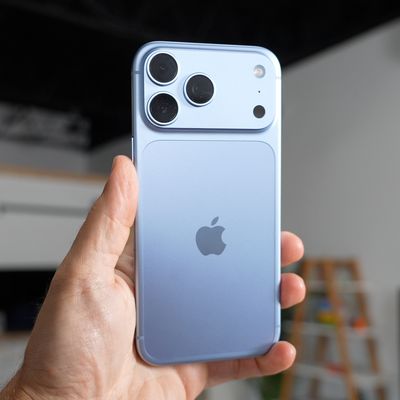
In iOS 26, Apple quietly added a neat new option that lets you send smaller-sized previews of images over Messages so that recipients get them right away, before the full-resolution images arrive.

iOS 26 Messages Feature 2 1
Thanks to the new setting, your recipient will receive a lower-quality preview almost instantly, followed by the full-resolution image. And if you're traveling with limited cellular data or using a metered data connection, they only get the compressed preview version – ensuring the original high resolution image doesn't hoover up your data.

How to Enable Send Photo Previews

Apple has made this feature easy to toggle on or off depending on your needs. Here's how to enable it:

  1. Open Settings on your iPhone.
  2. Scroll down and tap Apps.
  3. Select Messages from the app list.
  4. Toggle on the switch next to Send Low-Quality Photo Previews.
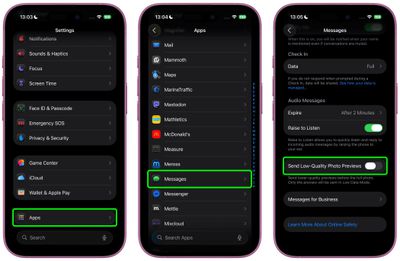
ios send photo previews messages

Once enabled, the feature works automatically, so you don't have to do anything else.

A Note on Low Data Mode

You can make sure that only smaller-sized previews of images are sent to recipients by keeping your iPhone in Low Data Mode. You can enable this manually by going to Settings ➝ Cellular Service. Choose your primary service, then tap Data Mode and toggle on Low Data Mode. The same setting appears under individual Wi-Fi network settings in Settings ➝ Wi-Fi (tap the encircled "i" button next to the Wi-Fi network name).
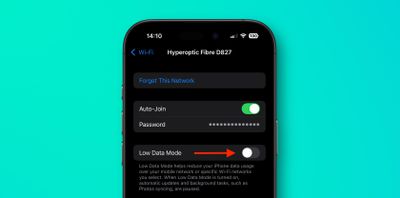
wi-fi
When Low Data Mode is active and Send Low-Quality Photo Previews is enabled, you may see photos in your Messages conversations appear slightly pixelated. Just bear in mind that they will only be delivered in higher quality versions if you send them when Low Data Mode is turned off.


Top Rated Comments

EugW Avatar
16 weeks ago

Wrong, iMessage compresses all photos before being sent.

Always a good idea to understand the topic you are engaging in before engaging.
That is incorrect. My wife and I iMessage each other photos all the time and they retain the original size. To confirm this I just compared my wife's original photo vs. the one I received. The one I received was not actually the exact same size, but it was ever so slightly bigger (by 2 KB). The differences I noticed were that the original was IMG_5827.HEIC and my received copy was IMG_5827.heic (lower case suffix) but had additional metadata indicating that the photo was from her. See below. (I've edited out her phone number that was included in the metadata in the version I received.)


Attachment Image
Score: 11 Votes (Like | Disagree)
Starfia Avatar
16 weeks ago

We want the opposite. Allow us to share the full image and not some compressed crap
Not possible. The toggle switch is the universal symbol for the absence of an option.
Score: 6 Votes (Like | Disagree)
iMaffo Avatar
16 weeks ago
Neat! Does anybody knows what happens if the recipient is not on iOS 26?
Score: 6 Votes (Like | Disagree)
EugW Avatar
16 weeks ago
If the recipient saves the image to Photos, does it save the small preview version or the full version?
Score: 4 Votes (Like | Disagree)
Loud_Texan Avatar
16 weeks ago
I hate when people share a picture in low-res since I like to save them.
Score: 4 Votes (Like | Disagree)
zach-coleman Avatar
16 weeks ago
Is there any intelligence to the situation where someone downloads the low quality one? Does it upgrade it later when the high quality arrives?
Score: 3 Votes (Like | Disagree)

Popular Stories

Verizon New

Verizon is Down: iPhones Show 'SOS' Mode Due to Network Outage [Resolved]

Wednesday January 14, 2026 10:18 am PST by
Verizon is experiencing a major outage across the U.S. today, with hundreds of thousands of customers reporting issues with the network on the website Downdetector. There are also complaints across Reddit and other social media platforms. iPhone users and others with Verizon service are generally unable to make phone calls, send text messages, or use data over 5G or LTE due to the outage....
iPhone Top Left Hole Punch Face ID Feature Purple

New Leak Reveals iPhone 18 Pro Display Sizes, Under-Screen Face ID, and More

Wednesday January 14, 2026 7:09 am PST by
While the iPhone 18 Pro models are still around eight months away, a leaker has shared some alleged details about the devices. In a post on Chinese social media platform Weibo this week, the account Digital Chat Station said the iPhone 18 Pro and iPhone 18 Pro Max will have the same 6.3-inch and 6.9-inch display sizes as the iPhone 17 Pro and iPhone 17 Pro Max. Consistent with previous...
iPhone Top Left Hole Punch Face ID Feature Purple

iPhone 18 Pro Launching Later This Year With These 12 New Features

Thursday January 15, 2026 10:56 am PST by
While the iPhone 18 Pro and iPhone 18 Pro Max are not expected to launch for another eight months, there are already plenty of rumors about the devices. Below, we have recapped 12 features rumored for the iPhone 18 Pro models, as of January 2026: The same overall design is expected, with 6.3-inch and 6.9-inch display sizes, and a "plateau" housing three rear cameras Under-screen Face ID...
2024 iPhone Boxes Feature

Apple Adjusts Trade-In Values for iPhones, Macs, and More

Thursday January 15, 2026 11:19 am PST by
Apple today updated its trade-in values for select iPhone, iPad, Mac, and Apple Watch models. Trade-ins can be completed on Apple's website, or at an Apple Store. The charts below provide an overview of Apple's current and previous trade-in values in the United States, according to the company's website. Most of the values declined slightly, but some of the Mac values increased. iPhone ...
maxresdefault

Google Gemini-Powered Siri Will Reportedly Have These 7 New Features

Tuesday January 13, 2026 7:52 pm PST by
Apple and Google this week announced that Gemini will help power a more personalized Siri, and The Information has provided more details. Subscribe to the MacRumors YouTube channel for more videos. As soon as this spring, the report said the revamped version of Siri will be able to… Answer more factual/world knowledge questions in a conversational manner Tell more stories Provide...