macOS Tahoe Beta 2 Lets You Add a Menu Bar Background

In macOS Tahoe Beta 2, Apple included a new option to add a background to the menu bar, making it possible to have a menu bar design that’s similar to the menu bar in macOS Sequoia.
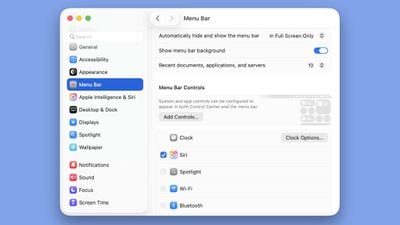
macos tahoe show menu bar background
As part of ‌macOS Tahoe‌’s Liquid Glass design, Apple removed the background of the menu bar, so it blends into the wallpaper or background behind it. The icons of the menu bar are more free floating with the transparent look, though Apple does add a slight gradient to wallpapers to improve visibility.

The menu bar toggle is available in the System Settings app under the Menu Bar section. Turning it on clearly delineates the background from the menu bar for those that prefer the non-transparent aesthetic.

With the second beta of ‌macOS Tahoe‌, Apple is making updates to address some of the issues that developers have raised. Apple also changed the color of the Finder icon to better match the traditional Finder colors.

Related Roundup: macOS Tahoe
Related Forum: macOS Tahoe

Popular Stories

Apple Announces Special Event in New York Feature

Apple Announces Special Event in New York, London, and Shanghai on March 4

Monday February 16, 2026 6:05 am PST by
Apple today announced a "special Apple Experience" in New York, London, and Shanghai, taking place on March 4, 2026 at 9:00am ET. Apple invited select members of the media to the event in three major cities around the world. It is simply described as a "special Apple Experience," and there is no further information about what it may entail. The invitation features a 3D Apple logo design...
M3 iPad Air

Apple's Next Two Products Are Coming Soon

Thursday February 12, 2026 11:17 am PST by
Apple plans to release an iPhone 17e and an iPad Air with an M4 chip "in the coming weeks," according to the latest word from Bloomberg's Mark Gurman. "Apple retail employees say that inventory of the iPhone 16e has basically dried out and the iPad Air is seeing shortages as well," said Gurman. "I've been expecting new versions of both (iPhone 17e and M4 iPad Air) in the coming weeks."...

Apple Sales Coach App

Apple Launching New 'Sales Coach' App

Friday February 13, 2026 2:01 pm PST by
Apple plans to launch a rebranded "Sales Coach" app on the iPhone and iPad later this month, according to a source familiar with the matter. "Sales Coach" will arrive as an update to Apple's existing "SEED" app, and it will continue to provide sales tips and training resources to Apple Store and Apple Authorized Reseller employees around the world. For example, there are articles and videos...
Coffee Burgundy and Purple iPhone 18 Pro Mock

Five iPhone 18 Pro Features Revealed in New Report

Friday February 13, 2026 8:43 am PST by
While the iPhone 18 Pro and iPhone 18 Pro Max are still seven months away, an analyst has revealed five new features the devices will allegedly have. Rumored color options for the iPhone 18 Pro models In a research note with investment firm GF Securities on Thursday, analyst Jeff Pu outlined the following upgrades for the iPhone 18 Pro models: Smaller Dynamic Island: It has been rumored...
iOS 26 Home Feature

Three New Apple Home Products Rumored for 2026

Friday February 13, 2026 4:18 pm PST by
Apple has a long list of new products rumored for 2026, including a series of home products that will see the company establishing more of a presence in the smart home space. Robots are on the horizon for 2027, but the 2026 releases will be a little tamer. HomePod mini We're expecting a new HomePod mini 2 to launch at any time. Apple isn't going to update the device's design, but we could...

Top Rated Comments

Zorn Avatar
9 months ago
Great - this is the best way to handle it. Let us who want the fresh look have it, and anyone who has a funky wallpaper that makes this not work can check an option. Everyone can be happy.
Score: 23 Votes (Like | Disagree)
n-evo Avatar
9 months ago
An actual screen shot of what it looks like would’ve been nice (and kinda expected) if you dedicate a separate article to this instead of just a description.
Score: 17 Votes (Like | Disagree)
Adora Avatar
9 months ago

An actual screen shot of what it looks like would’ve been nice (and kinda expected) if you dedicate a separate article to this instead of just a description.
Just noticed most parts of my system monitor are missing and the preferences don't open. They were just hidden behind the browser.


Attachment Image

Attachment Image
Score: 11 Votes (Like | Disagree)
9 months ago
Good god the dropdown menus for Weather etc and Battery are just disgusting. Why take something that's easy to read, and make it more difficult to read due to all the chaos blurs and lines in the background? Who in their right mind thought this was a good idea?
Score: 10 Votes (Like | Disagree)
Dorv Avatar
9 months ago
I know taste is subjective, but to me this is one of the best looking parts of Liquid Glass on my Mac.
Score: 8 Votes (Like | Disagree)
9 months ago

My M4 Pro Mini is always very warm when doing nothing. I already thought about downgrading but in low power mode it's only slightly warm. In Sequoia it was permanently cool.

It's the WindowServer process, that is stressing the GPU and the Efficiency Cores.
That's unfortunate. In Accessibility I have enabled "Reduce Transparency" but check out what it does to the Messages app (it's more obvious when in Light Mode).

Apple really had an opportunity to make macOS lightning fast, but instead they seem set on slowing it down as much as possible with bloat features. It's very, very frustrating to see the direction it's going. Literally, Linux in a VM operates much, much faster than macOS native. Yes, I know it's a beta, but the point still remains - this is all bloat features that nobody is asking for. I just hope they allow us to turn this **** off.
Score: 6 Votes (Like | Disagree)













































