Apple Adds Maps on the Web Support to iPhone - MacRumors
Skip to Content

Apple Adds Maps on the Web Support to iPhone

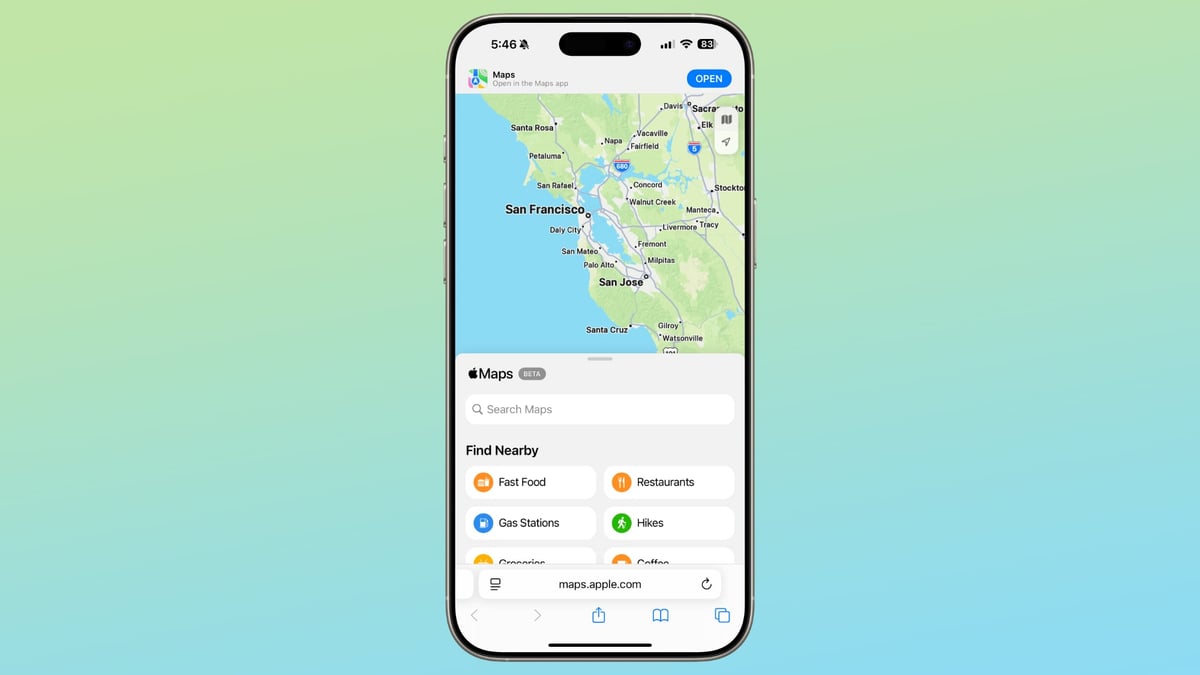
Apple today updated its support document for Apple Maps on the web to add a mention that the feature now works on the iPhone, which appears to be relatively new.
apple maps web iphone
A prior version of the support document listed only Macs, iPads, and PCs as being compatible with ‌Apple Maps‌ on the web, but now there is a new mobile devices section that lists both iOS and iPadOS. Maps.apple.com also loads on the iPhone rather than redirecting maps URLs to the ‌Apple Maps‌ app.

When the ‌Apple Maps‌ on the web feature launched last year, it was not available on the iPhone, and it only worked in select browsers. Apple has since expanded support, and it is available for Safari on Mac, Safari on iPhone and iPad, and also Edge, Chrome, and Firefox on Macs, PCs, and mobile devices.

It's possible that ‌Apple Maps‌ on the web support for iPhone was tied to iOS 18.4 and the option that allows EU users to select a new default mapping app. With a different Maps app set, ‌Apple Maps‌ links that an EU user receives are still be able to be opened via the ‌Apple Maps‌ website.

Popular Stories

iOS 26

iOS 26.5 Features: Everything New in iOS 26.5

Monday May 11, 2026 5:09 pm PDT by
Apple released iOS 26.5 after a few months of beta testing, and while it doesn't have the Siri features we were hoping for since those are being held until iOS 27, there are a handful of useful changes worth knowing about. Subscribe to the MacRumors YouTube channel for more videos. End-to-End Encryption for RCS Support for end-to-end encryption (E2EE) for RCS messages between iPhone and...
Dynamic Island iPhone 18 Pro Feature

11 Reasons to Wait for the iPhone 18 Pro

Monday May 11, 2026 9:01 am PDT by
We're only four months out from the launch of Apple's premium next-generation smartphone lineup, and while we're not expecting a sea change in terms of functionality, there are still several enhancements rumored to be coming to the iPhone 18 Pro and iPhone 18 Pro Max. One thing worth noting is that Apple is reportedly planning a major change to its iPhone release cycle this year, adopting a...
Apple WWDC25 iOS 26 CarPlay Light mode 250609

Six Popular iPhone Apps Now Available on CarPlay

Thursday May 14, 2026 9:10 am PDT by
Apple's CarPlay system for accessing iPhone apps on a vehicle's dashboard screen has received six popular apps in recent weeks: ChatGPT, Perplexity, Grok, Google Meet, WhatsApp, and the indie artist streaming platform Audiomack. Make sure you have the latest version of each app and they will automatically appear on CarPlay. ChatGPT Starting with iOS 26.4, CarPlay supports voice-based...

Top Rated Comments

14 months ago
I guess that's a good thing but why use a browser vs the iphone/ipad app?
Score: 4 Votes (Like | Disagree)
14 months ago

I had to stop using Apple Maps and switch to Google Maps because the Sat Nav function was taking me all over the place. I don’t know if it’s just me or a generic problem.
I've used Apple Maps to navigate all over the US, parts of the UK and all around Spain and it works very well for me, both with driving and transit.

At the same time apparently there or have been are some areas it doesn't work very well, from what I've read.

Google Maps also generally has a much more comprehensive and current database of businesses and other points of interest.
Score: 3 Votes (Like | Disagree)
antiprotest Avatar
14 months ago

I guess that's a good thing but why use a browser vs the iphone/ipad app?
Perhaps if a person has uninstalled Apple Maps receives link the browser can still open it.
Score: 3 Votes (Like | Disagree)
14 months ago

I've used Apple Maps to navigate all over the US, parts of the UK and all around Spain and it works very well for me, both with driving and transit.

At the same time apparently there or have been are some areas it doesn't work very well, from what I've read.

Google Maps also generally has a much more comprehensive and current database of businesses and other points of interest.
A few months ago in England my sat nav took me the most bizarre route home, something I eventually realised was wildly stupid. It was only when I stopped that I realised I had accidentally used Apple maps rather than Google. 13years on, it is still a hard pass from me.

(To clarify, most of the time I use Waze, which is why I didn't spot the UI/Voice difference between Gmaps and Amaps)
Score: 2 Votes (Like | Disagree)
14 months ago
Welp!! They broke it. All day today I have been getting screens like this..

Attachment Image
Score: 2 Votes (Like | Disagree)
14 months ago

Apple today updated its support document ('https://support.apple.com/en-us/120585') for Apple Maps on the web to add a mention that the feature now works on the iPhone, which appears to be relatively new.


A prior version of the support document listed only Macs, iPads, and PCs as being compatible with Apple Maps on the web, but now there is a new mobile devices section that lists both iOS and iPadOS. Maps.apple.com ('https://maps.apple.com') also loads on the iPhone rather than redirecting maps URLs to the Apple Maps app.

When the Apple Maps on the web feature launched last year ('https://www.macrumors.com/2024/07/24/apple-maps-now-available-on-the-web/'), it was not available on the iPhone, and it only worked in select browsers. Apple has since expanded support, and it is available for Safari on Mac, Safari on iPhone and iPad, and also Edge, Chrome, and Firefox on Macs, PCs, and mobile devices.

It's possible that Apple Maps on the web support for iPhone was tied to iOS 18.4 and the option that allows EU users to select a new default mapping app ('https://www.macrumors.com/2025/03/12/ios-18-4-new-setting/'). With a different Maps app set, Apple Maps links that an EU user receives are still be able to be opened via the Apple Maps website.

Article Link: Apple Adds Maps on the Web Support to iPhone ('https://www.macrumors.com/2025/04/09/maps-on-web-iphone/')
I love replacing maps.google.com with maps.apple.com for other users!
Score: 2 Votes (Like | Disagree)