Apple Updates Final Cut Pro for iPad and Final Cut Camera
Apple today updated both Final Cut Pro for iPad and Final Cut Camera, introducing a handful of useful new features that improve video editing and recording on Apple's mobile devices.
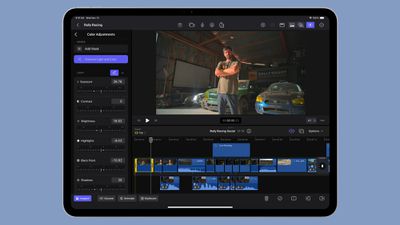
Final Cut Pro for iPad gains support for editing video in portrait orientation, and it includes new keyboard shortcuts. There's also Image Playground integration, and an option to capture video in 50fps.
- Expand your editing workflows with support for portrait orientation on your iPad.
- Speed up your editing with keyboard shortcuts to nudge a selection, replace with gap, and lift or overwrite to the primary storyline.
- Get inspired with Image Playground and use Apple Intelligence to quickly create stylized images based on a description, suggested concepts, or people from your Photos library. (Requires iPad with A17 Pro or M1 and later and iPadOS 18.2 or later.)
- Capture in 50 fps for additional editing flexibility and delivery options.
The updated version of Final Cut Camera includes support for quickly swapping over to the Telephoto lens on the iPhone 14 Pro and later, recording in Spatial Audio on the iPhone 16 and later, and recording in 50fps video.
- Quickly switch to the 48 mm telephoto lens to capture the perfect shot. (Requires iPhone 14 Pro or later.)
- Play back your Log videos in SDR or HDR with the vibrancy of the original scene by applying the Apple Log LUT. (Requires iPhone 15 Pro or later.)
- Record videos in Spatial Audio for even more realistic and immersive sound. (Requires iPhone 16.)
- Capture in 50 fps for additional editing flexibility and delivery options.
Final Cut Camera is software that is designed to let users record from up to four devices with footage imported into Final Cut Pro for iPad.
Final Cut Pro for iPad is available for $49 per year or $4.99 per month, while Final Cut Camera is free.
Popular Stories
Apple's next-generation iPhone 17 Pro and iPhone 17 Pro Max are less than three months away, and there are plenty of rumors about the devices.
Apple is expected to launch the iPhone 17, iPhone 17 Air, iPhone 17 Pro, and iPhone 17 Pro Max in September this year.
Below, we recap key changes rumored for the iPhone 17 Pro models:Aluminum frame: iPhone 17 Pro models are rumored to have an...
The long wait for an Apple Watch Ultra 3 appears to be nearly over, and it is rumored to feature both satellite connectivity and 5G support.
Apple Watch Ultra's existing Night Mode
In his latest Power On newsletter, Bloomberg's Mark Gurman said that the Apple Watch Ultra 3 is on track to launch this year with "significant" new features, including satellite connectivity, which would let you...
The upcoming iPhone 17 Pro and iPhone 17 Pro Max are rumored to have a slightly different MagSafe magnet layout compared to existing iPhone models, and a leaked photo has offered a closer look at the supposed new design.
The leaker Majin Bu today shared a photo of alleged MagSafe magnet arrays for third-party iPhone 17 Pro cases. On existing iPhone models with MagSafe, the magnets form a...
Apple is developing a MacBook with the A18 Pro chip, according to findings in backend code uncovered by MacRumors.
Earlier today, Apple analyst Ming-Chi Kuo reported that Apple is planning to launch a low-cost MacBook powered by an iPhone chip. The machine is expected to feature a 13-inch display, the A18 Pro chip, and color options that include silver, blue, pink, and yellow.
MacRumors...
Apple is planning to launch a low-cost MacBook powered by an iPhone chip, according to Apple analyst Ming-Chi Kuo.
In an article published on X, Kuo explained that the device will feature a 13-inch display and the A18 Pro chip, making it the first Mac powered by an iPhone chip. The A18 Pro chip debuted in the iPhone 16 Pro last year. To date, all Apple silicon Macs have contained M-series...
iOS 26 and iPadOS 26 add a smaller yet useful Wi-Fi feature to iPhones and iPads.
As spotted by Creative Strategies analyst Max Weinbach, sign-in details for captive Wi-Fi networks are now synced across iPhones and iPads running iOS 26 and iPadOS 26. For example, while Weinbach was staying at a Hilton hotel, his iPhone prompted him to fill in Wi-Fi details from his iPad that was already...
Apple today seeded the second betas of upcoming iOS 18.6 and iPadOS 18.6 updates to public beta testers, with the betas coming just a day after Apple provided the betas to developers. Apple has also released a second beta of macOS Sequoia 15.6.
Testers who have signed up for beta updates through Apple's beta site can download iOS 18.6 and iPadOS 18.6 from the Settings app on a compatible...
Apple hasn't updated the AirPods Pro since 2022, and the earbuds are due for a refresh. We're counting on a new model this year, and we've seen several hints of new AirPods tucked away in Apple's code. Rumors suggest that Apple has some exciting new features planned that will make it worthwhile to upgrade to the latest model.
Subscribe to the MacRumors YouTube channel for more videos.
Heal...
As part of its 10-year celebrations of Apple Music, Apple today released an all-new personalized playlist that collates your entire listening history.
The playlist, called "Replay All Time," expands on Apple Music's existing Replay features. Previously, users could only see their top songs for each individual calendar year that they've been subscribed to Apple Music, but now, Replay All...