Apple today provided developers with the second betas of iOS 18.1, iPadOS 18.1, and macOS Sequoia 15.1 to continue testing Apple Intelligence features. The second betas come two weeks after Apple seeded the first iOS 18.1, iPadOS 18.1, and macOS Sequoia 15.1 betas.
A device capable of supporting Apple Intelligence is required to download the updates, which includes the iPhone 15 Pro and Pro Max, Apple silicon iPads, and Apple silicon Macs. The updates can be downloaded from the Settings app on a compatible device, with developers able to choose between the standard iOS 18/iPadOS 18/macOS Sequoia 15 betas or the .1 betas with Apple Intelligence functionality.
Apple Intelligence includes Writing Tools that are available wherever text can be selected and edited, and it can be used for spell checking, fixing grammar, rewriting with a new tone, and summarizing text.
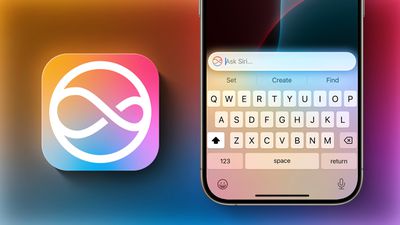
Siri has a new design with a subtle glow around the display, and there is a Type to Siri feature so you don't have to speak to Siri. Siri can follow along if you stumble over your words, and can maintain context between requests. Safari can summarize articles, and there's a new Reduce Interruptions Focus Mode.
Smart replies are available in Messages and Mail, plus the Mail app surfaces time sensitive messages and puts them at the top of your inbox. Photos has a Memory Movie feature for creating slideshows based on text descriptions, and you can record, transcribe, and summarize phone calls. Transcription and summarization are also available for any audio recording.
More on all of the features that are available in the betas right now can be found in our Apple Intelligence guide. Image Playground, Genmoji, and other new Siri features have not yet been implemented.
Apple has split Apple Intelligence into a separate set of betas because these features will not be available in the initial launch versions of iOS 18, iPadOS 18, and macOS Sequoia. Apple Intelligence will be available to the public later in the fall after a developer testing period.



/https://forums.macrumors.com/attachments/2405339/)
/https://forums.macrumors.com/attachments/2405256/)