Hands-On With the iPad Pro's Nano-Texture Glass - Is It Worth the Upgrade? - MacRumors
Skip to Content

Hands-On With the iPad Pro's Nano-Texture Glass - Is It Worth the Upgrade?

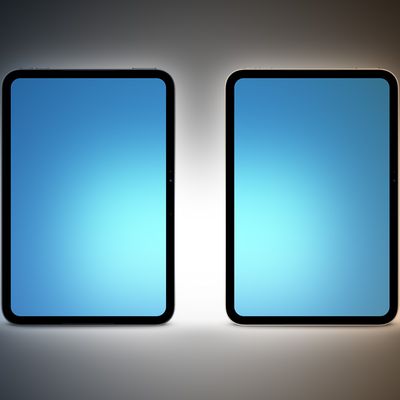
The M4 iPad Pro models that Apple released earlier this year have a display upgrade option that allows you to purchase nano-texture display glass, which is supposed to cut down on glare.


We've already reviewed the ‌iPad Pro‌, but we thought we'd revisit the nano-texture glass upgrade to see if it's worth the purchase price.

First introduced with the Pro Display XDR, nano-texture glass is etched at a nanometer scale, which is meant to preserve image quality while scattering ambient light to cut down on glare. It is the most matte display type that Apple makes, and Apple claims that it is useful for high-end, color-managed workflows or demanding ambient lighting environments.

The ‌iPad Pro‌ is the first iPad with nano-texture as an option, and it's previously been reserved for the Studio Display and Pro Display XDR. Nano-texture is a premium feature, so it costs an additional $100 over the standard glass. It's also only available on 1TB or 2TB ‌iPad Pro‌ models, so you do need to shell out at least $1,600 to get it on the 1TB 11-inch ‌iPad Pro‌.

Nano-texture on the larger ‌iPad Pro‌ will cost at least $1,999, which is the price of the 1TB model plus an extra $100 for the glass upgrade. It is an upgrade targeted at pro users and those with specific needs, and not everyone is going to want to opt for the matte design. The grippier texture of the nano-glass does feel better for writing on with an Apple Pencil, but if that's a factor for you, you're better off checking out something like Astropad's Rock Paper Pencil.

While nano-texture does a good job cutting down on glare, it does impact the contrast and crispness of the display, so it is serving a specific purpose for select workflows where mitigating light is important.

As with the nano-texture versions of Apple's displays, the nano-texture ‌iPad Pro‌ requires some special care. Apple recommends only cleaning it with the polishing cloth that's included in the box as other cleaning cloths can cause damage.

Given the caveats and the high price tag, the nano-texture display isn't for everyone, but it is a good option for those who know they need extra help addressing glare.

Popular Stories

macOS 27 on MacBook Pro

macOS 27 Will Mark the End of an Era

Saturday April 18, 2026 6:45 am PDT by
During its Platforms State of the Union segment at WWDC 2025, Apple revealed that macOS 26 Tahoe is the final major macOS version for Intel-based Macs. The upcoming macOS 27 release will be compatible with Apple silicon Macs only, meaning that you will need a Mac with an M-series chip or a MacBook Neo with an A18 Pro chip in order to install the software update. macOS 27 should be available...
Aston Martin CarPlay Ultra Screen

Apple Says CarPlay Ultra is Coming to These Vehicle Brands

Saturday April 18, 2026 5:59 am PDT by
Last year, Apple launched CarPlay Ultra, the long-awaited next-generation version of its CarPlay software system for vehicles. Nearly a year later, CarPlay Ultra is still limited to Aston Martin's latest luxury vehicles, but that should change fairly soon. In May 2025, Apple said many other vehicle brands planned to offer CarPlay Ultra, including Hyundai, Kia, and Genesis. CarPlay Ultra...
Tim Cook Rainbow

Apple CEO Tim Cook Stepping Down, John Ternus Taking Over

Monday April 20, 2026 1:33 pm PDT by
Apple CEO Tim Cook is stepping down as Apple's chief executive officer, and hardware engineering chief John Ternus is set to take over, Apple announced today. Cook will continue on as Apple CEO through the summer, with Ternus set to join Apple's Board of Directors and take over as CEO on September 1, 2026. Cook is going to transition to executive chairman, and he will "assist with certain...

Top Rated Comments

24 months ago
A friend of mine looked all the options in store, then bought the nano-texture glass just for the anti-glare effect. She's a professional musician, has her "sheet" music on an iPad, bluetooth pedals to "turn" the page, and just used it for the first time to play a gig outside.

Thrilled. No pages flopping in the wind, clear view of the music the entire time. No glare. Outstanding in that situation.

Score: 46 Votes (Like | Disagree)
24 months ago
I will say I agree it’s not for everyone but it’s been great for me

I get lots of glare and the screen does a fantastic job of addressing it. I can see how people feel it washes out the blacks some but I’d rather that than not seeing much of anything at all

Colors etc all look great and at night without glare it still looks fantastic
Score: 23 Votes (Like | Disagree)
HouseLannister Avatar
24 months ago
I bought both the 11" and 13" in the regular display. Saw the nano at the Apple store and was unimpressed. The glare is less, but the text was harder to read at small fonts and I had to crank the brightness higher, which would eat more battery. Plus I am never going to remember to carry around the magic Apple hanky.
Score: 19 Votes (Like | Disagree)
24 months ago
I guess they have to figure how to charge $100 for disabling temporal dithering before we see any progress there.
I tried it in store and while it does reduce glare, it does nothing for temporal dithering. The edges of letters still look like they are moving and cause eye strain for me.

Score: 11 Votes (Like | Disagree)
24 months ago

What about in conjunction with the Pencil? How does that affect the drawing experience. Previously I've found the Pencil to feel like it's skating over a sheet of glass, because... it's skating over a sheet of glass. Would be nice to get a bit more than a single sentence on that.

I have the iPad Pro with nano-textured glass and I find that there's not much difference. The paper-like screen protectors have much more texture to them and feel like paper. The nano-textured glass, to me, feels pretty much the same as smooth glass. Maybe just the tiniest feeling of more drag, but not much at all. The new Pro Pencil is really great though. The squeeze the pencil to bring up options is great. Saves so much time and frustration.
Score: 10 Votes (Like | Disagree)
PsykX Avatar
24 months ago
There's been so many issues with the nano texture on Apple Pro Display, a device that's not touch screen, that I would never put it on a device you have to touch often. It seems to peel after some time for whatever reason.
Score: 10 Votes (Like | Disagree)