

iOS 18 and iPadOS 18 Include Support for Formatting External Drives - MacRumors
Skip to Content

iOS 18 and iPadOS 18 Include Support for Formatting External Drives

Apple wants iPhone and iPad users to be able to format external drives connected to their device, without the need for a Mac, based on the latest find in the iOS 18 and iPadOS 18 developer betas (via MacStories).
iPadOS 18 on iPad Feature
Writing in his ByteBits substack, Kaleb Cadle said he made the discovery of new file format options while tinkering with the Files app:

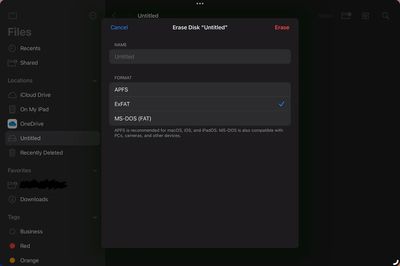
Now in the Files app on iPadOS 18, when we right click or hold press on an external drive and select "Erase", new options appear for reformatting the drive. Currently, the format options here are APFS (with options for Case Sensitive or Encrypted), ExFAT, and MS-DOS (FAT), the same format options available in Disc Utility (with the exception of macOS extension formats which wouldn't make much sense for this feature on iPadOS). This is a major improvement for iPad power users and it will be interesting to keep an eye out for new improvements to this functionality and others within the Files app over the course of the iPadOS 18 beta cycle. It seems Apple may be taking a similar tact to the way they incorporated much of the functionality of the Preview app into the Files app via Quick Look, but now with functionality from Disc Utility.
files app format drives

File format options in the Files app on iPadOS 18 (Image: Kaleb Cadle).

iPadOS 18 and iOS 18 are currently in beta. Apple plans to release the second betas to developers on Monday.

Update: Added iOS 18 beta references after confirmation that the formatting options are present on iPhones as well as iPads.


Related Forums: iOS 18, iPadOS 18

Popular Stories

macOS 27 on MacBook Pro

macOS 27 Will Mark the End of an Era

Saturday April 18, 2026 6:45 am PDT by
During its Platforms State of the Union segment at WWDC 2025, Apple revealed that macOS 26 Tahoe is the final major macOS version for Intel-based Macs. The upcoming macOS 27 release will be compatible with Apple silicon Macs only, meaning that you will need a Mac with an M-series chip or a MacBook Neo with an A18 Pro chip in order to install the software update. macOS 27 should be available...


Aston Martin CarPlay Ultra Screen

Apple Says CarPlay Ultra is Coming to These Vehicle Brands

Saturday April 18, 2026 5:59 am PDT by
Last year, Apple launched CarPlay Ultra, the long-awaited next-generation version of its CarPlay software system for vehicles. Nearly a year later, CarPlay Ultra is still limited to Aston Martin's latest luxury vehicles, but that should change fairly soon. In May 2025, Apple said many other vehicle brands planned to offer CarPlay Ultra, including Hyundai, Kia, and Genesis. CarPlay Ultra...
Tim Cook Rainbow

Apple CEO Tim Cook Stepping Down, John Ternus Taking Over

Monday April 20, 2026 1:33 pm PDT by
Apple CEO Tim Cook is stepping down as Apple's chief executive officer, and hardware engineering chief John Ternus is set to take over, Apple announced today. Cook will continue on as Apple CEO through the summer, with Ternus set to join Apple's Board of Directors and take over as CEO on September 1, 2026. Cook is going to transition to executive chairman, and he will "assist with certain...

Top Rated Comments

cicalinarrot Avatar
24 months ago
Gee, I never realised iPads couldn't autonomously perform basic OS tasks like this.
Score: 11 Votes (Like | Disagree)
Kylo83 Avatar
24 months ago
but you can’t eject a drive
Score: 7 Votes (Like | Disagree)
Alfred.Woodden Avatar
24 months ago
Fantastic and FINALLY!
Score: 6 Votes (Like | Disagree)
Carrotstick Avatar
24 months ago
Wow, this should have added when the files app was introduced.
Score: 6 Votes (Like | Disagree)
DaniTheFox Avatar
24 months ago

but you can’t eject a drive
This eject is a thing from the past. On iOS and iPadOS you never had to do it.
Score: 5 Votes (Like | Disagree)
MrENGLISH Avatar
24 months ago
Maybe in another 15 years we’ll finally be able to replace our Macs with an iPad 🙄
Score: 4 Votes (Like | Disagree)








































