iOS 18 Lock Screen Customization Options Include Multicolor Clock
Apple in iOS 18 has added a new multicolor swatch to the Font & Color customization options on the Lock Screen, so now you can display the time in rainbow colors against your chosen wallpaper.
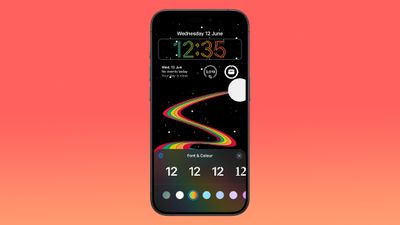
Unlike the other color swatches, the multicolor option does not currently apply to widgets and the date, which turn white when the rainbow effect is applied. However, there's a good chance this is something Apple intends to implement but has not yet got around to doing so in the developer beta.
iOS 18 also allows users to change the two Flashlight and Camera shortcut buttons on the Lock Screen to an action of their choice for the first time.
The ability to change these Lock Screen controls is part of a wave of new customization features in iOS 18, which includes app icon color-changing capabilities and more. The first public beta is set to arrive in July and the official release of iOS 18 is scheduled for the fall.
Popular Stories
Just two days before Apple's "Welcome home" experience in New York, Bloomberg's Mark Gurman has leaked several details about the new products set to be unveiled, including an all-new smart home hub, a HomePod mini 2, and a new Apple TV 4K.
Here is an all-in-one summary of the details shared by Gurman:Apple's home hub with a touch-enabled display will be named HomeView, seemingly confirming a ...
Apple may be planning to announce a new partnership with home security company ADT, alongside the introduction of its all-new smart home hub, according to several clues.
First and foremost, ADT has been posting "Low Voltage Technician" job listings in various U.S. cities since around July, but those hired for the position so far have been provided with very few details about their specific...
Apple today announced an upcoming product launch that will take place on Tuesday, October 13. We are expecting Apple's announcement to focus on new smart home products, including the long-rumored smart home hub, a new Apple TV 4K, and a refreshed HomePod mini.
Subscribe to the MacRumors YouTube channel for more videos.
The home hub is an all-new device that's like a cross between an iPad and...