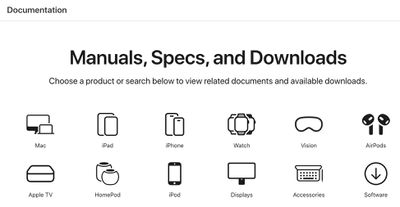
Apple recently added a new "Documentation" page to its website that provides links to user guides, repair manuals, tech specs, software downloads, and more for a variety of products. Some of this information was previously found across separate pages on Apple's website, and it has now been combined in one place for convenient access.
The page includes categories for the Mac, iPhone, iPad, iPod, Vision Pro, Apple Watch, Apple TV, AirPods, HomePod, displays like the Studio Display and Pro Display XDR, accessories like the Apple Pencil and Magic Keyboard, and software.
There is also a search tool on the page that provides links to support documents and other relevant information based on the keywords entered.
The new page was earlier spotted by Japanese blog Mac Otakara, and it may be worth bookmarking for reference purposes.
iOS 26.4 was released today, and it includes a couple of new features for CarPlay: an Ambient Music widget and support for voice-based chatbot apps.
To update your iPhone 11 or newer to iOS 26.4, open the Settings app and tap on General → Software Update. CarPlay will automatically offer the new features so long as the iPhone connected to your vehicle is running iOS 26.4 or later....
Apple today announced Apple Business, a new all-in-one platform that unifies device management, productivity tools, and customer outreach features.
The service is designed to be a consolidated replacement for several of Apple's existing business-focused offerings, including Apple Business Essentials, Apple Business Manager, and Apple Business Connect. It provides organizations with a single...
Tuesday March 24, 2026 12:31 pm PDT by Juli Clover
Apple today released new firmware for the AirPods Pro 2, AirPods Pro 3, and the AirPods 4. The firmware has a version number of 8B39, up from 8B34 on the AirPods Pro 3, 8B28 on the AirPods Pro 2, and 8B21 on the AirPods 4.
There is no word on what's included in the firmware, but Apple has a support document with limited notes. Most updates are limited to bug fixes and performance...
Nice! Always great to have this stuff handy and consolidated.
Waiting for the first "Apple should be working on [poster's preferred product] instead of wasting their time on this" post. (Bonus points if they shoehorn in some whinging about emojis as well.)
Nice! Always great to have this stuff handy and consolidated.
Waiting for the first "Apple should be working on [poster's preferred product] instead of wasting their time on this" post. (Bonus points if they shoehorn in some whinging about emojis as well.)
Why is Apple wasting time on something useful?😤 I want a bigger microfiber cloth--Polishing Cloth 2 Pro Max Ultra.🤩 The rinky dink polishing cloth is too small.😤😤😏
A step in the right direction. I think most of this was somehow accessible through searching the support site, but it's good to have it (somewhat) consolidated.
That said, although it appears items within product categories are in reverse chronological order, it still appears as a relatively jumbled mess. For a company with the resources and large historical product portfolio of Apple, I don't understand why they can't at least provide some additional sub-categories; for instance, separating out "MacBook Air" from "MacBook Pro" from "iBook". The Mactracker app and EveryMac.com do a much better job with much less.
Heck, with Apple's resources, they should have software downloads and documentation available stretching back to the original Macintosh, the Lisa, and the Apple I/II/III line.
Nice! Always great to have this stuff handy and consolidated.
Waiting for the first "Apple should be working on [poster's preferred product] instead of wasting their time on this" post. (Bonus points if they shoehorn in some whinging about emojis as well.)
Yeah... that really gets tiresome. Sadly, it's an everyday occurrence now. :(