Hate iOS 26's Liquid Glass Design? Here's How to Tone It Down

iOS 26 features a whole new design material that Apple calls Liquid Glass, with a focus on transparency that lets the content on your display shine through the controls. If you're not a fan of the look, or are having trouble with readability, there is a step that you can take to make things more opaque without entirely losing out on the new look.
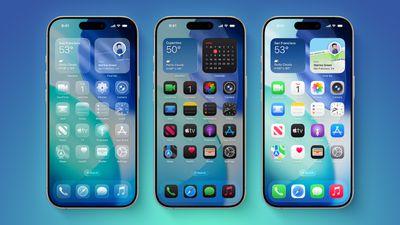
iOS 26 on Three iPhones
Apple has multiple Accessibility options that are designed to customize iOS for different visual needs, and one of these options is Reduce Transparency. Toggling on Reduce Transparency adds a darker background to translucent areas like the Control Center, app icons, and app folders, improving contrast.
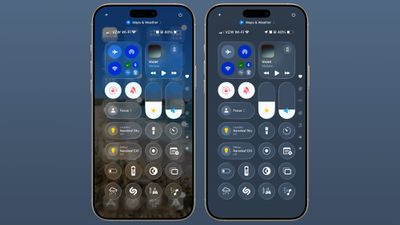
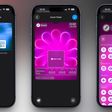
liquid glass reduce transparency 1
You can turn on Reduce Transparency by opening up the Settings app, going to Accessibility, selecting Display and Text Size, and tapping on the Reduce Transparency toggle. If you want to be able to turn the setting on and off quickly, you can add it to your Accessibility Shortcuts to get to it from the Control center interface.
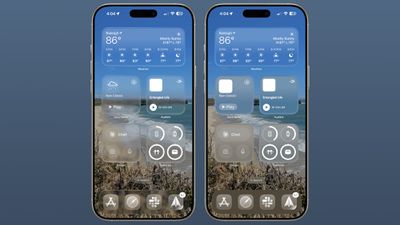
liquid glass reduce transparency 2
Activating Reduce Transparency does not remove all translucency from the iPhone's interface, but it does give everything more of an opaque look. It does not change the shape of buttons or return things to a pre-iOS 26 look.
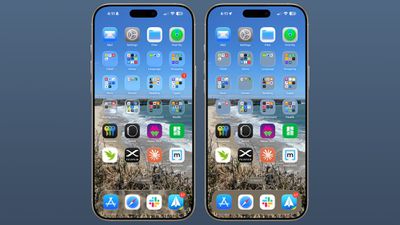
liquid glass reduce transparency 3
We're still very early in the beta testing process, and Apple will make tweaks and refinements to the Liquid Glass design based on user feedback. It's always tough to get used to an entirely new interface, so if you're a developer running the beta and you're having trouble adjusting or reading some text, temporarily activating Reduce Transparency might help ease the transition.
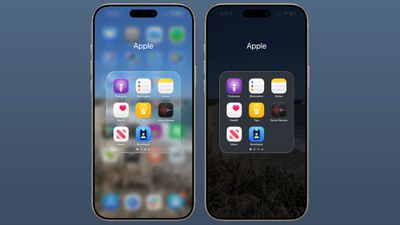
liquid glass reduce transparency 4
In all likelihood, most people will adjust to the updated Liquid Glass design within a few days. Apple hasn't made significant changes to app interfaces and layouts, so even though there's a whole new look for ‌iOS 26‌, Apple says it's still going to feel familiar to people.

Liquid Glass could look different by the time that ‌iOS 26‌ launches to the public, and we'll see it evolve over the next few months. Right now, ‌iOS 26‌ is limited to developers, but a public beta is coming in July. A launch will follow in September.


Related Roundups: iOS 26, iPadOS 26
Related Forum: iOS 26

Popular Stories

Low Cost MacBook Feature A18 Pro

Apple Is Expected to Launch These Four MacBooks in 2026

Friday January 9, 2026 8:17 am PST by
2026 could be a bumper year for Apple's Mac lineup, with the company expected to announce as many as four separate MacBook launches. Rumors suggest Apple will court both ends of the consumer spectrum, with more affordable options for students and feature-rich premium lines for users that seek the highest specifications from a laptop. Subscribe to the MacRumors YouTube channel for more videos. ...
iPhone Top Left Hole Punch Face ID Feature Purple

10 Reasons to Wait for This Year's iPhone 18 Pro

Thursday January 8, 2026 2:56 am PST by
Apple's iPhone development roadmap runs several years into the future and the company is continually working with suppliers on several successive iPhone models at the same time, which is why we often get rumored features months ahead of launch. The iPhone 18 series is no different, and we already have a good idea of what to expect for the iPhone 18 Pro and iPhone 18 Pro Max. One thing worth...
proposed unicode emoji 18%402x

Squinting Face, Pickle, and Lighthouse Among New Emoji Coming to iOS

Friday January 9, 2026 4:24 am PST by
The Unicode Consortium has published a draft list of emoji that could come to smartphones and other devices in the future. The list shared by Emojipedia outlines 19 emoji candidates under consideration for Emoji 18.0, which is expected to be finalized in September 2026. Among the proposed additions are a squinting face emoji, left- and right-pointing thumb gestures, a pickle, a lighthouse, a ...
apple homekit ios 18 5

Apple Reminding Users of Pending Home App Upgrade Requirement

Friday January 9, 2026 10:08 am PST by
Back in late 2022 and early 2023, Apple rolled out a new architecture for its Apple Home platform to deliver improved performance and compatibility, although the rollout came with some hiccups that forced Apple to pull and later re-release the upgrade. Three years later, Apple is now on the verge of ending support for the old version of the Home architecture, which may result in access to...
iOS 18 Siri Personal Context

Apple Confirms Google Gemini Will Power Next-Generation Siri This Year

Monday January 12, 2026 7:38 am PST by
In a statement shared with CNBC today, Apple confirmed that Google Gemini will power the next-generation version of Siri that is slated to launch later this year. "After careful evaluation, we determined that Google's technology provides the most capable foundation for Apple Foundation Models and we're excited about the innovative new experiences it will unlock for our users," the statement...
grok logo purple gradient

U.S. Senators Ask Apple and Google to Remove X and Grok Apps Over Sexualized Image Generation

Friday January 9, 2026 9:43 am PST by
In a letter to Apple CEO Tim Cook and Google CEO Sundar Pichai, U.S. Senators Ron Wyden, Ben Ray Lujan, and Edward Markey have requested that Apple and Google remove X Corp's X and Grok apps from their app stores over recent incidents of "mass generation of nonconsensual sexualized images of women and children." X has come under fire over the past week amid reports of Grok's AI image...
iOS 26 Glass Feature

iOS 26 Shows Unusually Slow Adoption Months After Release

Thursday January 8, 2026 3:44 pm PST by
iOS 26 is showing unusually slow adoption among iPhone users months after release, according to third-party analytics. Usage data published by StatCounter (via Cult of Mac) for January 2026 indicates that only around 15 to 16% of active iPhones worldwide are running any version of iOS 26. The breakdown shows iOS 26.1 accounting for approximately 10.6% of devices, iOS 26.2 for about 4.6%, and ...

Top Rated Comments

JaylenFast Avatar
8 months ago
I'm baffled that this passed Apple's entire design team. They need more frost and a darker effect on the background. Any colorful background makes this a mess. Definitely not ADA compliant, even with accessibility features on its low contrast.
Score: 70 Votes (Like | Disagree)
steve333 Avatar
8 months ago
When one has to tweak the controls just to make it readable, then it shouldn't have been done in the first place. IMO.
Score: 52 Votes (Like | Disagree)
HouseLannister Avatar
8 months ago
Unintended side effects. Can’t see what text you are selecting with transparency off.


Attachment Image
Score: 43 Votes (Like | Disagree)
Woyzeck Avatar
8 months ago
Just why would anyone want transparent icons on a phone ?

Come on - why stop here ? Take it to the next level and reduce the brightness to 10% and add noise to all sound output.
Score: 36 Votes (Like | Disagree)
GrassShark Avatar
8 months ago
I wish reduce transparency would also turn off the edge highlights. They look so bad.
Score: 32 Votes (Like | Disagree)
Populus Avatar
8 months ago
While the liquid glass of this first beta looks nice, I suspect it will get subtly tweaked to make it a little bit more frosty. Just a tiny bit. I think it’s a bit too transparent, at least in elements like the dock, but I this new look anyway.
Score: 28 Votes (Like | Disagree)