

Police Departments and News Sites Spreading Misinformation About How iOS 17 NameDrop Feature Works

Apple with iOS 17.1 and watchOS 10.1 introduced a new NameDrop feature that is designed to allow users to place Apple devices near one another to quickly exchange contact information. Sharing contact information is done with explicit user permission, but some news organizations and police departments have been spreading misinformation about how NameDrop functions.
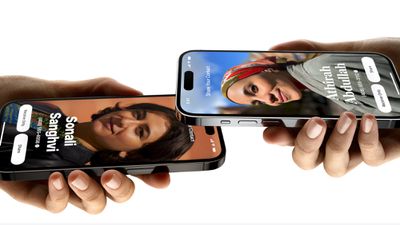
ios 17 namedrop
As noted by The Washington Post, there have been warnings about NameDrop popping up on FaceTime. Police departments in Pennsylvania, Oklahoma, Ohio, and other states have been suggesting that contact information can be shared "just by bringing your phones close together." From the City of Chester Police Department in Ohio:

IMPORTANT PRIVACY UPDATE: If you have an iPhone and have done the recent iOS 17 update, they have set a new feature called NameDrop defaulted to ON. This feature allows the sharing of your contact info just by bringing your phones close together. To shut this off go to Settings, General, AirDrop, Bringing Devices Together. Change to OFF.

While it's true that NameDrop is turned on by default, the way that it functions is more nuanced than simply putting two iPhones near each other.

NameDrop works when two iPhones running iOS 17.1 or an iPhone with iOS 17.1 and an Apple Watch running watchOS 10.1 are placed right next to each other, as in almost touching. When the two devices come in close contact and both are unlocked, there is a pop up prompting users to share contact information or an image.

Contact information is not shared automatically, and it is a user-initiated process that requires both people exchanging information to accept the transfer. While an accidental exchange could occur, it would require a user to unlock their device and accept the sharing prompt for that to occur.

Multiple police departments posted the warning above, which was widely shared on Facebook and other social networks. The message from the Noble County Sheriff's Office in Ohio, for example, got upwards of 70,000 shares, while the Dewey Police Department in Pennsylvania's warning was shared 11,000 times. After criticism from some commenters, Noble County edited its message to clarify that there's a popup to transfer content, and Dewey County said that it was attempting to "get parents engaged with their children," but many people who saw the original post may not see the updates.

The intent of the post was to get parents engaged with their children and what they are doing on their devices, not the fear mongering as suggested. We suggest everyone do research on new technology and updates to learn more about what is out there, especially for kids

Several local news stories have also shared similar questionable NameDrop information. KDKA-TV in Pittsburgh, for example, interviewed several people and included quotes suggesting NameDrop happens automatically.

"That's why I turned it off because I don't have a use for it. I don't even have my phone at work so I don't really have a use for it. But I guess a default on could be a bit controversial just because I think giving out your contact should be a conscious decision and not something that could accidentally happen," Jerry said.

"That is a little bit concerning, I think it should be an optional feature instead of automatically happening," said Liz Jones.

If anything, NameDrop has the potential to be more irritating than dangerous, simply because it's likely to activate when your phone is next to someone else's and unlocked, in a situation like a dinner or meeting. Given the negative feedback, Apple may in a future update turn NameDrop off by default, but those who want to disable it now can do so by opening up the Settings app, going to the General section, tapping AirDrop, and turning off "Bringing Devices Together."


Related Forums: iOS 17, iPadOS 17

Popular Stories

iOS 26

iOS 26.2 Coming Soon With These 8 New Features on Your iPhone

Thursday December 11, 2025 8:49 am PST by
Apple seeded the second iOS 26.2 Release Candidate to developers earlier this week, meaning the update will be released to the general public very soon. Apple confirmed iOS 26.2 would be released in December, but it did not provide a specific date. We expect the update to be released by early next week. iOS 26.2 includes a handful of new features and changes on the iPhone, such as a new...
AirPods Pro Firmware Feature

Apple Releases New Firmware for AirPods Pro 2 and AirPods Pro 3

Thursday December 11, 2025 11:28 am PST by
Apple today released new firmware designed for the AirPods Pro 3 and the prior-generation AirPods Pro 2. The AirPods Pro 3 firmware is 8B30, up from 8B25, while the AirPods Pro 2 firmware is 8B28, up from 8B21. There's no word on what's include in the updated firmware, but the AirPods Pro 2 and AirPods Pro 3 are getting expanded support for Live Translation in the European Union in iOS...
iOS 26

iOS 26.4 and iOS 27 Features Revealed in New Leak

Friday December 12, 2025 10:56 am PST by
Macworld's Filipe Espósito today revealed a handful of features that Apple is allegedly planning for iOS 26.4, iOS 27, and even iOS 28. The report said the features are referenced within the code for a leaked internal build of iOS 26 that is not meant to be seen by the public. However, it appears that Espósito and/or his sources managed to gain access to it, providing us with a sneak peek...
iOS 26

Apple Releases iOS 26.2 With Alarms for Reminders, Lock Screen Changes, Enhanced Safety Alerts and More

Friday December 12, 2025 10:10 am PST by
Apple today released iOS 26.2, the second major update to the iOS 26 operating system that came out in September, iOS 26.2 comes a little over a month after iOS 26.1 launched. ‌iOS 26‌.2 is compatible with the ‌iPhone‌ 11 series and later, as well as the second-generation ‌iPhone‌ SE. The new software can be downloaded on eligible iPhones over-the-air by going to Settings >...
Google maps feaure

Google Maps Quietly Added This Long-Overdue Feature for Drivers

Wednesday December 10, 2025 2:52 am PST by
Google Maps on iOS quietly gained a new feature recently that automatically recognizes where you've parked your vehicle and saves the location for you. Announced on LinkedIn by Rio Akasaka, Google Maps' senior product manager, the new feature auto-detects your parked location even if you don't use the parking pin function, saves it for up to 48 hours, and then automatically removes it once...
AirTag 2 Mock Feature

Apple AirTag 2: Four New Features Found in iOS 26 Code

Thursday December 11, 2025 10:31 am PST by
The AirTag 2 will include a handful of new features that will improve tracking capabilities, according to a new report from Macworld. The site says that it was able to access an internal build of iOS 26, which includes references to multiple unreleased products. Here's what's supposedly coming: An improved pairing process, though no details were provided. AirTag pairing is already...
macOS Tahoe 26 Thumb

Apple Releases macOS Tahoe 26.2 With Edge Light

Friday December 12, 2025 10:08 am PST by
Apple today released macOS Tahoe 26.2, the second major update to the macOS Tahoe operating system that came out in September. macOS Tahoe 26.2 comes five weeks after Apple released macOS Tahoe 26.1. Mac users can download the macOS Tahoe update by using the Software Update section of System Settings. macOS Tahoe 26.2 includes Edge Light, a feature that illuminates your face with soft...
iOS 26

15 New Things Your iPhone Can Do in iOS 26.2

Friday December 5, 2025 9:40 am PST by
Apple is about to release iOS 26.2, the second major point update for iPhones since iOS 26 was rolled out in September, and there are at least 15 notable changes and improvements worth checking out. We've rounded them up below. Apple is expected to roll out iOS 26.2 to compatible devices sometime between December 8 and December 16. When the update drops, you can check Apple's servers for the ...
maxresdefault

iOS 26 Code Leak Reveals Apple Smart Home Hub Details

Thursday December 11, 2025 4:02 pm PST by
Apple is working on a smart home hub that will rely heavily on the more capable version of Siri that's coming next year. We've heard quite a bit about the hub over the last two years, but a recent iOS 26 code leak provides additional insight into what we can expect and confirms rumored features. Subscribe to the MacRumors YouTube channel for more videos. Macworld claims to have access to an ...

Top Rated Comments

mnsportsgeek Avatar
27 months ago
Man the number of people on twitter the last 2 days up in arms over this has been absolutely hilarious.

“Why didn’t Apple tell us” - they did. Read your release notes.

“This is a privacy invasion.” - you have to confirm it every time.

I forget what else I’ve read.
Score: 58 Votes (Like | Disagree)

Slix Avatar
27 months ago
The horror!


(Police and news sites continuing to spread misinformation about tech will never not be annoying. Do better, people.)

Attachment Image
Score: 55 Votes (Like | Disagree)
brian3uk Avatar
27 months ago
The cops spreading fake info with no attempt to verify it first? I'm shocked. ;)
Score: 51 Votes (Like | Disagree)
elbolillo Avatar
27 months ago

What *is* a stupid default is that sharing your iCloud contact and photo via iMessage, is turned on since a few iOS's ago... so any random tradesperson, delivery driver, etc that you reply to can get that... that's worse IMHO, tell your friends to disable it. ("Share name and Photo" in Messages settings)
Another incorrect statement on an article about incorrect statements. Oh the irony. There is NO default sharing of your iCloud contact and photo via iMessage. The options are Contacts Only or Always Ask.
Score: 33 Votes (Like | Disagree)
Doctor Q Avatar
27 months ago
Bad news and scary news spread quickly. Corrections and good news spread slowly and are widely ignored.

This fake cat is out of the bag and a lot of people are going to worry about it needlessly.
Score: 23 Votes (Like | Disagree)
CapitalIdea Avatar
27 months ago
God. These dopey warnings are as bad as the old Reefer Madness nonsense.
Score: 21 Votes (Like | Disagree)









































