Apple Seeds Second Beta of macOS 14 Sonoma to Developers - MacRumors
Skip to Content

Apple Seeds Second Beta of macOS 14 Sonoma to Developers

Apple today seeded the second beta of the recently announced macOS 14 Sonoma update to developers for testing purposes. The beta comes two weeks after the launch of the first beta that came out following the June 5 WWDC keynote event. While the beta is limited to developers at this time, Apple plans to provide a public beta later this summer.
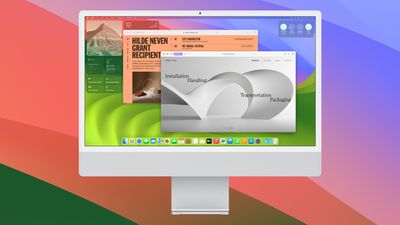
macos sonoma 4
Registered developers can download the beta through the Apple Developer Center and after the appropriate profile is installed, with the betas available through the Software Update mechanism in System Settings.

macOS Sonoma introduces new Apple TV-like screen savers that also serve as wallpapers after you log in, plus it moves widgets to the desktop. You can use the new widget gallery to choose from a range of widgets, and then drag them to your Mac's desktop.

Widgets can be arranged in any way that's useful, and when you're using an app, they are designed to fade into the background so they're less distracting. ‌Widgets‌ are more interactive than before, so you can use them to do things like play music, turn off the lights in your home, and more. Through Continuity, your iPhone's widgets can also show up on your Mac's desktop.

Video conferencing has improved with a new Presenter Overlay view that shows your desktop or project in new ways, plus Safari now supports web apps for the Dock and the option to create Profiles so you can separate personal browsing from work browsing.

Other new features include improved search that's faster and more responsive, password and passkey sharing, a revamped stickers interface for the Messages app, PDF integration in notes that makes it easier than ever to manage PDFs, and more.

macOS Sonoma will be in beta testing for several months, with a public release for the fall.

Related Forum: macOS Sonoma

Popular Stories

iPhone 18 Pro and Pro Max Feature

'Apple Upgrade' Program Reportedly Launching Next Week

Tuesday July 21, 2026 8:30 am PDT by
Apple and Klarna are partnering on a new "Apple Upgrade" leasing program set to launch in the U.S. on Tuesday, July 28, according to Bloomberg's Mark Gurman. The program will allow you to finance most iPhone, iPad, Mac, and Apple Watch models, with a 24-month term for iPhones and Apple Watches and a 36-month term for iPads and Macs. Customers will be able to pay off the device early during...
iPhone 18 Pro Deep Red Feature

iPhone 18 Pro Launching in Two Months With These 12 New Features

Tuesday July 21, 2026 6:22 am PDT by
It is now mid-July, and that means the iPhone 18 Pro and iPhone 18 Pro Max are now just two months away. The devices are expected to look similar to the iPhone 17 Pro and iPhone 17 Pro Max, but there will still be many year-over-year changes, with rumored features including a smaller Dynamic Island, 5G via satellite, and more. Apple is expected to unveil the iPhone 18 Pro, iPhone 18 Pro Max, ...
apple silicon mac lineup 2024 feature purple

Apple to Overhaul Mac Lineup With 11 New Models

Wednesday July 22, 2026 8:13 am PDT by
Apple is preparing to refresh every Mac it sells over the next two years, according to Bloomberg's Mark Gurman. The plans come amid a Mac resurgence, with sales projected to climb for a third consecutive year, partly thanks to a growing following among users who lean on the machines for demanding, agent-based AI workloads. The wave of new Macs will begin this fall with a refreshed...

Top Rated Comments

egga94 Avatar
40 months ago
Anyone else think the Sonoma wallpaper looks like Trix yogurt?

Attachment Image
Score: 10 Votes (Like | Disagree)

Realityck Avatar
40 months ago
released to devs

* iOS 17 beta 2 (21A5268h) - June 21, 2023
* iPadOS 17 beta 2 (21A5268h) - June 21, 2023
* macOS 14 beta 2 (23A5276g) - June 21, 2023
* watchOS 10 beta 2 (21R5295g) - June 21, 2023
* tvOS 17 beta 2 (21J5273q) -June 21, 2023
Score: 7 Votes (Like | Disagree)
40 months ago
I really hope they keep going with this widget thing. What I'd love is if there was some way to hit a key and have them all fade into view in a layer just above the desktop -- and then go away again with a second key press. Just spitballing here, but, but maybe they could call it... "Dashboard"?
Score: 6 Votes (Like | Disagree)
Mitthrawnuruodo Avatar
40 months ago
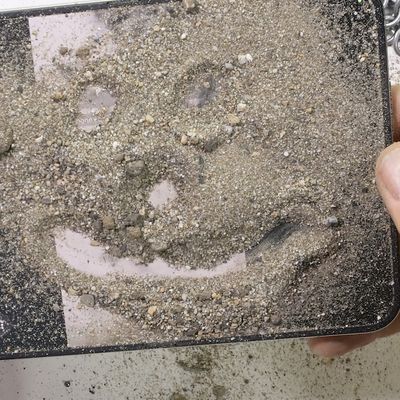
I get a lot of junk mail, but this is ridiculous:


Attachment Image
Score: 5 Votes (Like | Disagree)
40 months ago
Clock on the start-up screen defaulted to PST on Beta 1, but it is now fixed and shows local time.

So... that's one bug down. SHIP IT!
Score: 5 Votes (Like | Disagree)
Realityck Avatar
40 months ago
Just for reference to show differences between betas

macOS 14 beta 2 (23A5276g)

* Safari Version 17.0 (19616.1.17.11.4)
* System Firmware Version: 10151.0.156.505.1 (M1 based Macs)
* Darwin Kernel Version 23.0.0: Tue Jun 13 21:17:22 PDT 2023; root:xnu-10002.0.116.505.3~3/RELEASE_ARM64_T8103 arm64

macOS 14 beta (23A5257q)

* Safari Version 17.0 (19616.1.14.11.11)
* System Firmware Version: 10151.0.82.0.1 (M1 based Macs)
* Darwin Kernel Version 23.0.0: Mon May 22 22:50:46 PDT 2023; root:xnu-10002.0.40.505.5~4/RELEASE_ARM64_T8103 arm64
Score: 4 Votes (Like | Disagree)