iPhone 14 Pro's Always-On Display Behavior in iOS 16 Allegedly Revealed Days Ahead of Unveiling

The iPhone 14 Pro will feature unique behavior on the Lock Screen and significant changes to the status bar thanks to its always-on display, according to a source that spoke to MacRumors.
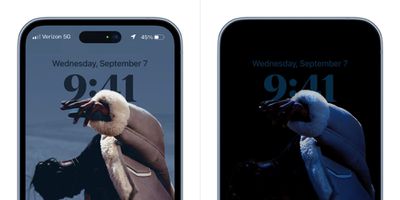
iphone 14 pro always on display 3
The source behind the latest wave of information was responsible for the bombshell leak earlier this week that claimed the ‌iPhone‌ 14 Pro's display cutouts will appear to have a single, unified "pill" at the top of the display, rather than two distinct cutouts.

According to new information from the source shared exclusively with MacRumors, iOS 16's Lock Screen will directly interact with the ‌iPhone‌ 14 Pro's always-on display, featuring integration with notifications and the depth effect and colors of wallpapers.
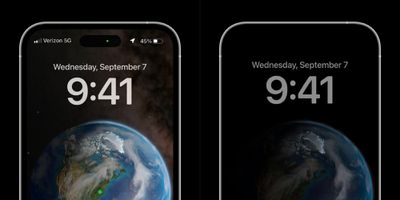
iphone 14 pro always on display 1
The ‌iPhone‌ 14 Pro's status bar will also purportedly see changes as a result of the increased amount of usable space at the top of the display, moving the cellular signal indictor to the left and re-implementing the full-width battery status bar on the Lock Screen and notification center when the device is locked.
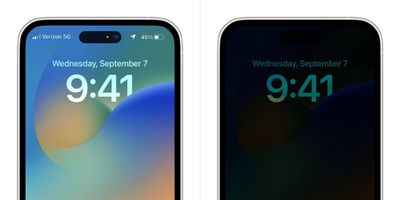
iphone 14 pro always on display 2
The source shared several graphics allegedly based on information from Apple that illustrate some of the ‌iPhone‌ 14 Pro's software changes on the MacRumors forums and has since provided further information. The ‌iPhone‌ 14 Pro will apparently feature the following features and specific changes:

  • The background of Lock Screen wallpapers with a depth effect will be removed and fully darkened when the display is in its always-on mode, while the foreground will be dimmed. In addition, the foreground will be tinted with color and feature edge highlights depending on user customization.
  • Widgets will be visible on the always-on display but will fade in and out at set intervals, unnoticeable to the user, to prevent OLED burn-in.
  • Content shown on the always-on Lock Screen and the full-illuminated Lock Screen must be configured in the same way and cannot be separated, meaning that they have to share the same wallpaper, color choices, fonts, and widgets. The core visual elements of the always-on display itself can be independently customized.
  • Notifications will be part of the ‌iPhone‌ 14 Pro's always-on display experience, and like on the normal Lock Screen, notifications will roll in from the bottom one at a time and remain subtly visible for 10 seconds. Once the display is woken up, the notifications will animate from the bottom and proceed to the user-defined setting of how notifications are presented on the Lock Screen (such as count, stack, or list).
  • Apple may also allow users to enable a notification counter at the bottom of the always-on display.

Apple is also said to be planning to release an update, such as iOS 16.0.1 or 16.1, soon after the launch of the ‌iPhone‌ 14 Pro that will include fixes for issues with the device’s always-on display and wallpapers. While the company is now in the feature’s final stages of development, it is reportedly still encountering bugs and is scrambling software engineers from different teams, including the Apple Watch, to finish the always-on display experience before launch.

The ‌iPhone‌ 14 Pro lineup is expected to be revealed at the Apple's "Far out" event on Wednesday, September 7. The ‌iPhone‌ 14 and ‌iPhone‌ 14 Pro are likely to be available for pre-order on Friday, September 9, and start arriving to customers on Friday, September 16.


Related Forum: iPhone

Popular Stories

iOS 26

iOS 26.2 Coming Soon With These 8 New Features on Your iPhone

Thursday December 11, 2025 8:49 am PST by
Apple seeded the second iOS 26.2 Release Candidate to developers earlier this week, meaning the update will be released to the general public very soon. Apple confirmed iOS 26.2 would be released in December, but it did not provide a specific date. We expect the update to be released by early next week. iOS 26.2 includes a handful of new features and changes on the iPhone, such as a new...
iOS 26

iOS 26.4 and iOS 27 Features Revealed in New Leak

Friday December 12, 2025 10:56 am PST by
Macworld's Filipe Espósito today revealed a handful of features that Apple is allegedly planning for iOS 26.4, iOS 27, and even iOS 28. The report said the features are referenced within the code for a leaked internal build of iOS 26 that is not meant to be seen by the public. However, it appears that Espósito and/or his sources managed to gain access to it, providing us with a sneak peek...
AirPods Pro Firmware Feature

Apple Releases New Firmware for AirPods Pro 2 and AirPods Pro 3

Thursday December 11, 2025 11:28 am PST by
Apple today released new firmware designed for the AirPods Pro 3 and the prior-generation AirPods Pro 2. The AirPods Pro 3 firmware is 8B30, up from 8B25, while the AirPods Pro 2 firmware is 8B28, up from 8B21. There's no word on what's include in the updated firmware, but the AirPods Pro 2 and AirPods Pro 3 are getting expanded support for Live Translation in the European Union in iOS...
iOS 26

Apple Releases iOS 26.2 With Alarms for Reminders, Lock Screen Changes, Enhanced Safety Alerts and More

Friday December 12, 2025 10:10 am PST by
Apple today released iOS 26.2, the second major update to the iOS 26 operating system that came out in September, iOS 26.2 comes a little over a month after iOS 26.1 launched. ‌iOS 26‌.2 is compatible with the ‌iPhone‌ 11 series and later, as well as the second-generation ‌iPhone‌ SE. The new software can be downloaded on eligible iPhones over-the-air by going to Settings >...
Google maps feaure

Google Maps Quietly Added This Long-Overdue Feature for Drivers

Wednesday December 10, 2025 2:52 am PST by
Google Maps on iOS quietly gained a new feature recently that automatically recognizes where you've parked your vehicle and saves the location for you. Announced on LinkedIn by Rio Akasaka, Google Maps' senior product manager, the new feature auto-detects your parked location even if you don't use the parking pin function, saves it for up to 48 hours, and then automatically removes it once...
AirTag 2 Mock Feature

Apple AirTag 2: Four New Features Found in iOS 26 Code

Thursday December 11, 2025 10:31 am PST by
The AirTag 2 will include a handful of new features that will improve tracking capabilities, according to a new report from Macworld. The site says that it was able to access an internal build of iOS 26, which includes references to multiple unreleased products. Here's what's supposedly coming: An improved pairing process, though no details were provided. AirTag pairing is already...
macOS Tahoe 26 Thumb

Apple Releases macOS Tahoe 26.2 With Edge Light

Friday December 12, 2025 10:08 am PST by
Apple today released macOS Tahoe 26.2, the second major update to the macOS Tahoe operating system that came out in September. macOS Tahoe 26.2 comes five weeks after Apple released macOS Tahoe 26.1. Mac users can download the macOS Tahoe update by using the Software Update section of System Settings. macOS Tahoe 26.2 includes Edge Light, a feature that illuminates your face with soft...
iOS 26

15 New Things Your iPhone Can Do in iOS 26.2

Friday December 5, 2025 9:40 am PST by
Apple is about to release iOS 26.2, the second major point update for iPhones since iOS 26 was rolled out in September, and there are at least 15 notable changes and improvements worth checking out. We've rounded them up below. Apple is expected to roll out iOS 26.2 to compatible devices sometime between December 8 and December 16. When the update drops, you can check Apple's servers for the ...

Top Rated Comments

TFK. Avatar
43 months ago
I can’t wait for people to start complaining about this for no reason
Score: 33 Votes (Like | Disagree)
daved2424 Avatar
43 months ago
Gosh, if the single unified pill was a bombshell leak, what does it make this? Is MR HQ still standing?
Score: 20 Votes (Like | Disagree)
aries81 Avatar
43 months ago
in before 'kiss your battery life goodbye'
Score: 11 Votes (Like | Disagree)
Mr. Dee Avatar
43 months ago

"What more can they really do?" USB-C, plus whatever else a zillion smart engineers can come up with over the next 12 months...
Here, are you happy now?


Attachment Image
Score: 10 Votes (Like | Disagree)
TheYayAreaLiving ?️ Avatar
43 months ago
Not going to lie the whole status bar looks great!
Score: 7 Votes (Like | Disagree)
brgjoe Avatar
43 months ago
Yeah, I don't get the complaints.

If you don't like it, I am sure there will be an option to turn it off. Like on the Apple watch. I look forward to *finally* seeing this feature on iPhones.

Don't see why people whine about some of us who want the OPTION to use a feature like this. <shrug>
Score: 6 Votes (Like | Disagree)