

Four iOS Safari Extensions to Make the Web Less Annoying

Constant pop-ups, annoying forms, and frustrating website behaviors can make browsing and using the web an unpleasant experience. Thankfully on iOS, iPadOS, and macOS, several Safari extensions help turn the experience around.
General iOS 15 Safari Feature
We've listed some Safari extensions that you may not have known about that can help remove annoyances and make a pleasant Safari experience.

No More Cookies
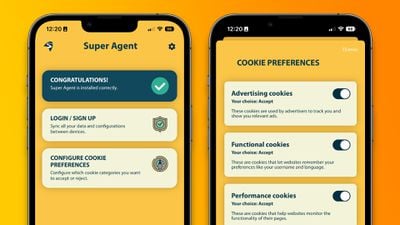
super agent ios safari extension
Perhaps the most universally dreaded web pop-up is: "This website uses cookies. Accept or Reject?" Virtually every website shows users a form to consent to using cookies as they browse that website. While it may be helpful for some to have granular controller over the use of cookies on each website they visit, there is likely to be a better solution for many.

Super Agent for Safari is an extension that automatically fills out the cookies consent form on each website you visit, meaning you'll no longer see those annoying pop-ups. The Super Agent for Safari app lets you customize how you would like websites to use cookies.

Users can choose whether they want to accept or reject advertising, functional, performance, and other cookies. The settings are applied universally to all websites.

Super Agent for Safari is free with no in-app subscription and can be found in the App Store.

'Open in App?' No Thanks.
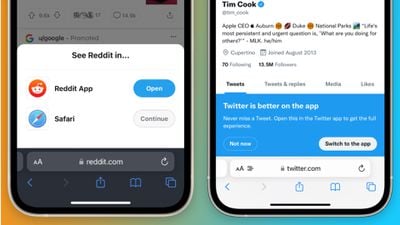
banish safari app pop ups
Some websites with accompanying apps on the App Store love to bombard users with pop-ups and banners to push them to use their app rather than the website.

Banish, a relatively new Safari extension on the ‌App Store‌ gets rid of such website notifications. Banish is a one-time purchase of $2 with no in-app subscription and can be found in the App Store.

StopTheMadness, Literally
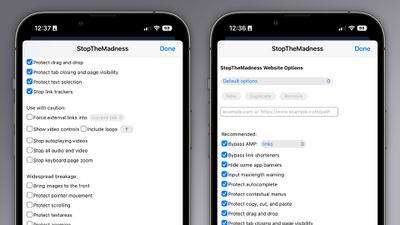
stopthemadness ios safari extension
StopTheMadness, as the name suggests, is a general-purpose privacy protection extension with several nifty features. Within the extension's settings page, StopTheMadness includes several toggles that users can enable and disable, including:

  • Bypassing Google's AMP webpages
  • Protects the ability to copy, cut, and paste on websites
  • Gets rid of link trackers and clickjacking in Google search results, and others
  • Stop autoplaying videos
  • Stop all audio and video on websites

StopTheMadness is a one-time purchase of $7.99 with no in-app subscription and can be found in the App Store.

Dark Mode For All
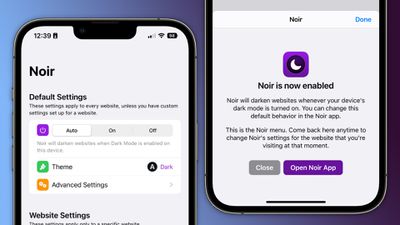
noir ios safari extension
Spearheaded by the introduction of systemwide dark mode in iOS 13, many websites on the web now have the option of light and dark themes. For those websites that don’t have a dark mode option, however, there is a solution.

Noir is a Safari extension that automatically turns a website into dark mode, even if it doesn’t support it. Noir only kicks in if the website doesn’t have a native dark mode theme built-in. This can be especially helpful when your phone is in dark mode, but a website isn’t and you’re suddenly blinded by a bright white webpage.

Noir is a $2.99 purchase with no in-app subscription and can be found in the App Store.

Tag: Safari

Popular Stories

Apple Creator Studio

Apple Introduces New 'Creator Studio' Bundle of Apps for $129 Per Year

Tuesday January 13, 2026 6:11 am PST by
Apple today introduced a new Apple Creator Studio bundle that offers access to six creative apps, as well as exclusive AI features and content, as part of a single subscription. In the U.S., pricing is set at $12.99 per month or $129 per year. Here are the six apps included with an Apple Creator Studio subscription:Final Cut Pro on the Mac and iPad Logic Pro on the Mac and iPad Pixelmator...
Verizon New

Verizon is Down: iPhones Show 'SOS' Mode Due to Network Outage [Resolved]

Wednesday January 14, 2026 10:18 am PST by
Verizon is experiencing a major outage across the U.S. today, with hundreds of thousands of customers reporting issues with the network on the website Downdetector. There are also complaints across Reddit and other social media platforms. iPhone users and others with Verizon service are generally unable to make phone calls, send text messages, or use data over 5G or LTE due to the outage....
iPhone Top Left Hole Punch Face ID Feature Purple

New Leak Reveals iPhone 18 Pro Display Sizes, Under-Screen Face ID, and More

Wednesday January 14, 2026 7:09 am PST by
While the iPhone 18 Pro models are still around eight months away, a leaker has shared some alleged details about the devices. In a post on Chinese social media platform Weibo this week, the account Digital Chat Station said the iPhone 18 Pro and iPhone 18 Pro Max will have the same 6.3-inch and 6.9-inch display sizes as the iPhone 17 Pro and iPhone 17 Pro Max. Consistent with previous...
iOS 26

Here's What's New in iOS 26.3 So Far

Monday January 12, 2026 1:15 pm PST by
Apple today seeded the second beta of iOS 26.3, nearly a month after the first beta. So far, the update includes a couple of new features for iPhones. iOS 15.3 through iOS 18.3 were all released in late January over the years, so it is thereby likely that iOS 26.3 will be released towards the end of this month as well. The update is compatible with the iPhone 11 series and newer. Below,...
airpods pro 3 design

Apple Releases New AirPods Pro 3 Firmware Update

Tuesday January 13, 2026 11:29 am PST by
Apple today released a firmware update for the AirPods Pro 3. The latest firmware has a version number of 8B34, up from the previous version 8B30. Apple has a support document for AirPods firmware updates, and it indicates that the 8B34 update contains unspecified "bug fixes and other improvements." No other AirPods models received firmware updates today. How to install AirPods Pro...

Top Rated Comments

ct2k7 Avatar
45 months ago
If you use YouTube on Safari, use the Vinegar.app to make the video element a <video> one. Kills adds, and adds useful options. (Also works on Mac)/
Score: 17 Votes (Like | Disagree)
maktaba Avatar
45 months ago
My biggest concern with Safari extensions is that these can collect your browser data. Content blockers are fine - no data is sent back to the app. But with extensions, everything is sent.
Score: 14 Votes (Like | Disagree)
DMG35 Avatar
45 months ago
Awesome stuff; thank you for this!
Score: 12 Votes (Like | Disagree)
Nozuka Avatar
45 months ago
On this article i got this:

"MacRumors Forums would like your permission to enable push notifications."

When i clicked it away, i got this:
"We strongly recommend enabling push notifications on this device so that you can be kept up-to-date with site activity."


I wonder if any of these extensions would prevent this annoyance ?
Score: 6 Votes (Like | Disagree)
krspkbl Avatar
45 months ago
Only extension i use is Wipr which is an adblocker. Also gets rid of trackers and the cookie/GDPR notices. i'm quite happy with it.

it blocks 89% of trackers on this page:

https://d3ward.github.io/toolz/adblock.html

for comparison, default safari is 12%, Duckduck Go browser is ~40% and Block Bear is ~64%

it is a paid app but worth it, imo. by far the best adblocker i've used on iOS.
Score: 6 Votes (Like | Disagree)
USB-Adapter Avatar
45 months ago
Does StopTheMadness really work?

I hate Facebook, because I cannot select and copy text from there.

I hate Facebook, again, for no controls in videos, and if I tap a playing video, it starts from the beginning.

Score: 6 Votes (Like | Disagree)








































