Everything New in iOS 16 Beta 4 For Lock Screen, iMessage, CarPlay, and More - MacRumors
Skip to Content

Everything New in iOS 16 Beta 4 For Lock Screen, iMessage, CarPlay, and More

Apple today seeded the fourth beta of iOS 16 to developers for testing. The latest beta contains a handful of new features and changes involving the Messages app, Home app, Mail app, Lock Screen notifications, CarPlay, and more.


iOS 16 is currently in beta for developers and members of Apple's free public beta testing program, and the software update will be released for all users with an iPhone 8 or newer in September. A second public beta of iOS 16 that corresponds with today's fourth developer beta is also now available.

We've outlined notable new features and changes in iOS 16 beta 4 below. Thanks to Steve Moser and @AppleSWUpdates for their contributions.

iMessage Edit/Undo Send Changes
iPhone 13 Editable Messages Feature
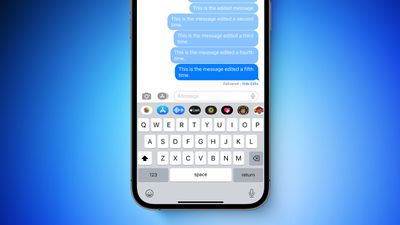
You can now tap on the small "Edited" label below an edited iMessage bubble to view the original version of the message and any other previous edits. In addition, iMessages can now only be edited a total of five times before the "Edit" option disappears.

While there's still a 15-minute window for editing an iMessage, Apple has reduced the time limit for unsending an iMessage to two minutes after it is delivered.

Live Activities API
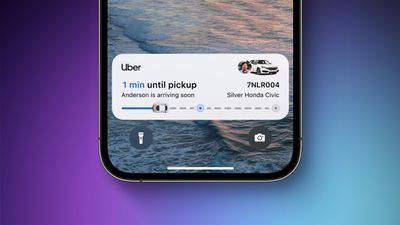
ios 16 live activities feature
Apple has released ActivityKit in beta, allowing developers to begin testing the Live Activities feature on the Lock Screen in their apps on the iOS 16 beta. For now, apps that implement the feature will only be available via TestFlight.

Live Activities will provide real-time glanceable information on the Lock Screen. For example, a sports app might allow the user to start a Live Activity for a live sports game. In that scenario, the Live Activity would appear on the Lock Screen for the duration of the game and offer the latest updates about the game at a glance.

Apple says Live Activities will not be included in the initial publicly released version of iOS 16, with the feature to be enabled in an update later this year — perhaps iOS 16.1. At that time, apps offering Live Activities will become available in the App Store.

New Wallpapers in Home App
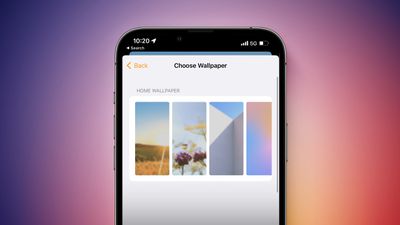
iOS 16 Beta 4 Wallpaper Feature
The fourth beta of iOS 16 adds new Wildflowers and Architectural wallpapers to choose from in the Home app, alongside existing wallpapers.

New Time Limits for Undo Send in Mail
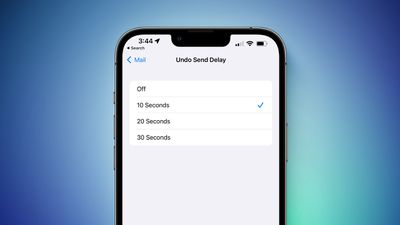
iOS 16 Beta 4 Undo Send Feature
In the Mail app on iOS 16, it is briefly possible to unsend an email in the Mail app. In the first three betas, the time limit for unsending an email was 10 seconds, but the fourth beta provides users with options of 10, 20, or 30 seconds.

Lock Screen Notification Settings
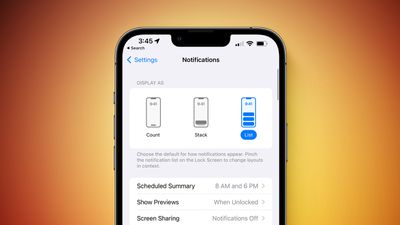
iOS 16 Beta 4 Notifications Feature
Apple has enhanced the look of Lock Screen notification options in the Settings app. In the fourth beta of iOS 16, Apple now includes images that visualize the Count, Sack, and List options for how Lock Screen notifications are displayed.

New Lock Screen Customization Interface

Apple has revamped the interface when customizing the Lock Screen, with options for colors, gradients, photos, and more at the bottom.
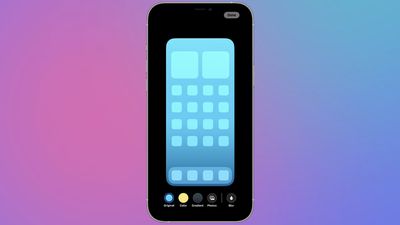
iOS 16 Beta 4 Lock Screen Customizer

Bolder Music Player on Lock Screen

Apple has updated the music player on the Lock Screen with bolder elements.
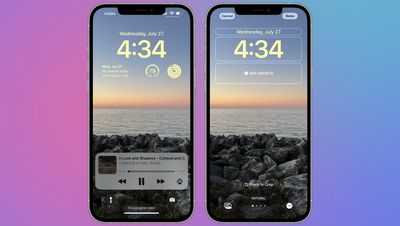
iOS 16 Beta 4 Music Player

New Wallpapers for CarPlay

A static version of the iOS 16 wallpaper for the iPhone is now available for CarPlay, with multi-colored, blue, and gray options to choose from.

Other Changes

If you spot any other changes, let us know in the comments section.

Related Forum: iOS 16

Popular Stories

MacBook Pro Low Angle Wide Lens

Apple to Launch 'MacBook Ultra' With These Six New Features

Friday April 24, 2026 10:32 am PDT by
While the 14-inch and 16-inch MacBook Pro were just updated with M5 Pro and M5 Max chips last month, bigger changes are reportedly around the corner. According to Bloomberg's Mark Gurman, the higher-end MacBook Pro models will be receiving a major redesign by early 2027, and he said that Apple might use "MacBook Ultra" branding for them. If so, the MacBook Ultra would likely be a...
Apple TV Thumb 3

Here's What's Coming in the 2026 Apple TV

Thursday April 23, 2026 12:08 pm PDT by
There are a lot of folks waiting for a new version of the Apple TV because the set-top box hasn't been updated since 2022. There is an update coming this year, but people will need to wait a bit longer because Apple is holding the next Apple TV until the new version of Siri comes out this fall. Design Apple TV design updates don't happen often, and that's not changing in 2026. The next...
Dynamic Island iPhone 18 Pro Feature

This Is What the iPhone 18 Pro Looks Like

Saturday April 25, 2026 10:00 am PDT by
A recent leak provides our best look yet at the design of Apple's upcoming iPhone 18 Pro and iPhone 18 Pro Max models. Leaker Sonny Dickson recently shared images of the first iPhone 18 Pro, iPhone 18 Pro Max, and foldable iPhone dummy models. The images largely conform with rumors about the designs of the three devices and provide the first real visual confirmation of how they will look. ...

Top Rated Comments

MrGimper Avatar
49 months ago
The fact that iPadOS doesn’t have the same lock screen customisation is somewhat backwards.
Score: 17 Votes (Like | Disagree)
bLackjackj Avatar
49 months ago

BETA 4 HAS FINALLY BROUGHT BACK THE FEATURE OF TOGGLING DND FROM THE LOCKSCREEN BY CLICKING THE DND ICON. WHY APPLE EVEN REMOVED THIS FROM THE FIRST PLACE COMPLETELY CONFUSES ME.
1. Why are you YELLING?

2. This is BETA software & you know this. Why does it confuse you? Features will be added, removed, updated, downgraded, fixed..etc before release. You signed up to be a free Apple tester, so why are you complaining?
Score: 10 Votes (Like | Disagree)
49 months ago

The fact that iPadOS doesn’t have the same lock screen customisation is somewhat backwards.
I get you I thought this. But I have since thought maybe it’s just that on an iPad we don’t generally really use the Lock Screen, whereas the iPhone is with us all the time and we glance at it a lot more.
Score: 10 Votes (Like | Disagree)
-BigMac- Avatar
49 months ago

So why still no option to delete a imessage?
It happens alot you send the wrong message to the wrong person!
Editing that message is not an option as they can still read the original.
Are you even reading the article/past beta articles before commenting?
Score: 8 Votes (Like | Disagree)
srbNYC Avatar
49 months ago

OH. MY. GOD.
ITS BACK.
EVERYONE, HOLD THEIR PANTS.

BETA 4 HAS FINALLY BROUGHT BACK THE FEATURE OF TOGGLING DND FROM THE LOCKSCREEN BY CLICKING THE DND ICON. WHY APPLE EVEN REMOVED THIS FROM THE FIRST PLACE COMPLETELY CONFUSES ME.
I welcome its return but NOT SURE I'M AS EXCITED AS YOU ARE ABOUT IT.
Score: 7 Votes (Like | Disagree)
49 months ago

So why still no option to delete a imessage?
It happens alot you send the wrong message to the wrong person!
Editing that message is not an option as they can still read the original.
From the article: “…Apple has reduced the time limit for unsending an iMessage to two minutes after it is delivered.” This tells me one can still delete iMessages sent in error, no?
Score: 6 Votes (Like | Disagree)