More iOS 16 Tidbits: New FaceTime Video Call UI, Redesigned Video Player, and More

Apple this week announced iOS 16, a major release filled with significant customization features for the Lock Screen, new features for Focus mode, the ability to edit and retract iMessages, and so much more.
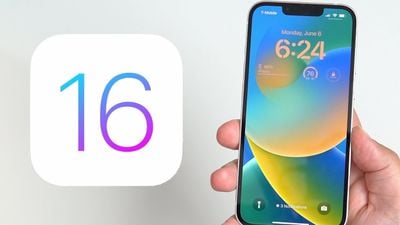
ios 16 lock screen
While Apple showcased some of iOS 16's major features during its jam-packed WWDC keynote, there are dozens, if not hundreds, of smaller features and changes left for users to discover. Below, we've compiled a list of six changes and new features you may not have known about.

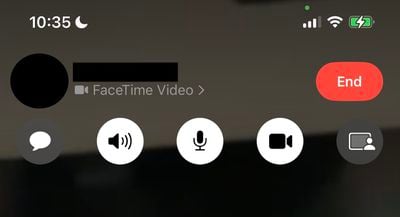
Transparent FaceTime Video Call UI
ios 16 transparent video call ui
During a FaceTime video call, Apple has updated the UI in iOS 16 to be fully transparent, with buttons for camera, microphone, message, speaker, and SharePlay now larger and easier to tap.

iMessage Mention Suggestions Now Include Contact Images

ios 16 imessage mentions
When mentioning a contact on iMessage, mention suggestions now include a contact image in the Quick Tap bar. This can be particularly helpful in group chats where multiple people may share a first name.

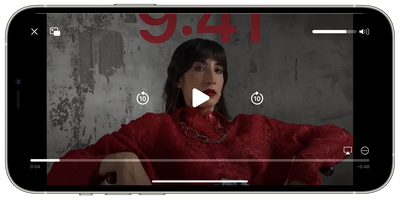
Entirely Redesigned Video Player UI
ios 16 updated vidoe player ui
Apple has redesigned the stock video player UI in iOS 16, making it cleaner by getting rid of unnecessary clutter while highlighting basic controls such as volume, play/pause, and Picture in Picture.

Redesigned Voice Messaging Experience in iMessage
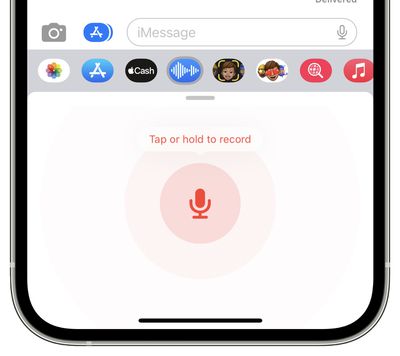
ios 16 new audio recording imessage
Apple has redesigned the voice messaging experience on iMessage with iOS 16, making it its own separate iMessage app that lives in the app bar.

The app lets users tap, hold, and record messages more quickly. Apple has replaced the previous hold and swipe-up gesture to record voice messages with a new Dictation button. On a related note, users can now skim through voice messages on iOS 16.

Privacy Access History
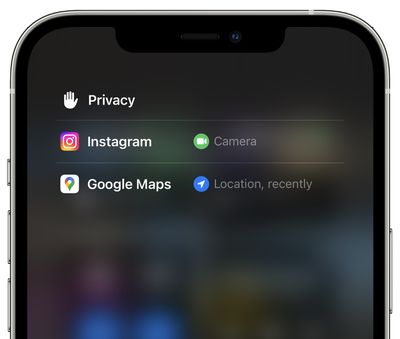
ios 16 privacy access history
On iOS 16 Apple is adding a neat trick that lets users check which apps have recently accessed their camera, microphone, location, and other sensitive sensors on their iPhone. The new view can be accessed by tapping on the top of Control Center shortly after an app has used access.


Related Forum: iOS 16

Popular Stories

iphone 17 models

No iPhone 18 Launch This Year, Reports Suggest

Thursday January 1, 2026 8:43 am PST by
Apple is not expected to release a standard iPhone 18 model this year, according to a growing number of reports that suggest the company is planning a significant change to its long-standing annual iPhone launch cycle. Despite the immense success of the iPhone 17 in 2025, the iPhone 18 is not expected to arrive until the spring of 2027, leaving the iPhone 17 in the lineup as the latest...
duolingo ad live activity

Duolingo Used iPhone's Dynamic Island to Display Ads, Violating Apple Design Guidelines

Friday January 2, 2026 1:36 pm PST by
Language learning app Duolingo has apparently been using the iPhone's Live Activity feature to display ads on the Lock Screen and the Dynamic Island, which violates Apple's design guidelines. According to multiple reports on Reddit, the Duolingo app has been displaying an ad for a "Super offer," which is Duolingo's paid subscription option. Apple's guidelines for Live Activity state that...
Clicks Communicator Feature

'Clicks Communicator' Unveiled — Will You Carry This With Your iPhone?

Friday January 2, 2026 6:35 am PST by
The company behind the BlackBerry-like Clicks Keyboard accessory for the iPhone today unveiled a new Android 16 smartphone called the Clicks Communicator. The purpose-built device is designed to be used as a second phone alongside your iPhone, with the intended focus being communication over content consumption. It runs a custom Android launcher that offers a curated selection of messaging...
apple intelligence black

Report: Apple's AI Strategy Could Finally Pay Off in 2026

Tuesday December 30, 2025 9:01 am PST by
Apple's restrained artificial intelligence strategy may pay off in 2026 amid the arrival of a revamped Siri and concerns around the AI market "bubble" bursting, The Information argues. The speculative report notes that Apple has taken a restrained approach with AI innovations compared with peers such as OpenAI, Google, and Meta, which are investing hundreds of billions of dollars in data...
apple fitness 2026 1

Apple Teases 'Something Big' Coming Soon to Apple Fitness+

Tuesday December 30, 2025 2:11 pm PST by
The Apple Fitness+ Instagram account today teased that the service has "big plans" for 2026. In a video, several Apple Fitness+ trainers are shown holding up newspapers with headlines related to Apple Fitness+. What's Apple Fitness+ Planning for the New Year? Something Big is Coming to Apple Fitness+ The Countdown Begins. Apple Fitness+ 2026 is Almost Here 2026 Plans Still Under ...
Low Cost MacBook Feature A18 Pro

Low-Price 12.9-Inch MacBook With A18 Pro Chip Reportedly Launching Early This Year

Friday January 2, 2026 9:08 am PST by
Apple plans to introduce a 12.9-inch MacBook in spring 2026, according to TrendForce. In a press release this week, the Taiwanese research firm said this MacBook will be aimed at the entry-level to mid-range market, with "competitive pricing." TrendForce did not share any further details about this MacBook, but the information that it shared lines up with several rumors about a more...
Mac Pro Feature Blue

What's Happening With the Mac Pro?

Wednesday December 31, 2025 9:59 am PST by
Apple hasn't updated the Mac Pro since 2023, and according to recent rumors, there's no update coming in the near future. In fact, Apple might be finished with the Mac Pro. Bloomberg recently said that the Mac Pro is "on the back burner" and has been "largely written off" by Apple. Apple apparently views the more compact Mac Studio as the ideal high-end pro-level desktop, and it has almost...
Apple Fitness Plus hero

Apple Announces New Fitness+ Workout Programs, Strava Challenge, and More

Friday January 2, 2026 6:43 am PST by
Apple today announced a number of updates to Apple Fitness+ and activity with the Apple Watch. The key announcements include: New Year limited-edition award: Users can win the award by closing all three Activity Rings for seven days in a row in January. "Quit Quitting" Strava challenge: Available in Strava throughout January, users who log 12 workouts anytime in the month will win an ...

Top Rated Comments

a104375 Avatar
47 months ago
I hate that the new video controls dim the screen and are needlessly in the middle. What was wrong with having them off to the side out of the main content area?
Score: 6 Votes (Like | Disagree)
Reeneman Avatar
47 months ago
These are some very welcome small features :)
Score: 5 Votes (Like | Disagree)
Kylo83 Avatar
47 months ago

These are some very welcome small features :)
None will really change anything, we need the batt % number back at the top and the home bar gone that would make a big change
Score: 3 Votes (Like | Disagree)
BJMRamage Avatar
47 months ago

None will really change anything, we need the batt % number back at the top and the home bar gone that would make a big change
I'd even go as far as the Battery is shown but once it hits 20% you instead get a Percentage to better track things.
Score: 1 Votes (Like | Disagree)
Mousse Avatar
47 months ago

The native iOS video player STILL does not have a rotation button, or play videos in landscape by default. I had a jailbreak tweak for this literally over a decade ago. What gives?
That's because the average person records video in the vertical orientation. It's one of the few things that triggers me when I see the way most people record videos on their smartphones. Record in landscape orientation ya Philistines.?

Anyhow, I only use my iPhone for games. I used my android phone for watching videos because it's ten billion percent ('//www.youtube.com/watch?v=HlUBIM_6oUI') easier to get movies on and off via microSD. And the video players on Android are superior to those on iOS.
Score: 1 Votes (Like | Disagree)
trost Avatar
47 months ago

I hate that the new video controls dim the screen and are needlessly in the middle. What was wrong with having them off to the side out of the main content area?
I thought I was the only one! The new video controls would be fine if they didn’t have to dim the entire video to change volume or scrub video track..
Score: 1 Votes (Like | Disagree)