You Can Unsend an Email 10 Seconds After It's Sent in iOS 16 Mail App - MacRumors
Skip to Content

You Can Unsend an Email 10 Seconds After It's Sent in iOS 16 Mail App

Apple in iOS 16, iPadOS 16, and macOS Ventura is overhauling the Mail app and introducing a slew of new features that bring it more in line with competing mail services such as Gmail. One of those new features is a long-awaited Undo Send option, designed to let you quickly recall an email if you make a mistake.
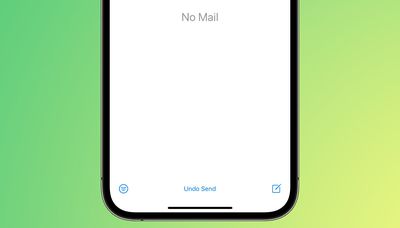
mail undo send
Undo Send works for up to 10 seconds after you send an email, so you don't have a lot of time to change your mind if you do want to unsend an email that you've sent out. Google's Gmail service also has an undo send feature for emails, but you can customize the cancelation period to 5, 10, 20, or 30 seconds.

For now, Apple is limiting undo send to 10 seconds, but it's possible the company could add other time options in the future.

There are several other new features coming to the Mail app. You can schedule your emails for the future, or have Mail give you a reminder about an email you opened but forgot to respond to. It will also let you move sent messages to the top of your inbox so you can get a reminder to send a follow-up, and it can notify you if you forget an important part of an email like an attachment or recipient.
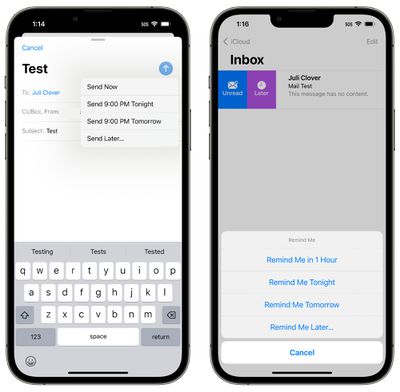
mail send later reminders
Rich links are now supported in email messages so you can see more at a glance, and search is improved. Apple says that you'll see better search suggestions from the moment you begin a search, and it will also correct typos and use synonyms for your search terms to bring up what you're looking for.

These features are available across Apple's platforms for those running the latest software. Apple's updates are limited to developers at this time, but the company plans to release public betas in July.

Related Forum: iOS 16

Popular Stories

MacBook Pro Low Angle Wide Lens

Apple to Launch 'MacBook Ultra' With These Six New Features

Friday April 24, 2026 10:32 am PDT by
While the 14-inch and 16-inch MacBook Pro were just updated with M5 Pro and M5 Max chips last month, bigger changes are reportedly around the corner. According to Bloomberg's Mark Gurman, the higher-end MacBook Pro models will be receiving a major redesign by early 2027, and he said that Apple might use "MacBook Ultra" branding for them. If so, the MacBook Ultra would likely be a...
Apple TV Thumb 3

Here's What's Coming in the 2026 Apple TV

Thursday April 23, 2026 12:08 pm PDT by
There are a lot of folks waiting for a new version of the Apple TV because the set-top box hasn't been updated since 2022. There is an update coming this year, but people will need to wait a bit longer because Apple is holding the next Apple TV until the new version of Siri comes out this fall. Design Apple TV design updates don't happen often, and that's not changing in 2026. The next...
Four iPhone 18 Pro Colors Mock Feature

iPhone 18 Pro Launching in September With These 10 New Features

Monday April 20, 2026 7:13 am PDT by
While the iPhone 18 Pro and iPhone 18 Pro Max are not launching until September, there are already plenty of rumors about the devices. It was initially reported that the iPhone 18 Pro models would have fully under-screen Face ID, with only a front camera visible in the top-left corner of the screen. However, the latest rumors indicate that only one Face ID component will be moved under the...

Top Rated Comments

BradWI Avatar
51 months ago

Instead of undo send they should have delayed send so you can catch it before it ever leaves Apple Mail.
Isn't that what is happening here anyway? Didn't think there is a real way to actually unsend an email.
Score: 32 Votes (Like | Disagree)
4jasontv Avatar
51 months ago
Give the send button options.
Express: Sends it after 10 seconds.
Courier: Sends the message after 10 minutes.
FedEx: Let you schedule when it's sent.
UPS: Let's you schedule when it's sent but it sits in iCloud for a few days before it's delivered.
USPS: Waits until late afternoon to be sent out, but it sits in iCloud for a week before it's delivered.
Surepost: Let's you schedule when it's sent but it sits in iCloud for a week before it's delivered.
Score: 10 Votes (Like | Disagree)
macduke Avatar
51 months ago
I just want machine learning that can tell I referenced adding an attachment in my message text and then pop up when I go to send with a confirmation “It sounds like you meant to attach a file, do you want to send this message without a file or cancel and attach a file?” Because 9 times out of 10 that’s why I would want to undo send.
Score: 9 Votes (Like | Disagree)
51 months ago

Isn't that what is happening here anyway? Didn't think there is a real way to actually unsend an email.
Yeah, pretty sure this is what it is doing.
Score: 7 Votes (Like | Disagree)
TheYayAreaLiving 🎗️ Avatar
51 months ago
I use this feature all the time in Gmail. Reminds me of Gmail "Undo Send". Happy to see, Apple has finally decided to bring it to it's own operating system.
Score: 7 Votes (Like | Disagree)
zorinlynx Avatar
51 months ago
By the way folks, there's a reason this is only ten seconds.

There is no "undo send" with E-mail. Once your E-mail hits the SMTP server, it's sent. There's no taking it back. Doing so would require the cooperation of the recipient's mail server, which cannot be guaranteed and opens a can of worms to allow this ability.

A 10 second "undo send" is just delaying sending the message for ten seconds. Yes, that'll be enough to sometimes catch yourself and not send it, but you can easily just mull over sending it for ten seconds and it would accomplish the same thing.

Score: 6 Votes (Like | Disagree)