

Pixelmator Pro 2.3 Adds Smart Subject Selection and Background Removal Features, Plus New Select and Mask Tools - MacRumors
Skip to Content

Pixelmator Pro 2.3 Adds Smart Subject Selection and Background Removal Features, Plus New Select and Mask Tools

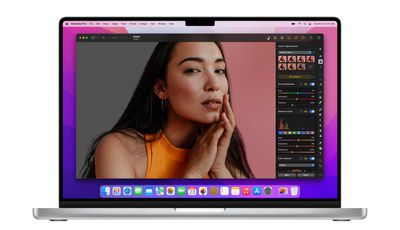
Pixelmator Pro 2.3 went live on the Mac App Store on Tuesday, and the latest major update to the popular image editing app brings a smart new automatic background removal feature, automatic subject selection, new Select and Mask tools, and more.
pixelmator pro 2 31
In a blog post announcing the update, Pixelmator's developers say that it's now possible for users to "magically" remove the background from any image with just a click. The new feature is based on machine learning models that can find a subject in almost any image and automatically strip out the background, and it's also available in Finder as a built-in Quick Action.

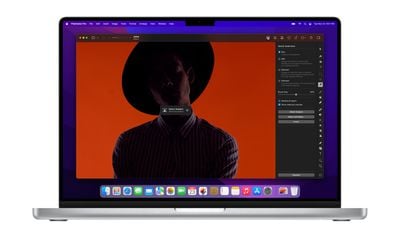
In addition to the background eraser feature, a new AI-powered Decontaminate Colors feature can remove traces of the old background from the edges of objects left behind, allowing them to blend seamlessly with any new background. Decontaminate Colors can be applied manually in any layer, even on ones that have been cut out in other apps.
pixelmator pro 2 34
Building on the same set of machine learning algorithms is Automatic Subject Selection, which allows users to make a selection of the subject of any image with just a click. Meanwhile, a new Select and Mask tool makes it easier to select difficult areas of subjects like hair, fur, and other objects with complex edges.

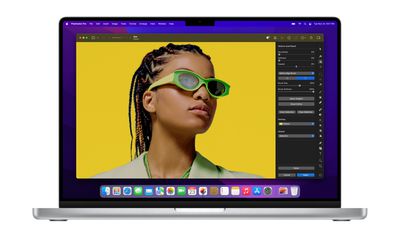
The Smart Refine feature has also been redesigned to enhance selection accuracy, and a new Refine Edge Brush lets users brush over particularly tricky edges to get the selection they want.

These new features are powered by ML algorithms that are integrated into Pixelmator Pro using Core ML, which makes them "absolutely fly" on the latest M1-powered devices thanks to their overall speed and the Apple Neural Engine, according to the developers. For example, background removal takes around 2-5 seconds on M1 devices and up to 30 seconds on Intel devices for an average image.
pixelmator pro 2 33
The update includes some smaller changes, like the ability to specify custom export sizes and scales in the Export dialog. More details are available in the release notes. Version 2.3 is free for existing Pixelmator Pro users, and there's currently a 50% discount off the app price (usually $39.99) in the Mac App Store.


Popular Stories

iphone 16 teal

'Siri AI' Lawsuit Update: Apple to Pay Owners of These iPhone Models

Thursday July 9, 2026 7:08 am PDT by
In May, Apple agreed to pay $250 million to settle a U.S. class action lawsuit over Siri AI's delayed launch, and eligible iPhone users could receive up to a $95 payout. This week, the California court overseeing the case held a hearing regarding preliminary approval of the settlement, but the judge has not yet issued a ruling. It will likely be at least a few more months before eligible...

Apple TV Thumb 3

Everything Coming in the 2026 Apple TV 4K

Wednesday July 8, 2026 4:51 pm PDT by
The Apple TV 4K hasn't been updated since 2022, and it's due for a refresh. An update is planned for 2026, but Apple is likely going to wait to launch it after Siri AI launches in iOS 27. Design Apple TV design updates don't happen often, and that's not changing. The next Apple TV is going to have the same squircle shape as the current model, and it'll continue to be made from a black...
apple wallet drivers license feature iPhone 15 pro

Apple Says iPhone Driver's Licenses Will Expand to These 6 U.S. States

Thursday July 9, 2026 7:29 am PDT by
In select U.S. states, residents can add their driver's license or state ID to the Apple Wallet app on the iPhone and Apple Watch, and then use it to display proof of identity or age at select airports and businesses, and in select apps. To set up the feature, open the Wallet app on the iPhone and tap on the plus sign in the top-right corner. Next, tap on Driver's License and ID Cards,...

Top Rated Comments

FSMBP Avatar
61 months ago
Pixelmator Team is killing it...Lot of good updates this year.
Score: 21 Votes (Like | Disagree)
61 months ago
Love this update so far! Thanks Pixelmator for investing time and talent to creating an innovative product that destroys Photoshop.
Score: 11 Votes (Like | Disagree)
joshwenke Avatar
61 months ago
Pixelmator is an incredible app. Not only is it powerful and can handle projects fit for Photoshop, it's intuitive and combines everything I love about Mac and UI and graphic design.
Score: 10 Votes (Like | Disagree)
H3LL5P4WN Avatar
61 months ago
I don't know why anyone would buy into Adobe when Pixelmator exists.

(Provided you don't need the rest of Adobe's ecosystem, of course.)
Score: 9 Votes (Like | Disagree)
attila Avatar
61 months ago

does this 'thing" have layers?
and older 10.14 versions?

the graphic program looks very good and at a great price!
I'd recommend "Affinity Photo" instead if you need anything similar to Photoshop.
Score: 6 Votes (Like | Disagree)
PsykX Avatar
61 months ago

I don't know why anyone would buy into Adobe when Pixelmator exists.

(Provided you don't need the rest of Adobe's ecosystem, of course.)
I'm asking myself the same thing.
It's basically the price of 1-2 months of Photoshop, except that you own it and you have it forever.
Score: 5 Votes (Like | Disagree)











































