Apple's Shazam Control Center Music Recognition Feature Hits 1 Billion Songs Identified - MacRumors
Skip to Content

Apple's Shazam Control Center Music Recognition Feature Hits 1 Billion Songs Identified

With the launch of iOS 14.2, Apple introduced a new Shazam Music Recognition toggle for the Control Center, giving iPhone, iPad, and iPod touch users a quick and easy way to identify what music is playing.
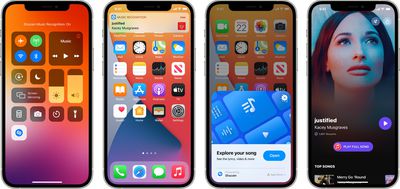
shazam music recognition
Music Recognition has been a popular Control Center integration, and according to Apple, Shazam just surpassed 1 billion cumulative recognitions from the Control Center on iOS devices.

Compared to the standard Shazam app, Music Recognition is unique because it allows users to identify songs playing in their favorite apps, TV shows, and movies even while wearing headphones, a feature available in addition to the option to identify songs playing out loud.

The number one most Shazamed track from the Control Center is Bruno Mars' "Talking to the Moon," with a list of the top 10 Shazamed songs available below.

  • "Talking To The Moon" - Bruno Mars
  • "Astronaut In The Ocean" - Masked Wolf
  • "MONTERO (Call Me By Your Name)" - Lil Nas X
  • "Beggin" - Måneskin
  • "Another Love" - Tom Odell
  • "Runaway" - AURORA
  • "Dick" - StarBoi3 Feat. Doja Cat
  • "Arcade" - Duncan Laurence
  • "Stay" - The Kid LAROI & Justin Bieber
  • "drivers license" - Olivia Rodrigo

For those who do not already use Music Recognition, it can be added to the Control Center by opening up the Settings app and selecting the Control Center section. From there, scroll down and tap the "+" button next to the "Music Recognition" option that has the Shazam logo. Once added, users can access the Control Center and tap on the icon with the Shazam logo to identify a song that's playing.

Apple is improving Music Recognition in iOS 15 and going forward, it will automatically save a list of songs that users have discovered through the Control Center feature. The Music Recognition history can be viewed by long pressing on the Shazam Control Center icon on a device running iOS 15 or iPadOS 15.

Developers are also now able to take advantage of a ShazamKit API that allows Shazam's audio recognition technology to be integrated directly into apps, and the first apps with this functionality will launch this fall.


Tag: Shazam

Popular Stories

iCloud iPhone 17 Pro

iPhone Users Who Pay for iCloud Storage Get Two New Perks on iOS 27

Thursday July 2, 2026 6:10 am PDT by
If you pay for certain iCloud+ storage plans beyond the 5GB that Apple offers for free, you will receive two more perks on iOS 27 at no additional cost. A summary of the two new iCloud+ perks on iOS 27:Increased daily usage limits for some new Apple Intelligence features, including image generation in the revamped Image Playground app. HomeKit Secure Video cameras receive generated video...

Apple Event Logo

Apple Just Released a New Product

Thursday July 2, 2026 8:04 am PDT by
Apple's first product release of summer 2026 occurred this week, but do not get too excited, as it is merely the Beats Solo Buds in a new color. Beats Solo Buds are now offered in orange through Best Buy in the U.S., with availability set to expand to 7-Eleven stores in Japan on July 4. Apple already offered orange Solo Buds in India for free with the purchase of an iPhone 15 or iPhone 15 ...
iPhone 4 on Black Feature

Apple Facing One of Its Worst Leaks Since the iPhone 4

Thursday July 2, 2026 9:53 am PDT by
Apple supplier Tata Electronics recently suffered a cyberattack that resulted in thousands of confidential files being published on the dark web, and this reportedly included some photos and documents related to the upcoming iPhone 18 Pro. We have elected not to share any of the leaked photos in this story due to the illegal nature in which they were obtained, but they can easily be found...

Top Rated Comments

63 months ago

Funny thing, I do have Shazam icon on my control center, and for some reason, when I need to quickly identify a song, I go to spotlight, search for the Shazam app, and launch the app. I completely ignore that Control Center button.
I removed my control center button, because it has no link to the app. It keeps no history and doesn’t save to a playlist.
Score: 3 Votes (Like | Disagree)
Populus Avatar
63 months ago
Funny thing, I do have Shazam icon on my control center, and for some reason, when I need to quickly identify a song, I go to spotlight, search for the Shazam app, and launch the app. I completely ignore that Control Center button.
Score: 3 Votes (Like | Disagree)
63 months ago

I don't like you can’t try again later when their music database is updated like sound hound. Also I do a control center Shazam and later open the Shazam app and it has no history and I lost what I was searching for.
Thankfully iOS 15 fixes this. If you Haptic Touch on the icon on iOS 15, it opens a history of identified songs. I am on the beta currently and I have 20 songs identified in history so far.
Score: 3 Votes (Like | Disagree)
JosephAW Avatar
63 months ago
I don't like you can’t try again later when their music database is updated like sound hound. Also I do a control center Shazam and later open the Shazam app and it has no history and I lost what I was searching for.
Score: 3 Votes (Like | Disagree)
63 months ago
Use this quite often. Shazam is fantastic.
Score: 2 Votes (Like | Disagree)
63 months ago

This inability to see search history makes the app as it currently stands worthless. I'm not going to go searching for songs AFTER the app has recognized it while in a social setting. If I don't do it then and there, the identification is lost. It's so dumb. Nice that the entire phone needs an update for this to function as well as it's acquired app from 10 years ago.
Shazam is great, hardly "worthless". all my shazams are in a history, just scroll through them in the order you shammed. Seriously, this complaint of yours is confusing. Sorry it is too complicated for you. Maybe there is another app that works better for you
Score: 2 Votes (Like | Disagree)