Affinity Creative Apps Gain Memory Optimization Update Making Some Tasks Up to 10 Times Quicker - MacRumors
Skip to Content

Affinity Creative Apps Gain Memory Optimization Update Making Some Tasks Up to 10 Times Quicker

Serif today announced across-the-board updates for its popular suite of Affinity creative apps, including Affinity Photo, Affinity Designer, and the Apple award-winning Affinity Publisher for Mac, all of which were among the first professional creative suites to be optimized for Apple silicon.
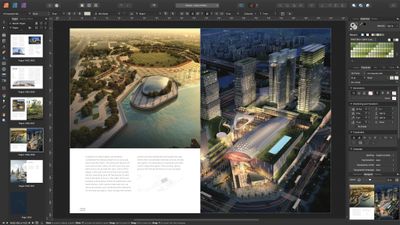
110 affinity publisher pages
For Affinity Publisher, a total rewrite of memory management now enables instant loading times for very large documents, even those with thousands of pages and many gigabytes' worth of linked images. These rewrites have also allowed for smooth live editing and fast scroll, pan and zoom across the whole document.

"We've been excited to see the scale of some of the projects our customers are creating in Affinity Publisher, and knew we could do better to ensure the app remained fast when pushed to the limits," said Ashley Hewson, Managing Director of Affinity developer Serif. "We completely reimagined our memory-handling architecture and the result is that there's really no limit to the size of document you can work on while maintaining that stunning performance."

This performance improvement also extends to Affinity Designer, where the benefit will be most felt by users who import PDF files generated in a CAD app or similar that include hundreds of thousands of objects. Even with less-complex projects, though, everything should feel a lot smoother and snappier, according to the developers.
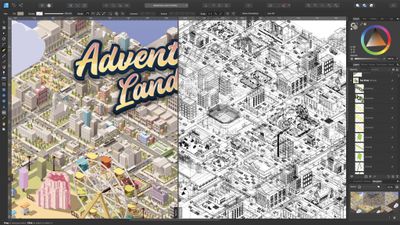
110 affinity designer outline view
Elsewhere, Affinity Photo has received "extensive" performance tweaks, so users can expect greater efficiency when blending layers together, while retaining a non-destructive workflow. This version also introduces some options to ensure editing speed remains slick even after building up a complex stack of hundreds of pixel and vector layers, and filter effects, while still maintaining the full layer stack.

Lastly, IDML import in Affinity Publisher is said to be up to four times faster, text flow speeds have nearly doubled, a series of other smaller tweaks and stability improvements have been made to the Affinity suite for version 1.10.

The update is available across all Affinity apps on macOS, Windows and iPad from today and is free to existing users. All Affinity apps are currently available to purchase individually for $60 each on the Affinity website, no subscriptions required.

Popular Stories

iPhone Handoff Feature

iOS 27 Introduces New 'iPhone Handoff' Feature

Wednesday September 2, 2026 12:35 pm PDT by
Apple has added a new "iPhone Handoff" feature to iOS 27 that will allow you to switch between two iPhones while using the same phone number on each device. This functionality was briefly mentioned during the WWDC 2026 keynote in June, on a slide that listed hundreds of new features coming in iOS 27 and corresponding software updates, but Apple never shared any further details at the time. ...

Dynamic Island iPhone 18 Pro Feature

iPhone 18 Pro Prices Estimated Ahead of Apple Event Next Week

Thursday September 3, 2026 3:41 am PDT by
Less than a week before Apple debuts new iPhone 18 Pro models, research firm TrendForce has estimated the prices of the devices based on the latest hardware cost environment. TrendForce's price estimates compared to last year's models look like this: Model Starting Price Model Starting Price Change iPhone 17 Pro $1,099 iPhone 18 Pro $...
Apple Foldable Thumb

iPhone Ultra's Very High Price and Features Revealed in New Report

Thursday September 3, 2026 7:33 am PDT by
Ahead of Apple's event on Wednesday, September 9, where it is expected to unveil its first-ever foldable iPhone, Taiwanese research firm TrendForce today outlined the device's estimated price range, features, and some other key details. In the U.S., TrendForce estimated that the foldable iPhone will have a starting price of $2,099 to $2,299 and said the highest-end configurations could...

Top Rated Comments

66 months ago
I use Affinity Photo every day for work, and the other apps in the suite often. Incredible set of software, these guys deserve all the credit in the world for putting a dent in the Adobe machine.

The universe would rejoice if they released a Premiere or After Effects-style studio.
Score: 23 Votes (Like | Disagree)
66 months ago

Is this update referring to v1.9 or a newer version?

The link to the announcement is broken.
It is 1.10, our site taking a bit longer to deploy than planned - should be live in a couple of minutes!
Score: 10 Votes (Like | Disagree)
66 months ago

I had to use Affinity in a past project, and it's extremely confusing if you're used to Adobe. Everything works just differently enough to cause hick-ups all the times and you totally lose focus. The absolutely worst thing is how shift, cmd and alt do something totally different when resizing things. If you're used to Affinity, it may be nice, but it's certainly not a drop-in replacement for Adobe CC as some claim here (and it's also missing some features).
I disagree. I worked with Adobe Software all my life and swiching to Affinity was painless because the basic works the same way, even some shortcuts, but others features are actually better implemented and more practical, you just have to learn. Complaning that one software isn't a exact copy of another is just ridiculous, Adobe softwares have many qualities but good UX isn't one of them.
Score: 6 Votes (Like | Disagree)
Eddy Munn Avatar
66 months ago
We use Affinity Designer—it's such solid software.
Score: 6 Votes (Like | Disagree)
Schnegg Avatar
66 months ago
Big fan of Designer here, it's so fast and intuitive. Kudos!

I'm still not as fluent in Photo as I was in PS, but that's because I try to do everything in Designer 🙂
Score: 5 Votes (Like | Disagree)
Apple Knowledge Navigator Avatar
66 months ago
Meanwhile, Adobe doesn’t know the meaning of optimisation.
Score: 4 Votes (Like | Disagree)