iOS 15 Can Automatically Add and Remove Widgets to a Smart Stack - MacRumors
Skip to Content

iOS 15 Can Automatically Add and Remove Widgets to a Smart Stack

On iOS 14, Smart Stacks for widgets allow users to stack different widgets on top of each other and then allow iOS to display the most relevant widget depending on the time of day, location, and more. On iOS 15, Apple is taking Smart Stacks even further with Widget Suggestions, which automatically add and remove widgets in a Smart Stack depending on context.
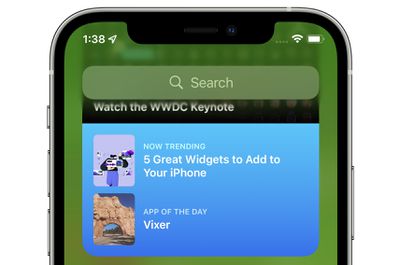
app store widget
For example, if a user has an existing Smart Stack which includes the Weather and Reminders widget, iOS 15 may add a Calendar widget to the stack if the user has an upcoming meeting. Then, after the meeting, iOS 15 will remove the widget from the Smart Stack, reverting it to the stack that the user had set up with Weather and Reminders. Apple says it hopes this new feature, which can be disabled on a per Smart Stack basis, will allow users to discover new and helpful widgets.

iOS 15 and iPadOS 15 introduces new widgets for Find My, Game Center, App Store Today, Sleep, Mail, and more. Developers interested in learning more about widget suggestions and how they can be implemented into their app can check out this WWDC session.

Related Forum: iOS 15

Popular Stories

M5 Vision Pro Thumb 2

Apple Has Given Up on the Vision Pro After M5 Refresh Flop

Wednesday April 29, 2026 11:31 am PDT by
Apple has all but given up on the Vision Pro after the M5 model failed to revitalize interest in the device, MacRumors has learned. Apple updated the Vision Pro with a faster M5 chip and a more comfortable band in October 2025, but there were no other hardware changes, and consumers still weren't interested. The Vision Pro has been criticized for its high price tag and its uncomfortable...
Four iPhone 18 Pro Colors Mock Feature

iPhone 18 Pro to Launch in September With These 10 New Features

Tuesday April 28, 2026 9:35 am PDT by
While the iPhone 18 Pro and iPhone 18 Pro Max are not launching until September, there are already plenty of rumors about the devices. It was initially reported that the iPhone 18 Pro models would have fully under-screen Face ID, with only a front camera visible in the top-left corner of the screen. However, the latest rumors indicate that only one Face ID component will be moved under the...
airpods pro 3 design

'AirPods Ultra' Rumored to Feature a Major Upgrade Over AirPods Pro

Thursday April 30, 2026 8:40 am PDT by
In a social media post this week, Bloomberg's Mark Gurman reiterated that Apple is planning to release new AirPods with cameras "for Siri." Last month, Gurman said these AirPods will likely be priced above the current AirPods Pro 3, which Apple sells for $249. As a result, he said Apple is likely considering using "AirPods Ultra" branding for the camera-equipped AirPods. "AirPods Ultra"...

Top Rated Comments

64 months ago
I hate this stuff. A good UI is predictable and boring.
Score: 3 Votes (Like | Disagree)
bchery21 Avatar
64 months ago

Hmm. Sounds like an okay idea to me, as long as I can disable it if I don't like the behavior. I was disappointed to not hear that the widgets will be interactive (checking items off a todo list, for example), but maybe that will still happen?
I hope so, especially with the example you gave. Checking something off the Reminders widget instead of bringing you into the app would be welcomed especially since that's how it use to behave.
Score: 2 Votes (Like | Disagree)
cmaier Avatar
64 months ago
A trend in Apple's UX designs lately - try and guess what will appear when you swipe the smart stack! Try and guess where the text box is to type a new address into safari! Try and guess where the keys are on the TouchBar!
Score: 2 Votes (Like | Disagree)
TheYayAreaLiving 🎗️ Avatar
64 months ago
I have to admit. The widgets are cool
Score: 2 Votes (Like | Disagree)
64 months ago

For iOS it’s kind of annoying. I just wish you could tell the system what to auto show and what not to. In CarPlay my wife’s calendar appts show up on the dashboard. I don’t care. However, I love the garage button that disappears when I leave home. That one is rock solid.
I find it incredible that hiding calendars is still not working as expected. I now get the invites from my partner’s calendar. And their appointments show up in widgets and Maps. Why Apple?! Why?
Score: 1 Votes (Like | Disagree)
QuarterSwede Avatar
64 months ago

A trend in Apple's UX designs lately - try and guess what will appear when you swipe the smart stack! Try and guess where the text box is to type a new address into safari! Try and guess where the keys are on the TouchBar!
For iOS it’s kind of annoying. I just wish you could tell the system what to auto show and what not to. In CarPlay my wife’s calendar appts show up on the dashboard. I don’t care. However, I love the garage button that disappears when I leave home. That one is rock solid.
Score: 1 Votes (Like | Disagree)