

For this week's giveaway, we've teamed up with Fuse to offer MacRumors readers a chance to win a full set of cable organizers for Apple's iPhones, iPads, Apple Watches, and Macs from Fuse.
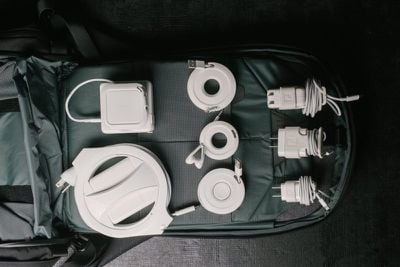
Fuse used to focus on Mac cable organizing options, but last November, the company came out with a full line of cord management options for Apple's full device lineup, and with many people working from home these days, Fuse's cable wrangling accessories are perfect for keeping home offices neat and tidy.
From the Side Winder that keeps the MacBook Pro's USB-C cable organized to the Watch Side Winder for rolling up the Apple Watch cord and charging, Fuse has something for everyone, and all of the products are on sale for a limited time.
Snap Backs for iPhone, iPad, and MacBook
Available for $9.99 to $11.99, the Snap Backs can be purchased for the 12W iPhone and iPad charger, the 18W iPad Pro/iPhone charger, the 5W iPhone charger, and the 29/30W MacBook charger.
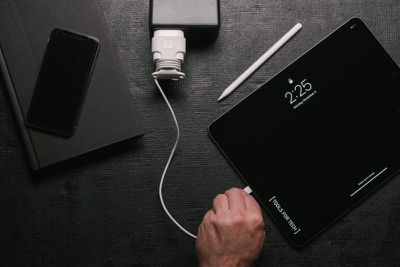
Each Snap Back fits over one of Apple's chargers, with the reel at the bottom used to wind up the cord, so you can pull out as much cord as you need with no excess. It's ideal for travel because you can roll up the entire cord to keep it organized when its tucked in a backpack or bag.
Side Winders for Cables of All Sizes
Priced starting at $7.99, Fuse makes small Side Winders for iPhone cables, headphone cables, iPad cables, and more. The Side Winder is donut shaped and lets you roll the cord around the middle portion before securing the end of the cable using the included groove.
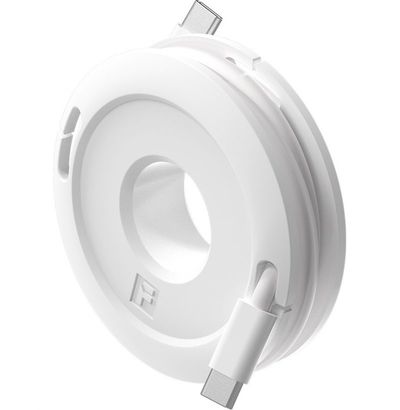
The Side Winder Mini ($7.99) is perfect for iPhone cables, micro-USB cables, corded headphones, and more. It can be used with cables one foot to five feet in length.
The Side Winder Max ($8.99) is identical to the Side Winder Mini but it's bigger in size so it works with USB-C cables and can wrap up cables between one foot and 10 feet in length.

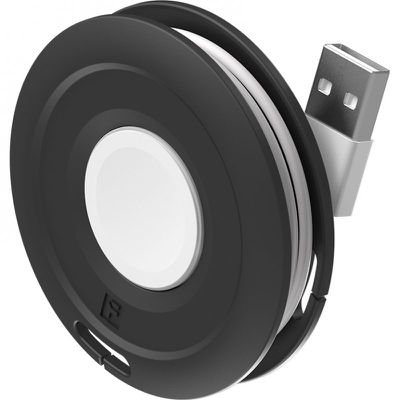
The Side Winder Watch ($8.99) is designed specifically for the Apple Watch. It wraps up the Apple Watch cable and has a cutout in the center for the watch so it can be used as a charging base in addition to a cable management option.
The Side Kick
The Side Kick, priced at $12.99, is designed to work with Apple's MacBook, MacBook Air, and MacBook Pro chargers. It's a little pop out socket that attaches to the side of a MacBook power adapter using adhesive.
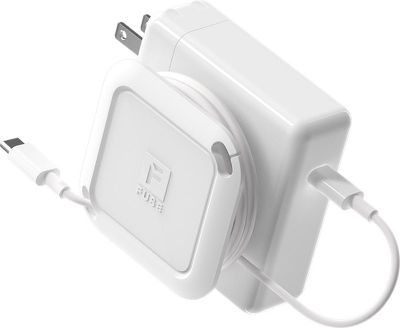
When popped out, it can be used to wrap up a MacBook's cord neatly, allowing the power adapter and the cord to be transported with no cable mess. When you're using the cable, the Side Kick pops back in so it adds little bulk to an Apple power adapter.
The Side Winder
Priced at $19.99, the Side Winder is designed for the MacBook Air and MacBook Pro models, and it's meant to wind up both the USB-C (or MagSafe) cable of a MacBook along with the extension cable.

The MacBook's power adapter goes in the center and the two cables wrap up in the reel around it. You can pull out just the right amount of cable so you never have excess cable to deal with. This model is designed specifically for the power adapter with extension, and if you just have a standard USB-C cable for charging and no extension cable (USB-C Macs don't come with them by default) the Side Kick is the better option.
Other Products
If you like Fuse's cable winders and organizers, you might want to check out the company's latest product, the Amp Light, which is on Kickstarter now. The Amp Light is a mounted webcam light designed to make you look your best when working from home, with a design that allows it to be attached anywhere. It won't be out until next year and so it won't be included as an option in this giveaway, but Fuse has discounted versions available for Kickstarter backers.

Enter the Giveaway
We have 10 home office organization setups to give away to MacRumors readers, with each winner able to choose any five cable organizing products from Fuse.
To enter to win, use the Gleam.io widget below and enter an email address. Email addresses will be used solely for contact purposes to reach the winners and send the prizes. You can earn additional entries by subscribing to our weekly newsletter, subscribing to our YouTube channel, following us on Twitter, following us on Instagram, or visiting the MacRumors Facebook page.
Due to the complexities of international laws regarding giveaways, only U.S. residents who are 18 years or older and Canadian residents (excluding Quebec) who have reached the age of majority in their province or territory are eligible to enter. To offer feedback or get more information on the giveaway restrictions, please refer to our Site Feedback section, as that is where discussion of the rules will be redirected.
The contest will run from today (October 9) at 11:00 a.m. Pacific Time through 11:00 a.m. Pacific Time on October 16. The winners will be chosen randomly on October 16 and will be contacted by email. The winners will have 48 hours to respond and provide a shipping address before new winners are chosen.


/https://forums.macrumors.com/attachments/964792/)

/https://forums.macrumors.com/attachments/964621/)















































