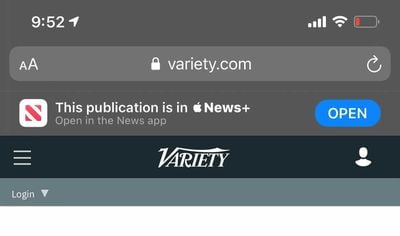
Apple has added Smart App Banners to the latest iOS 14 beta that prompt Safari users to open its News app when viewing the website of a publisher that is part of Apple News+.
First spotted by AppleInsider, the new in-app Safari prompts use Apple's Smart App Banner API, first introduced in iOS 13, which allows developers to prompt users to download their third-party app from the App Store or a corresponding link from Safari.
In this case, Apple is using the Smart App Banner framework to direct users to its own News app when they visit a website hosted by a publication that is also an Apple News+ partner. It's worth noting that the banners only appear for users who subscribe to Apple News+.
The Smart App Banner code on affected pages is reportedly unchanged, making it seem likely that it's a change to the way Safari handles publisher URLs, but it remains unclear if developers are able to control which banner appears.
The news follows a similar change Apple made in iOS 14 and macOS Big Sur that directs users who tap to read a news story in Safari to the Apple News app instead of to the publisher's website.
Safari banner that appears in iOS 14 (Image via AppleInsider)
Many Apple News+ users have been asking for a way to open up web links in Apple News+ to avoid paywalls on the web, so Apple News+ subscribers that pay for the service are likely to be appreciative of the new feature.
However, it has not gone down well with some large publishers, three of which have said they were not informed of the change and are now evaluating whether to terminate their relationship with Apple News+ as a result.
There have been multiple reports suggesting publishers are unimpressed with the revenue generated from Apple News+, which has fallen below Apple's initial promises. Apple has not only struggled to entice new publishers to the paid service, it has had difficulty gaining new subscribers since it launched in March 2019.
Saturday February 7, 2026 9:26 am PST by Joe Rossignol
Apple today shared an ad that shows how the upgraded Center Stage front camera on the latest iPhones improves the process of taking a group selfie.
"Watch how the new front facing camera on iPhone 17 Pro takes group selfies that automatically expand and rotate as more people come into frame," says Apple. While the ad is focused on the iPhone 17 Pro and iPhone 17 Pro Max, the regular iPhone...
Monday February 9, 2026 6:24 am PST by Joe Rossignol
In select U.S. states, residents can add their driver's license or state ID to the Apple Wallet app on the iPhone and Apple Watch, and then use it to display proof of identity or age at select airports and businesses, and in select apps.
The feature is currently available in 13 U.S. states and Puerto Rico, and it is expected to launch in at least seven more in the future.
To set up the...
Tuesday February 10, 2026 4:27 pm PST by Juli Clover
Apple is planning to launch new MacBook Pro models as soon as early March, but if you can, this is one generation you should skip because there's something much better in the works.
We're waiting on 14-inch and 16-inch MacBook Pro models with M5 Pro and M5 Max chips, with few changes other than the processor upgrade. There won't be any tweaks to the design or the display, but later this...
Tuesday February 10, 2026 6:33 am PST by Joe Rossignol
It has been a slow start to 2026 for Apple product launches, with only a new AirTag and a special Apple Watch band released so far. We are still waiting for MacBook Pro models with M5 Pro and M5 Max chips, the iPhone 17e, a lower-cost MacBook with an iPhone chip, long-rumored updates to the Apple TV and HomePod mini, and much more.
Apple is expected to release/update the following products...
New MacBook Pro models with the M5 Pro and M5 Max chips could arrive as soon as Monday, March 2, according to Bloomberg's Mark Gurman.
In today's "Power On" newsletter, Gurman said that the release of new MacBook Pro models is tied to the release of macOS Tahoe 26.3. The launch is said to be slated for as early as the week of March 2. He added that the M4 Pro and M4 Max models on sale today...
Apple is really doing themselves no favors in their anti-trust case. Tell me how can a third party developer on iOS hijack third party website URLs and redirect to their own app?
It’s only for paying users who ALREADY pay the publisher via News+. This is so they can use their subscription on/from the web too. This has nothing to do with antitrust, just letting the user know that they can read the article with the News+ subscription they already have, instead of subscribing to another one for the web version.
Apple is really doing themselves no favors in their anti-trust case. Tell me how can a third party developer on iOS hijack third party website URLs and redirect to their own app?
THIS IS ONLY FOR NEWS+ USERS, NOT REGULAR USERS OR USERS WHO HAVE SUBSCRIBED THROUGH THE PUBLISHER’S APP. This isn’t antitrust, for goodness sake. ?♂️