Apple today seeded the second public betas of upcoming iOS and iPadOS 14 updates to its public beta testing group, two weeks after seeding the first iOS and iPadOS 14 betas to public beta testers. The second public beta corresponds to the third developer beta that was released yesterday.
Public beta testers who have signed up for Apple's beta testing program can download the iOS/iPadOS 14 updates over the air after installing the proper certificate from the Public Beta website on an iOS device, with instructions available in our how to. The updates should not be installed on primary devices as this is beta software and could have serious bugs.
iOS 14 brings changes to the Home Screen, including widget support. Widgets can now be placed right next to your apps, and with the focus on widgets, Apple has introduced new widgets from default apps and is allowing them to be customized in three sizes.
You can put widgets anywhere on any app page, with new widgets able to be found in the widget gallery. Along with widgets, Apple has introduced an App Library, which is an interface that shows all of the apps on your iPhone both in smart folders that are created automatically and in an alphabetical list.
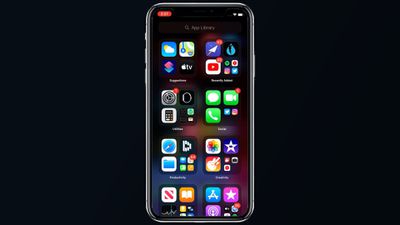
With the App Library providing access to all your apps, there's now an option to hide entire app pages from your iPhone, so you can avoid a cluttered Home Screen.
Apple has worked to make the iPhone's interface more compact, and incoming phone calls and Siri requests no longer take over the whole screen and are instead presented in a banner style, a feature also available on iPadOS.
There's a Picture in Picture mode for watching videos or using FaceTime while doing something else at the same time on the iPhone. The Messages app has new features focused on group conversations like pinned conversations, mentions, and inline replies.
A new App Clips feature lets you use small bite sized bits of an app without the need to download the whole app, useful for times when you need an app to buy a coffee, rent a scooter, or make a restaurant reservation. App Clips will work through Apple-designed App Clip codes, NFC tags, or QR codes, and can also be shared in Messages or from Safari.
The Health app supports the Sleep Tracking feature added in watchOS 7, and the iPhone will support the Sleep Mode and Wind Down features designed to help you get a better night's sleep. There's also a new Health Checklist that makes it easier to manage health and safety features like Emergency SOS, Fall Detection, and Medical ID.
The Weather app now provides info on severe weather events and minute-by-minute precipitation readings (U.S. only), and the Maps app supports cycling directions for the first time so bike riders can plan routes with info like busy streets, elevation changes, stairs, and more. Maps also now lets electric vehicle owners plan routes with EV charging spots.
The Home app is smarter with automation suggestions and an Adaptive Lighting feature that lets HomeKit lights adjust their color temperature throughout the day, plus there are new features for HomeKit Secure Cameras.
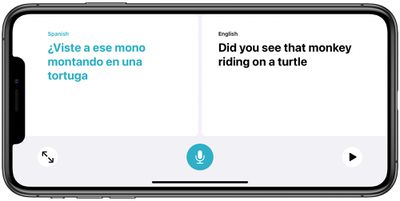
A new Apple-designed Translate app provides text and voice translations to and from 11 languages, and with an on-device mode, translations can be done entirely on your phone.
Tons of new privacy features have been added in iOS and iPadOS 14. Apps need permission before accessing devices on a local network, you get notified when an app accesses the clipboard, and there are little icons in the status bar of the Home Screen when an app is using the camera or the microphone.
There are also new options for limiting access to select photos and providing apps with an approximate location rather than an exact location for better privacy protection. Safari has Privacy Report that tells you which trackers sites are using, and in the future, the App Store will include a summary of developers' privacy practices in an easy-to-read format.
AirPods can now seamlessly and automatically switch between devices, and AirPods Pro gain a new spatial audio feature for surround sound complete with dynamic head tracking.
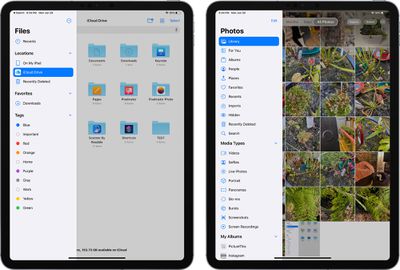
As for iPadOS 14, it includes most of the new iOS 14 updates, minus the Home Screen redesign. The biggest change is the new Scribble feature that lets you use the Apple Pencil to write on any text field, with the written text converted to typed text.
Scribble works throughout the operating system so you can use the Apple Pencil for Safari searches, adding new items in Calendar and Reminders, sending Messages, handwriting in the Notes app, and more.
The beta 3 update for developers included a new red Music icon, changes to the design of the Music Library in the Music app, a Clock widget, an updated Screen Time widget, and more, with details available in our beta 3 tidbits article.
For more on everything that's new in iOS and iPadOS 14, make sure to check out our iOS 14 and iPadOS 14 roundups, which have a detailed look on all of the new features.