Slack Desktop App Update Introduces Major Platform Redesign - MacRumors
Skip to Content

Slack Desktop App Update Introduces Major Platform Redesign

by

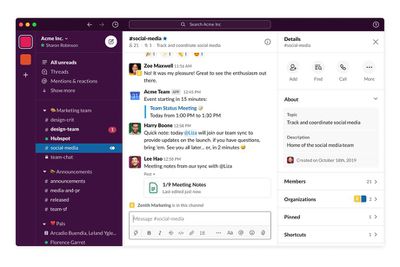
Slack is today rolling out a redesign of its team chat app for desktop that aims to make navigating the platform's various menus and options simpler and more intuitive.
slacknewdesign
First up, the Slack sidebar is about to become a lot more flexible for users on paid Slack plans. You can now group together channels, apps, and direct messages into nested, collapsible sections using a simple drag-and-drop action.

All users will be able to take advantage of a new large compose button at the top of the sidebar that works as a way to start a message, wherever you are in Slack. When you start typing your message, Slack displays the relevant message history within the compose window to help you refer back to past chat topics.

In addition, links to Slack's People and Mentions & reactions sections have been added to the sidebar, with the aim of making searching for team members and reacting to channel pings less of a struggle.

Elsewhere, the search field at the the top of the sidebar has become more powerful, allowing you to discover key conversations, files, apps and more. There's also extra spacing between menus, panes and preferences, and an added ability to customize the sidebar width, all of which aim to make the Slack window a lot less cluttered. New color themes are also on the way.

The changes to the desktop app are rolling out today, although the developers are prioritizing new Slack users who may have just joined the service owing to an uptick in remote working due to coronavirus containment measures. Other users should see the design changes in the coming weeks.

Tag: Slack

Top Rated Comments

82 months ago
Is it still a crappy electron app?
Score: 11 Votes (Like | Disagree)
82 months ago
this is horrible timing. We just dumped a bunch of noobs on to slack due to the virus. To change it when they've only been using it for two days is unfortunate.


Score: 1 Votes (Like | Disagree)
82 months ago

Is it still a crappy electron app?
Came to ask the same thing.
Score: 1 Votes (Like | Disagree)
nutmac Avatar
82 months ago

Is it still a crappy electron app?
Yup, even with the update pushed to the App Store yesterday and this modest redesign being rolled out to customers, the app is still slow and feels more like a web page than a macOS app.

iOS app doesn't necessarily look any better, but it feels smoother.
Score: 1 Votes (Like | Disagree)
82 months ago
My company was on the pilot. These new features are great.
Score: 1 Votes (Like | Disagree)

Popular Stories

iphone 16e usb c feature

Apple Begins Selling a $419 iPhone

Monday July 6, 2026 6:29 am PDT by
Apple recently added the iPhone 16e to its refurbished store, with U.S. pricing starting as low as $419 for a model with 128GB of storage. Originally released in February 2025, the iPhone 16e is a lower-end device with a 6.1-inch OLED display, an A18 chip with 8GB of RAM for Apple Intelligence support, a single 48-megapixel rear camera, a 12-megapixel front camera, a USB-C port, an Action...
iphone 17 pro black feature

iPhone 18 Pro Battery Capacities Revealed by Regulatory Filings

Monday July 6, 2026 5:41 am PDT by
New Chinese regulatory certification filings appear to confirm the battery capacities of Apple's upcoming iPhone 18 Pro and iPhone 18 Pro Max models. According to new filings in China's C3 database, spotted by the leaker known as "Digital Chat Station" on Weibo, the iPhone 18 Pro is seemingly rated for 4,056mAh in China and 4,288mAh in the U.S., up modestly from the iPhone 17 Pro's 3,988mAh...
iOS 26 Home Glass Feature

Apple Intelligence Home Features Require 2TB iCloud+ Plan in iOS 27

Monday July 6, 2026 2:13 pm PDT by
Using Apple Intelligence camera features in the Home app will require an iCloud+ plan starting at 2TB, according to Apple. Apple shared the detail in its notes for the third macOS Golden Gate beta that was released today. In iOS 27, iPadOS 27, and macOS 27 Golden Gate, the Home app is able to generate written summaries for motion alerts from HomeKit Secure Video cameras. It's also able to...