Microsoft Office App Released for iPhone, Combines Word, Excel, and PowerPoint
Following beta testing, Microsoft today released its new Office app for iPhone, bringing together Word, Excel, and PowerPoint in a single app.
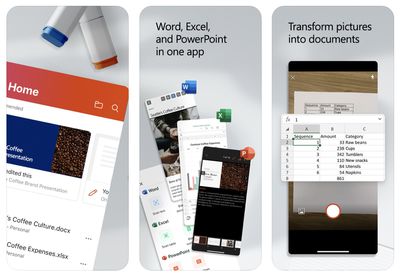
The main benefit of the unified Office app is that it requires only a single download with a much smaller file size, but it does have a few unique features, including camera integration for easily converting photos of documents and tables into Word and Excel files. The app also has a new Actions pane that supports a number of common tasks like signing PDFs and scanning QR codes.
Microsoft explains some of the benefits of the new Office app in a blog post:
The Office app delivers several key benefits including:
- Combining Word, Excel, and PowerPoint in a way that simplifies the experience with fewer apps to download or switch between. It requires far less phone storage than installing individual apps while maintaining virtually all the capabilities of the existing mobile apps people already know and use.
- Integrating our Lens technology to unlock the power of the camera with capabilities like converting images into editable Word and Excel documents, scanning PDFs, and capturing whiteboards with automatic digital enhancements to make the content easier to read.
- Adding new functionality for common tasks people often encounter when working on a phone—things like making quick notes, signing PDFs, scanning QR codes, and transferring files between devices.
The new Microsoft Office app is available on the App Store for the iPhone and on the Google Play Store for Android. Microsoft says the app will be optimized to support the iPad soon. The app is free to use, even without signing in, but an Office 365 subscription starting at $6.99 per month is required to unlock premium features.
Microsoft's standalone Word, Excel, and PowerPoint apps remain available and were
recently updated with a simplified three-tab layout.
(Thanks, Michaël!)
Popular Stories
Since the iPhone X in 2017, all of Apple's highest-end iPhone models have featured either stainless steel or titanium frames, but it has now been rumored that this design decision will be coming to an end with the iPhone 17 Pro models later this year.
In a post on Chinese social media platform Weibo today, the account Instant Digital said that the iPhone 17 Pro models will have an aluminum...
Apple is continuing to refine and update iOS 26, and beta three features smaller changes than we saw in beta 2, plus further tweaks to the Liquid Glass design. Apple is gearing up for the next phase of beta testing, and the company has promised that a public beta is set to come out in July.
Transparency
In some apps like Apple Music, Podcasts, and the App Store, Apple has toned down the...
In select U.S. states, residents can add their driver's license or state ID to the Wallet app on the iPhone and Apple Watch, providing a convenient and contactless way to display proof of identity or age at select airports and businesses, and in select apps.
Unfortunately, this feature continues to roll out very slowly since it was announced in 2021, with only nine U.S. states, Puerto Rico,...
Apple will launch its new iPhone 17 series in two months, and the iPhone 17 Pro models are expected to get a new design for the rear casing and the camera area. But more significant changes to the lineup are not expected until next year, when the iPhone 18 models arrive.
If you're thinking of trading in your iPhone for this year's latest, consider the following features rumored to be coming...
Apple is expanding the ability to add an Apple Account Card to the Wallet app to more countries, according to backend Apple Pay changes.
With iOS 15.5, Apple updated the Wallet app to allow users to add an Apple Account Card, which displays the Apple credit balance associated with an Apple ID.
If you receive an Apple gift card, for example, it is added to an Apple Account that is also...
Three out of four iPhone 17 models will feature more RAM than the equivalent iPhone 16 models, according to a new leak that aligns with previous rumors.
The all-new iPhone 17 Air, the iPhone 17 Pro, and the iPhone 17 Pro Max will each be equipped with 12GB of RAM, according to Fixed Focus Digital, an account with more than two million followers on Chinese social media platform Weibo. The...
Apple should unveil the iPhone 17 series in September, and there might be one bigger difference between the Pro and Pro Max models this year.
As always, the Pro Max model will be larger than the Pro model:iPhone 17 Pro: 6.3-inch display
iPhone 17 Pro Max: 6.9-inch displayGiven the Pro Max is physically larger than the Pro, it has more internal space, allowing for a larger battery and...
The calendar has turned to July, meaning that 2025 is now more than half over. And while the summer months are often quiet for Apple, the company still has more than a dozen products coming later this year, according to rumors.
Below, we have outlined at least 15 new Apple products that are expected to launch later this year, along with key rumored features for each.
iPhone 17 Series
iPho...