Apple Seeds First Public Betas of iOS and iPadOS 13.4 With New Mail Toolbar, iCloud Folder Sharing and More [Updated] - MacRumors
Skip to Content

Apple Seeds First Public Betas of iOS and iPadOS 13.4 With New Mail Toolbar, iCloud Folder Sharing and More [Updated]

Apple today seeded the first public betas of upcoming iOS and iPadOS 13.4 updates to its public beta testing group, a few days after releasing the updates for developers.

Beta testers who have signed up for Apple's beta testing program will be able to download the iOS/iPadOS 13.4 beta update over-the-air after installing the proper certificate on an iOS device.
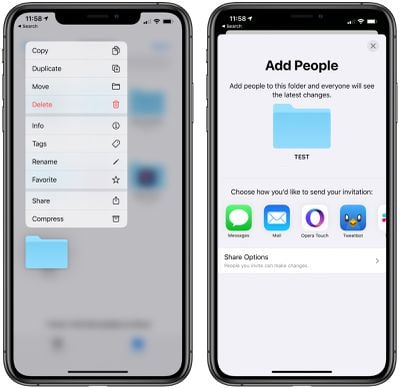
icloudfoldersharing
iOS and iPadOS 13.4 introduce some useful and notable new features and changes. There's a new Mail toolbar that separates the reply button from the delete button to make it harder to accidentally delete emails, there's a new "Shazam It" shortcut in the Shortcuts app for identifying songs, and some tweaks have been made to CarPlay controls for calls and third-party navigation apps.

The update includes support for iCloud Folder Sharing, a long-awaited iOS 13 feature. ‌iCloud‌ Folder Sharing allows iCloud Drive files to be shared with other people, making the folders accessible to multiple users.

There are a total of nine new Memoji/Animoji stickers that can be used wherever emoji can be used, and Apple has made minor changes to Location Services to appease app developers who want to encourage customers to turn on the "Always" option for Location Services for apps that need it.
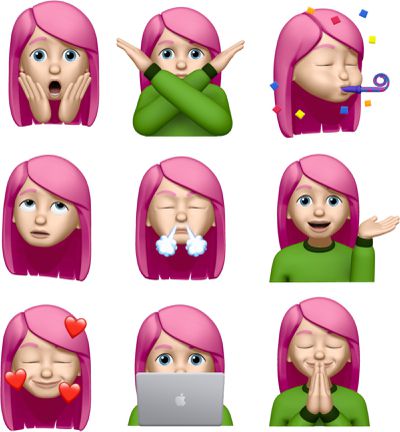
newmemojistickers
Apple has added support for universal app purchases, which means developers can sell a single app across iOS, tvOS, and macOS. For apps that enable this feature, customers will be able to make one purchase and then download an app across all applicable platforms.

There are hints of a new "CarKey" API, which is designed to allow the iPhone or the Apple Watch to be used in lieu of a traditional car key in vehicles that support NFC.

For the iPad specifically, Apple has introduced new keyboard shortcuts for the Photos app for navigating between tabs, search, creating albums, deleting photos, and entering Edit mode, plus there's a new feature for hardware key remapping in iPadOS.

For a full rundown of everything that's new in iOS and iPadOS 13.4, make sure to check out our complete feature list.

Update: Apple has also seeded a new public beta of tvOS 13.4 for the fourth and fifth-generation Apple TV models. tvOS 13.4 brings Family Sharing integration to the ‌Apple TV‌ app.

Related Forum: iOS 13

Popular Stories

Apple Event Logo

Apple's Next Era Begins September 1

Thursday May 7, 2026 10:36 am PDT by
Apple recently announced that Tim Cook will be stepping down as CEO later this year, after 15 years of leading the company. Effective September 1, Apple's hardware engineering chief John Ternus will become the company's next CEO, while Cook will become executive chairman of Apple's board of directors. In his new role, Apple said Cook will assist with "certain aspects" of the company,...
Four iPhone 18 Pro Colors Mock Feature

iPhone 18 Pro Launching in September With These 10 New Features

Saturday May 9, 2026 6:03 am PDT by
While the iPhone 18 Pro and iPhone 18 Pro Max are not launching until September, there are already plenty of rumors about the devices. It was initially reported that the iPhone 18 Pro models would have fully under-screen Face ID, with only a front camera visible in the top-left corner of the screen. However, the latest rumors indicate that only one Face ID component will be moved under the...
MacBook Pro Low Angle Wide Lens

macOS 27: Two More Changes Leaked Ahead of WWDC Next Month

Sunday May 10, 2026 9:45 am PDT by
macOS 27 will have a "slight redesign" compared to macOS Tahoe, according to the latest word from Bloomberg's Mark Gurman. In his Power On newsletter today, Gurman said the design changes will help to improve the readability of macOS Tahoe's Liquid Glass interface:If you've used Tahoe, you're likely familiar with some of the quirks — particularly the transparency effects and shadows that...

Top Rated Comments

Rocko99991 Avatar
82 months ago
I need mail to work, not a new toolbar.
Score: 12 Votes (Like | Disagree)
motm95 Avatar
82 months ago
Ya'll might want to try out Outlook for iOS as an alternative. I prefer it over Mail. And don't let the word "Outlook" scare you - it has nothing to do with MS Outlook for Windows.
Score: 9 Votes (Like | Disagree)
82 months ago
I'll take any FIX to Mail they dish out. In the name of all things good and holy, please just fix Mail...
Score: 9 Votes (Like | Disagree)
Rocko99991 Avatar
82 months ago

Ya'll might want to try out Outlook for iOS as an alternative. I prefer it over Mail. And don't let the word "Outlook" scare you - it has nothing to do with MS Outlook for Windows.
How does it not have anything to do with MS Outlook when it's made by MS and called Outlook?
Score: 8 Votes (Like | Disagree)
crizzly Avatar
82 months ago
It's hard to believe Mail has gone a few months now with such buggy mail fetching. I am considering switching to another mail client at this point but it's too bad we cannot set a default mail handler to have email links open in a third party client. I have a feeling we will need to wait till iOS 14 for a fix to buggy Mail app.

Score: 6 Votes (Like | Disagree)
82 months ago

Because Outlook for iOS was originally an email app from Accompli until that company was bought by Microsoft. So the iOS version is not related to the bloated nightmare that is the desktop client.

Of course it's unrelated to the Windows desktop app because one is a Win32 desktop application and the other is an iOS application. I don't think anyone would even think they're related in that sense.

As for bloated, Outlook 2016 on my computer is currently using less RAM (actually, almost 3x less RAM) than the single tab open to Gmail in my browser.
Score: 5 Votes (Like | Disagree)