Apple Reminds iPhone 5 Owners to Update to iOS 10.3.4 by November 3 - MacRumors
Skip to Content

Apple Reminds iPhone 5 Owners to Update to iOS 10.3.4 by November 3

by

Apple has started advising iPhone 5 owners to update to iOS 10.3.4 before November 3, otherwise several key functions like iCloud and the App Store will no longer work on their device because of a time rollover issue.
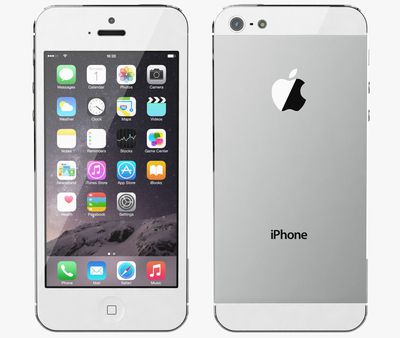
Apple iPhone 5 white
Back in July, Apple released updated versions of iOS for older iPhones and iPads models, including the iPhone 5, to address an issue that could impact GPS location performance and lead to the system date and time being incorrect. The GPS time rollover issue began affecting GPS-enabled products from other manufacturers on April 6, 2019, but Apple's affected devices aren't impacted by the problem until just before midnight UTC on November 3, 2019.

For iPhone 5 and the fourth-generation iPad with Wi-Fi and Cellular, the 10.3.4 update is required to maintain accurate GPS location and to continue to use functions that rely on correct date and time including ‌App Store‌, ‌iCloud‌, email, and web browsing. An iOS 9.3.6 update is available for the also-affected iPhone 4s and cellular models of the original iPad mini, the ‌iPad‌ 2, and the ‌iPad‌ 3.

From Apple's support document:

Starting just before 12:00 a.m. UTC on November 3, 2019, iPhone 5 will require an iOS update to maintain accurate GPS location and to continue to use functions that rely on correct date and time including App Store, iCloud, email, and web browsing. This is due to the GPS time rollover issue that began affecting GPS-enabled products from other manufacturers on April 6, 2019. Affected Apple devices are not impacted until just before 12:00 a.m. UTC on November 3, 2019.

If iPhone 5 models in particular are not updated by November 3, 2019, Apple says users will have to back up and restore using a Mac or PC in order to update, because over-the-air software updates and ‌iCloud‌ Backup will not work.

If you have an iPhone 5, check to make sure your device has updated successfully by following these steps.

  1. Launch the Settings app on your iPhone 5.
  2. Tap General -> About.
  3. Look for the number next to Software Version.

The updated software version should be 10.3.4.

Related Forum: iPhone

Top Rated Comments

90 months ago
Deleted.
Score: 14 Votes (Like | Disagree)
NufSaid Avatar
90 months ago
To support hardware like this that is so old is very generous when you think about it.
Score: 11 Votes (Like | Disagree)
90 months ago
You’ve got to hand it to Apple: providing a software update to the iPhone 4S in 2019 is beyond helpful.

Do you see Samsung offering an update to the Galaxy S1? Or Google to the Nexus S? They wouldn’t even bother.
Score: 10 Votes (Like | Disagree)
PickUrPoison Avatar
90 months ago

It depends. If apple bricks it, that not “generous”. If they are simply removing iCloud access that’s another matter.
Apple’s not bricking anything, and they’re not removing iCloud access.

Apple released 10.3.4 a few months ago to deal with a well-known problem (GPS rollover issue). If iPhone 5 users don’t update, they’re going to have problems.


How? It’s not supported anymore. It’s not like the iPhone 5 is getting iOS 13.
Not getting the latest version of iOS is not the same as unsupported.

Apple released a new version (10.3.4) a few months ago specifically to support customers still using iPhone 5. They need to update or they’ll have problems.
Score: 9 Votes (Like | Disagree)
acblue94 Avatar
90 months ago


Apple has started advising ('https://support.apple.com/en-us/HT210712#925') iPhone 5 owners to update to iOS 10.3.4 before November 3, otherwise several key functions like iCloud and the App Store will no longer work on their device because of a time rollover issue.

Back in July, Apple released updated versions of iOS ('https://www.macrumors.com/2019/07/22/apple-releases-gps-bug-fix-older-iphones-ipads/') for older iPhones and iPads models, including the iPhone 5, to address an issue that could impact GPS location performance and lead to the system date and time being incorrect. The GPS time rollover issue began affecting GPS-enabled products from other manufacturers on April 6, 2019, but Apple's affected devices aren't impacted by the problem until just before midnight UTC on November 3, 2019.

For iPhone 5 and the fourth-generation iPad with Wi-Fi and Cellular, the 10.3.4 update is required to maintain accurate GPS location and to continue to use functions that rely on correct date and time including App Store, iCloud, email, and web browsing. An iOS 9.3.6 update is available for the also-affected iPhone 4s and cellular models of the original iPad mini, the iPad 2, and the iPad 3.

From Apple's support document ('https://support.apple.com/en-us/HT210712#925'):
If iPhone 5 models in particular are not updated by November 3, 2019, Apple says users will have to back up and restore using a Mac or PC in order to update, because over-the-air software updates and iCloud Backup will not work.

If you have an iPhone 5, check to make sure your device has updated successfully by following these steps.
[LIST=1]
* Launch the Settings app on your iPhone 5.
* Tap General -> About.
* Look for the number next to Software Version.

The updated software version should be 10.3.4.

Article Link: Apple Reminds iPhone 5 Owners to Update to iOS 10.3.4 by November 3 ('https://www.macrumors.com/2019/10/27/apple-reminds-iphone-5-owners-update-ios-10-3-4/')
They should also remind iPhone 5 users that it’s 2019. And welcome them.
Score: 7 Votes (Like | Disagree)
Kabeyun Avatar
90 months ago

Macrumors had an article about this on July 22, 2019.

https://www.macrumors.com/2019/07/22/apple-releases-gps-bug-fix-older-iphones-ipads/
Thanks for that, but notification isn’t my point. iOS 13.1.4 isn’t out yet, at least not for me, and we have only a week to install it before there are adverse consequences. Time to deploy, Apple.

Edit: Holy crap, I’ve been thinking of 13.1.4, while this is all about 10.1.4. I’ll just face palm myself and move on. And I’m leaving my posts up to show that I’ll own a dumb error.
Score: 6 Votes (Like | Disagree)

Popular Stories

All Screen iPhone 2030 Feature Sans Text

iPhone 18 Pro: Nine Reasons Not to Upgrade This Year

Monday September 7, 2026 5:01 am PDT by
Apple is set to unveil new iPhone 18 Pro and iPhone 18 Pro Max models on Wednesday, September 9, and the devices are expected to feature a design that's largely similar to the iPhone 17 Pro models, with a peppering of enhancements inside. Major changes are not expected until next year, when Apple is expected to introduce a radically redesigned 20th-anniversary iPhone. If you're thinking of...
iPhone 18 Pro Dark Cherry Feature

iPhone 18 Pro Reportedly Starts With 256GB of Storage

Thursday September 3, 2026 9:22 am PDT by
While the iPhone 17 Pro has double the base storage compared to the iPhone 16 Pro, there will apparently be no further increase this year. Taiwanese research firm TrendForce today again reported that the iPhone 18 Pro models will start with 256GB of storage, like the iPhone 17 Pro models. Minimum storage capacities by model:iPhone 16 Pro: 128GB iPhone 17 Pro: 256GB iPhone 18 Pro...
Foldable iPhone Ultra Still Likely to Be Missing These Five Features 16x9 1

Foldable 'iPhone Ultra' Still Likely to Be Missing These Five Features

Friday September 4, 2026 3:00 pm PDT by
Apple's first foldable iPhone, dubbed the "iPhone Ultra," is expected to launch without at least four features that will be present on the iPhone 18 Pro models, despite a price tag of at least $2,000. The iPhone Air lacks Ultra Wide and Telephoto rear cameras, a SIM card slot, and stereo speakers. With a super thin design, a titanium frame, and a glass back, the iPhone Ultra is expected to ...