Procreate Illustration App for iPad Gains New Text Manipulation Features
The Procreate app for iOS was today updated to version 4.3, introducing several major features that enable new text manipulation abilities within illustrations, as well as general speed and performance improvements.
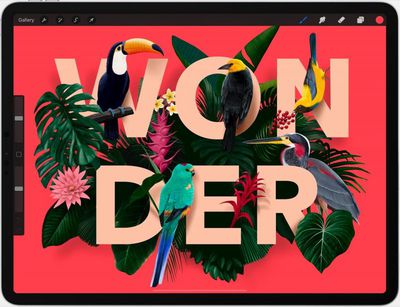
Users of the popular illustration app for iPad can now add editable typography to their illustrations, while precision sliders make it possible to refine spacing and alignment, and rasterize the results to finish.
This release also introduces the ability to drag and drop fonts into Procreate, while new layer export options allow you to share layers as folders containing PNG images, a multi-page PDF, or an animated GIF.
Elsewhere, there's new pressure smoothing settings to enhance strokes, and new layer blend modes including Darker/Lighter Color, Vivid Light, Linear Light, Pin Light, Hard Mix and Divide.
Procreate 4.3 is a free update for existing users. New users can download Procreate from the App Store for $9.99. [Direct Link]
Popular Stories
Apple is launching five new products on Friday, November 6, following pre-orders that opened last week, including its first touchscreen MacBook Pro models.
The following new products will be available from today:
iPad mini with OLED display and A20 Pro chip
iMac with M6 chip
14-inch MacBook Pro with M6 chip
14-inch MacBook Pro with OLED touchscreen
16-inch MacBook Pro with OLED...
Apple is sending email surveys to some iPhone Duo buyers to get feedback on display size, crease, under-display camera, and other features.
The first question asks why the buyer chose the iPhone Duo now, with answers like "I wanted to try Apple's first foldable," "It was an impulse purchase," and "I expect smartphone prices to increase."
Other questions ask about the size of the iPhone...
Apple today announced that its Festival Place store in Basingstoke, England will be permanently closing on Saturday, November 21.
Apple Festival Place
Apple had already announced that the store would be closing in November, but it had not provided the public with a specific date until now.
Apple's store inside the Festival Place shopping center opened in 2011, so it had a 15-year run....