

Yoink for Mac Updated With Clipboard Support - MacRumors
Skip to Content

Yoink for Mac Updated With Clipboard Support

by

Eternal Storms Software today updated its popular drag and drop Mac app Yoink with several improvements, including clipboard support.

yoink mac app
Mac users can now add the contents of their clipboard to Yoink by opening the app's dropdown menu from the menu bar and clicking "Add from Clipboard." If you copy an image from a website, for example, you can essentially paste it into Yoink and it will appear as a TIFF file that can be dragged and dropped.
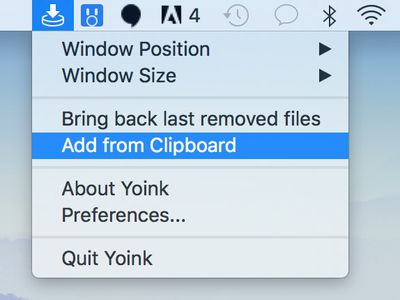
yoink clipboard
Alongside clipboard support, PopClip can now be integrated with Yoink after installing a plugin in the app's advanced preferences.

Yoink 3.4 has improved compatibility with several apps, including Messages and Mail on macOS High Sierra, Parallels, ForkLift, Keka, Horos, and JPEGmini. The update also fixes a bug in macOS High Sierra where performing a dragging gesture would sometimes result in files being selected in Yoink.

Yoink, first released in 2011, is a popular drag and drop helper for Mac. When you drag a file, the app pops open along the edge of the screen as a convenient place to drop the file. Yoink will hold on to the files you drag into it until you drag them out again, freeing up your mouse to navigate more easily.

Yoink 3.1

Yoink 3.4 is available now on the Mac App Store [Direct Link] as a free update for existing users. The app costs $6.99 for new users.


Top Rated Comments

macs4nw Avatar
116 months ago
I love it! One of the kings of the Mac App Store! Highly recommended!
I love this app so much!
This is a great example of an app I wish I could try for free before buying. It looks useful, but I'm not sure I'll integrate it into my workflow.
Hadn't heard of it before, but based upon your positive feedback, I'm curious to try this out.
Score: 3 Votes (Like | Disagree)
116 months ago
I love it! One of the kings of the Mac App Store! Highly recommended!
Score: 2 Votes (Like | Disagree)
116 months ago
It was added in Lion. Cmd+opt+v moves a copied file. Pretty basic.
I knew you could copy/paste files but did not know about the Cmd+opt+v combo.
Score: 1 Votes (Like | Disagree)
philosopherdog Avatar
116 months ago
Yoink would be absolutely useless if Apple adhered to universal standards with CMD+X and CMD+V commands to move files.

But then again, Apple has either the incompetent people working for them if not at least the most stubborn.

It was added in Lion. Cmd+opt+v moves a copied file. Pretty basic.
Score: 1 Votes (Like | Disagree)
Jessica Lares Avatar
116 months ago
FYI: You need to log out then back in before the new PopClip extension will work. ;)
Score: 1 Votes (Like | Disagree)
macsplusmacs Avatar
116 months ago
I love this app so much!
Score: 1 Votes (Like | Disagree)

Popular Stories

Apple Event Logo

Apple Unveiled Four New Products Today

Tuesday August 25, 2026 8:39 am PDT by
Apple today unveiled a new Mac mini with M6 and M5 Pro chip options, a new Mac Studio with M5 Max and M5 Ultra chip options, a new version of the Polishing Cloth with a lower price, and updated Magic Keyboards for Macs. To learn more about these products, read our coverage below: Apple Announces New Mac Mini With M6 and M5 Pro Chips and More Apple Unveils New Mac Studio With M5 Max and M5...
iPhone 18 Pro Dark Cherry Feature

iPhone 18 Pro and iPhone Ultra: When Will Apple Event Be Announced?

Monday August 24, 2026 6:45 am PDT by
It is now late August, meaning that Apple's annual iPhone event is just around the corner. Below, we take a look at when the event might be held this year. This September, Apple is expected to unveil the iPhone 18 Pro, iPhone 18 Pro Max, and an all-new foldable iPhone that will reportedly be named the iPhone Ultra. The regular iPhone 18, a lower-end iPhone 18e, and the iPhone Air 2 are not...
apple magic keyboard with glyphs 2026 refresh

Apple Quietly Refreshes Magic Keyboards

Tuesday August 25, 2026 7:22 am PDT by
Apple today quietly introduced updated Magic Keyboard models with revised U.S. English key labeling. On the new keyboards, the tab, caps lock, shift, return, and delete keycaps are labeled with glyphs rather than edge text. On the full-size models with a numeric keypad, the change goes further, with the home, page up, page down, end, clear, and enter keys also swapping their text labels for...








































