Google Search and Maps Apps Gain 'SOS Alerts' Feature - MacRumors
Skip to Content

Google Search and Maps Apps Gain 'SOS Alerts' Feature

by

Google launched a new feature for its Search and Maps apps today that aims to help users stay on top of events when a natural disaster or other crisis occurs near their location (via TechCrunch).

Called "SOS Alerts", the notifications will appear at the top of Google search results and Maps when a user looks for information about an incident or the affected area.
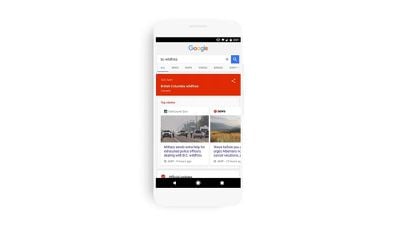
SOS Alerts
In the Search app, Google will offer an overview of the incident using maps, relevant news stories, emergency phone numbers where available, websites, and any other information that might be useful. In the event that the user is in close proximity to the incident, Google may also send notifications directing users to further details.

The same information will show up in the Maps app where relevant, for example in search results, with real-time updates detailing road closures and traffic and transit updates.

Google has worked with several organizations to bring the feature to its Search and Maps apps, including the Red Cross, the Federal Emergency Management Agency, the Philippine Atmospheric, and Geophysical and Astronomical Services Administration.

Google Maps and Search can be downloaded from the App Store for free.

Top Rated Comments

114 months ago
So my understanding (from the MR post and TechCrunch and Google's press release) is that this isn't a service/feature you opt into, it will do it by default, is that correct? None of them say this explicitly but I'm assuming so. Wonder how it works for people who have location services turned off for Google -- will it still know what country you're in and push related national alerts?
There is nothing to opt-in to. This isn't a push notification service. These are shown at the top of search results when performing a search for a place or thing relevant to some type of emergency situation. And, if you aren't using location services, using Google Maps seems like it would be difficult. Regardless, it isn't required since these are being shown off relevant searches when using Google search. Google can approximate your location without the need for location from the users anyways.
[doublepost=1501014673][/doublepost]
We track you here. We track you there. We track you. We track you everywhere.
What does this have to do with tracking? Showing emergency alerts based off of searches has nothing to do with tracking.
Score: 2 Votes (Like | Disagree)

Popular Stories

Gmail General

Don't Like Your Gmail Email Address? You Can Finally Change It

Tuesday March 31, 2026 7:31 am PDT by
Google today announced that you can finally change the Google Account email address that you use for Gmail, Google Calendar, Google Photos, Google Drive, and more, but this ability is only rolling out to U.S. accounts for now. The company did not indicate if or when this functionality will be available in other countries. You can switch to any available @gmail.com address, and your previous...
google chrome vertical tabs

Google Brings Vertical Tabs and Improved Reading Mode to Chrome

Tuesday April 7, 2026 1:27 pm PDT by
Google today updated its Chrome browser with support for vertical tabs, which are displayed in a sidebar instead of at the top of the browser. The tab layout can be changed by right clicking on any Chrome window and choosing the "Show Tabs Vertically" option. Sidebar tabs feature full page titles and make it simple to organize tab groups. Google has also added a new full-page interface...
Chrome Feature 22

Gemini in Google Chrome Gets a Skills Library for Saving Custom AI Prompts

Tuesday April 14, 2026 10:00 am PDT by
Chrome has been updated today with a Skills library that's designed to let Chrome users turn AI tasks into repeatable skills that can be used on any website. Useful prompts you create for Gemini in Chrome can be saved as a Skill that can be accessed later with a single click. If you're shopping for skincare and ask Gemini about the ingredients in a product, for example, you can save the...