

iOS 11 Makes it Easy to Share Your Wi-Fi Password With Nearby Friends - MacRumors
Skip to Content

iOS 11 Makes it Easy to Share Your Wi-Fi Password With Nearby Friends

With the developer beta of iOS 11 out in the wild, new features of the operating system have been coming to light throughout the week, including an unobtrusive volume indicator and new AirPods controls. In iOS 11, users will also be able to easily join a Wi-Fi network thanks to a new password sharing process between trusted devices, which should reduce the hassle of joining new networks.

The feature allows one iOS device with knowledge of a Wi-Fi network's password to grant access to a separate iOS device that still needs the password in question. 9to5Mac detailed an example where an iPad was already on a Wi-Fi network, while an iPhone still required the Wi-Fi password to connect.

All devices must be running iOS 11, and it appears that macOS High Sierra will support the feature as well.
ios 11 wifi on iphone sharing

Images via 9to5Mac

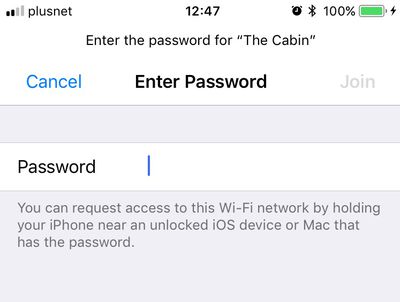
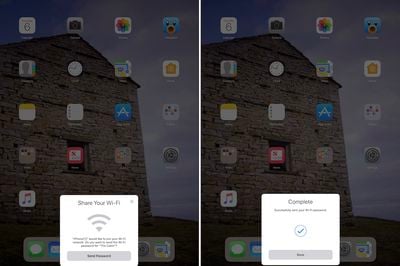
After navigating to Settings > Wi-Fi and choosing the right network, the iPhone user is greeted with the traditional password screen (seen above), but on iOS 11 when the iPhone is brought near the iPad, a card on the iPad notifies its user that the iPhone wants to join the network (seen below).

The iPad user can then tap and send their password to the iPhone, which recognizes the password, fills out the information, and connect to the Wi-Fi. As Apple notes, the iOS device or Mac with knowledge of the network's password must be unlocked for the transfer process to work.
ios 11 ipad wifi
There are plenty more iOS 11 tidbits to discover in the wake of the official unveiling this week at WWDC, so be sure to check out the MacRumors iOS 11 roundup to find out everything we know about the newest version of iOS.


Related Forum: iOS 11

Popular Stories

iOS 26

iOS 26.4 Adds Two New Features to CarPlay

Tuesday March 24, 2026 1:55 pm PDT by
iOS 26.4 was released today, and it includes a couple of new features for CarPlay: an Ambient Music widget and support for voice-based chatbot apps. To update your iPhone 11 or newer to iOS 26.4, open the Settings app and tap on General → Software Update. CarPlay will automatically offer the new features so long as the iPhone connected to your vehicle is running iOS 26.4 or later....
Apple Business hero

Apple Unveils 'Apple Business' All-in-One Platform

Tuesday March 24, 2026 8:53 am PDT by
Apple today announced Apple Business, a new all-in-one platform that unifies device management, productivity tools, and customer outreach features. The service is designed to be a consolidated replacement for several of Apple's existing business-focused offerings, including Apple Business Essentials, Apple Business Manager, and Apple Business Connect. It provides organizations with a single...
AirPods Pro Firmware Feature

Apple Releases New Firmware for AirPods Pro 3, AirPods Pro 2 and AirPods 4

Tuesday March 24, 2026 12:31 pm PDT by
Apple today released new firmware for the AirPods Pro 2, AirPods Pro 3, and the AirPods 4. The firmware has a version number of 8B39, up from 8B34 on the AirPods Pro 3, 8B28 on the AirPods Pro 2, and 8B21 on the AirPods 4. There is no word on what's included in the firmware, but Apple has a support document with limited notes. Most updates are limited to bug fixes and performance...

Top Rated Comments

115 months ago
What about corporate situations where we don't want our end users having or knowing the password? Is there any way as an IT administrator to disable this for our network?
Corporate wifi should be using radius type authentication not PSK.
Score: 10 Votes (Like | Disagree)
115 months ago
If someone wants access to your network, you don’t have to tell them the password. You can ask for their device and type the password in yourself. Then they have access to the network but don’t know your password. This seems to bypass that bit of security as now anyone with access to your network could theoretically grant access to additional people.
This is not secure at all. For example, if the person has activated iCloud Keychain, the Wifi password may be synced to a Mac where it can simply be viewed in Keychain Access.
That said, if you’re that concerned with securing your network, either properly vet those you grant access to, use a different authenticion method, guest network, etc.
Yup.
Score: 9 Votes (Like | Disagree)
joshwenke Avatar
115 months ago
What about corporate situations where we don't want our end users having or knowing the password? Is there any way as an IT administrator to disable this for our network?
Score: 7 Votes (Like | Disagree)
115 months ago
After everyone realizes they will lose all their 32 bit free & other games, they will realize that IOS 11 is as Steve Jobs once said, "A Bag of Hurt."
Just like when steve removed support for legacy 16 bit Mac apps... Or when microsoft removed win 3.1 app support.. you can't support old software forever :P
Score: 5 Votes (Like | Disagree)
Fall Under Cerulean Kites Avatar
115 months ago
How would that be any different than verbally telling someone the password? They could then verbally tell someone else...
If someone wants access to your network, you don’t have to tell them the password. You can ask for their device and type the password in yourself. Then they have access to the network but don’t know your password. This seems to bypass that bit of security as now anyone with access to your network could theoretically grant access to additional people.

That said, if you’re that concerned with securing your network, either properly vet those you grant access to, use a different authenticion method, guest network, etc.
Score: 5 Votes (Like | Disagree)
Kaibelf Avatar
115 months ago
After everyone realizes they will lose all their 32 bit free & other games, they will realize that IOS 11 is as Steve Jobs once said, "A Bag of Hurt."
Yeah, I checked and out of the many dozens of apps on my phone, ONE of them wasn't ready to go, and I hadn't used that app in many many months. I think somehow society will live on.
Score: 4 Votes (Like | Disagree)














