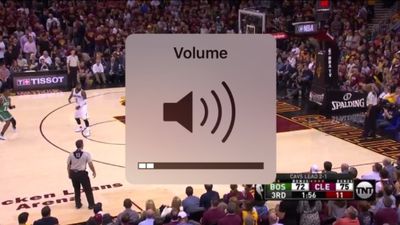
iPhone users can finally cross one item off their wishlists: the volume slider no longer covers videos in iOS 11.
iOS 11 volume HUD screenshot shared by Twitter user Devon T.
Now, when a user adjusts the volume while watching a video, a much smaller volume HUD appears in the top-right corner of the screen.
While the change is small, the user interface tweak was highly requested by many iPhone users for several years. On iOS 10 and earlier, the volume HUD intrusively pops up in the center of the screen for a few seconds after the volume is adjusted, unnecessarily covering the video content until it disappears.
iOS 10 volume HUD screenshot shared by Twitter user Justin L.
Some third-party apps such as YouTube already had their own smaller volume HUD, and now the look is universal across iOS 11, as part of Apple's broader improvements to the native video player on iPhone, iPad, and iPod touch.
Friday October 16, 2026 4:37 pm PDT by Juli Clover
Verizon plans to charge customers $10 per month for the iPhone Handoff feature that Apple added in iOS 27. iPhone Handoff allows one phone number to be shared across two separate iPhones.
Pricing was included in Verizon's iPhone Duo announcement today, with the carrier confirming iPhone Handoff will work with the iPhone Duo and the iPhone 18 Pro models.
Verizon will support iPhone Handoff,...
Apple has begun inviting selected members of the media to a product launch experience in Los Angeles on Wednesday, October 28, according to Bloomberg's Mark Gurman.
In a post on X, Gurman described the gathering as an "all-day product launch experience" for touchscreen MacBooks, a new iPad mini, and Macs equipped with M6 chips.
Gurman previously reported that Apple would introduce the...
Thursday October 15, 2026 5:27 pm PDT by Juli Clover
Apple has an unreleased iPad mini Smart Folio listed on its French regulatory website, hinting that a new iPad mini is coming. The case's A3632 model number doesn't match current or past iPad mini cases.
Apple appears to have added the case to its website recently, and it's listed alongside iPhone 18 Pro accessories added in September.
The listing doesn't include any iPad mini specs, but...
Nice! Surprised nobody noticed until now? Don't let people fool you when they say iOS 11 doesn't change much. All of these small changes add up to a better user experience.
Now if only we could get them to implement the same double tap left/right on a video to skip back/forward 10 seconds that YouTube has. I find myself accidentally trying to do this in the native video controller all the time because it's so useful and intuitive.
Apple's first foldable iPhone, with a book-style design featuring a 5.4-inch outer display and a 7.6-inch inner display with a minimal crease down the middle.