Latest Chrome Canary Build Includes Support for MacBook Pro Touch Bar - MacRumors
Skip to Content

Latest Chrome Canary Build Includes Support for MacBook Pro Touch Bar

by

The newest build (58.0.3020.0) of Chrome Canary, Google's experimental browser, includes support for the Touch Bar built into the 2016 MacBook Pro, indicating Touch Bar support will soon be added to the Chrome browser.

On the Touch Bar, the current Chrome Canary build offers a search/URL bar, forward and back buttons, a refresh/stop option, a button for opening a new tab, and a button for adding a new bookmark.
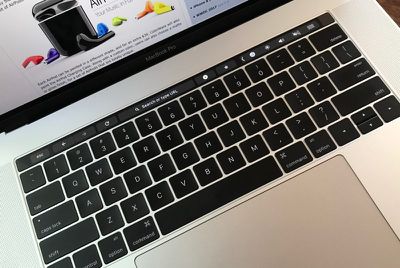
macbookprochrometouchbar
It's much a simpler implementation than Touch Bar support in Safari, which includes preview tabs for quickly switching between windows. There are also no controls available for video or music playback in the browser.

Features are tested in Canary before being added release builds of the Google Chrome browser, so Touch Bar support is expected in Chrome 58, set to be released during the week of April 25th.

Those who want to give Touch Bar support a try ahead of the release of Chrome 58 can download Chrome Canary from Google.


Tags: Chrome, Google

Top Rated Comments

alphaod Avatar
120 months ago
Looking forward to it, but I don't use the Touch Bar for anything. It's still much faster to use keyboard shortcuts.\

I can see this being good for my folks or other people who are less familiar with keyboard shortcuts.
Score: 9 Votes (Like | Disagree)
otternonsense Avatar
120 months ago
There's nothing useful about the Touchbar, other than perhaps scrolling through a song without opening Spotify or iTunes. Especially when working on 2 displays, the last thing I wanna do is interrupt my focus to look down on this wonky emojistrip. I also wish the new MBPs had the option to ship without it.
Score: 4 Votes (Like | Disagree)
120 months ago
But who besides pros and heavy users pay more than 3 thousand cash for a laptop?
The same people who buy Gucci and Prada. The target audience of Apple today are the novice tech people who aren't interested in the best or value for money and those same people aren't that demanding in wanting the best in money can buy. Apple wants to be a status symbol. They always were a bit more expensive in history but they were better then their competitors too. Today it's 'bling', status and overpriced minus premium delivery.
Score: 3 Votes (Like | Disagree)
120 months ago
There's nothing useful about the Touchbar, other than perhaps scrolling through a song without opening Spotify or iTunes. Especially when working on 2 displays, the last thing I wanna do is interrupt my focus to look down on this wonky emojistrip. I also wish the new MBPs had the option to ship without it.
Apple needs a reason to up the price by € 500,-. The ergonomic touchbar disaster is one of them. They target one finger typing persons who have to look down at the keyboard anyway. It's about 5 years ago Apple targeted the heavy user anyway.
Score: 3 Votes (Like | Disagree)
120 months ago
Man, they are trying really hard to make the Macbook a joke among actual "pro" users. First they remove features the pros need and then they add useless features on top, just to add insult to injury. :(

I guess I'll work on my maxed out 2014 MBP a few more years and then switch to a Windows laptop.
Score: 3 Votes (Like | Disagree)
atikalz Avatar
120 months ago
Why isn't the escape key at the very left end of the touchbar?
What is the purpose of it being offset relative to the tilde key?
That's because John Ive (the man who invented a round mouse) needs everything aligned perfect optically instead of ergonomic and usable. And the right side needed to be offset because of touch id.

Score: 2 Votes (Like | Disagree)

Popular Stories

Gmail General

Don't Like Your Gmail Email Address? You Can Finally Change It

Tuesday March 31, 2026 7:31 am PDT by
Google today announced that you can finally change the Google Account email address that you use for Gmail, Google Calendar, Google Photos, Google Drive, and more, but this ability is only rolling out to U.S. accounts for now. The company did not indicate if or when this functionality will be available in other countries. You can switch to any available @gmail.com address, and your previous...
google chrome vertical tabs

Google Brings Vertical Tabs and Improved Reading Mode to Chrome

Tuesday April 7, 2026 1:27 pm PDT by
Google today updated its Chrome browser with support for vertical tabs, which are displayed in a sidebar instead of at the top of the browser. The tab layout can be changed by right clicking on any Chrome window and choosing the "Show Tabs Vertically" option. Sidebar tabs feature full page titles and make it simple to organize tab groups. Google has also added a new full-page interface...
Chrome Feature 22

Gemini in Google Chrome Gets a Skills Library for Saving Custom AI Prompts

Tuesday April 14, 2026 10:00 am PDT by
Chrome has been updated today with a Skills library that's designed to let Chrome users turn AI tasks into repeatable skills that can be used on any website. Useful prompts you create for Gemini in Chrome can be saved as a Skill that can be accessed later with a single click. If you're shopping for skincare and ask Gemini about the ingredients in a product, for example, you can save the...