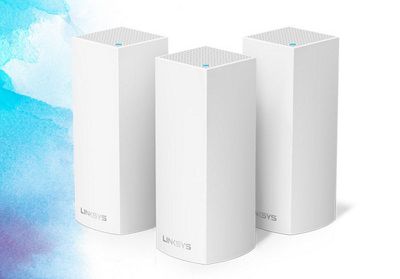
Linksys today announced a modular Wi-Fi system called "Velop," which boosts internet coverage throughout any style of home thanks to its multi-unit set-up, similar to products like Google Wi-Fi and Eero (via The Verge). Linksys said that Velop can be set up in just minutes and delivers some of the fastest and most reliable Wi-Fi in the multi-unit router market.
velop-router-3
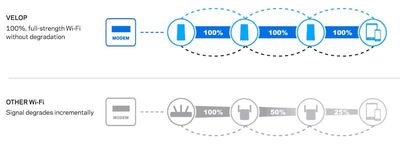
Like similar products, Velop's advantage lies in its ability to be placed situationally around a home to create a steady blanket of internet coverage with no dead spots, even in oddly shaped houses. The company said that Velop "outperforms traditional routers and range extenders" because it doesn't degrade as users move farther away from the router.

Velop is also a tri-band system, meaning that one of its three Wi-Fi radios is constantly dedicated to communication between each router to ensure there's no speed drop off at any point in the connection. The "100% Wi-Fi mesh network signal" means that users get constant, seamless Wi-Fi with no buffering or lag.
velop-router-4

A Velop modular Wi‑Fi mesh system outperforms traditional routers and range extenders giving you 100% seamless Wi‑Fi without lag or buffering. With other Wi‑Fi, the signal degrades as you move farther away from the router, leaving you susceptible to dropped connections. Velop gives you full-strength Wi‑Fi everywhere.

Feel free to video stream while the kids are gaming online. Velop’s Tri-Band technology dynamically changes to ensure and deliver blazing fast, seamless Wi‑Fi to all devices for the ultimate in Wi‑Fi freedom.

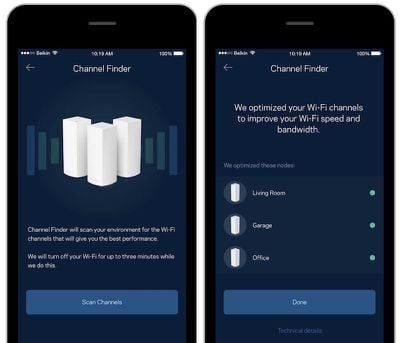
A connected Linksys app also makes it easy for users to manage their Wi-Fi from afar, including parental control settings, device prioritization to ensure extra-solid internet for streaming to an Apple TV for example, speed tests, and various other settings. Velop works with Amazon Alexa as well, so users can interact with the router system with their voice.
velop-router-1
Velop goes on sale today at a steeper price in comparison to other multi-unit routers: it runs for $499.99 for a 3-pack, $349.99 for a 2-pack, and $199.99 for one Velop router.


Top Rated Comments

doelcm82 Avatar
117 months ago
Wifi router market has been dying for some time. After people initially bought one, there's little reason to buy a new one for years.

Now to revive sales, router makers are coming up with these new setups and pushing them as must-haves.

The reality is that a standard 802.11n router is more than fast enough for almost all users. Very very few will see any benefit from these new routers. But that won't stop them from making you believe that you'll see huge benefits from dropping $500 on a new setup.
This is for people with large houses. I have friends who can't get a wi fi signal in parts of their house, so they have multiple wifi networks. A system like this would allow them to run a single network. A single network would also make it easier to set up home automation.
Score: 9 Votes (Like | Disagree)
Corrode Avatar
117 months ago
Apple needs to step up and release a mesh network system.
Score: 8 Votes (Like | Disagree)
SpamJunkie Avatar
117 months ago
The reality is that a standard 802.11n router is more than fast enough for almost all users. Very very few will see any benefit from these new routers. But that won't stop them from making you believe that you'll see huge benefits from dropping $500 on a new setup.
I don't think so. Many people complain about bad wifi at home: dead spots, slow speeds, etc. It depends on your home; for a lot of people mesh will make a big improvement. Not only that, lots of people will see a difference between an old 802.11n router and a modern 802.11ac one. The differences may not be as big as they were in the past, and it's not for _everyone_, but these aren't esoteric, contrived technologies.
Score: 7 Votes (Like | Disagree)
jerry16 Avatar
117 months ago
I like how everyone else is coming out with these cool routers (Linksys, Google, and some others) while Apple is allegedly exiting the business. Bummer.

Score: 4 Votes (Like | Disagree)
Lixivial Avatar
117 months ago
The reality is that a standard 802.11n router is more than fast enough for almost all users. Very very few will see any benefit from these new routers. But that won't stop them from making you believe that you'll see huge benefits from dropping $500 on a new setup.
Not really about speed, but about accessibility. These mesh networks are meant to replace scenarios under which a repeater would've previously been used. As illustrated in the article, when using a repeater, the network speed is halved with every hop you take. My house is an old house with lathe and plaster walls and 2 floors + a basement -- getting a signal from one corner of the second floor to the main floor is next to impossible without severe degradation. Even in mid-sized apartments, dead spots and slower wifi can occur regardless of beam-forming.

Aside from dead spot management, I really love having wired network segments talking to each other over wifi. It means i can let the network device handle wifi communication and let older legacy devices like, say, video game consoles, work over the wire. The benefit there is that I don't need to broadcast a separate 802.11g network or bring down the speed of my ac network and I don't need to wire the house to get a reasonably decent network connection.

Regardless of whether "many, many users" or "very, very few users" will see benefits, these systems scale outward. So all you have to do is pay for the base unit up front and can add nodes to the network as budgets allow or network segments grow.
Score: 3 Votes (Like | Disagree)
macpanzer Avatar
117 months ago
This is for people with large houses. I have friends who can't get a wi fi signal in parts of their house, so they have multiple wifi networks. A system like this would allow them to run a single network. A single network would also make it easier to set up home automation.
There is nothing stopping them from having a single network now, without any new devices. Just configure both the access points with the same SSID and password and put them on different (preferrably non overlapping) channels. There will be a single WIFI network and clients will be roaming between the access points should they move around.
Score: 2 Votes (Like | Disagree)

Popular Stories

apple music chatgpt

ChatGPT's Apple Music Integration Is Now Live

Wednesday December 17, 2025 3:50 pm PST by
There's now a dedicated Apple Music app for ChatGPT, which allows ChatGPT to make music recommendations and build playlists. Apple Music can be added to ChatGPT through the Settings section in the Mac app, website, or iOS app. Apple Music is listed under the apps option, and connecting to it requires signing in with your Apple Account for authorization purposes. ChatGPT can be used to...
iPhone Top Left Hole Punch Face ID Feature Purple

iPhone 18 Pro Features Leaked in New Report, Including Under-Screen Face ID

Tuesday December 16, 2025 8:44 am PST by
Next year's iPhone 18 Pro and iPhone 18 Pro Max will be equipped with under-screen Face ID, and the front camera will be moved to the top-left corner of the screen, according to a new report from The Information's Wayne Ma and Qianer Liu. As a result of these changes, the report said the iPhone 18 Pro models will not have a pill-shaped Dynamic Island cutout at the top of the screen....
airpods pro 3 new blue

AirPods Pro 3's Static and Noise Issues Haven't Been Resolved

Thursday December 18, 2025 3:44 pm PST by
Since the AirPods Pro 3 launched, there have been complaints from users who have noticed a static-like sound or a crackling issue when using the earbuds, particularly when Active Noise Cancellation is on but no media is playing. Users have also run into strange high-pitched whistling sounds that happen intermittently. We shared the issues back in late October, and despite two subsequent...
iOS 26 Maps Glass

Apple Quietly Discontinued Flyover City Tours in Apple Maps

Thursday December 18, 2025 1:31 pm PST by
Apple Maps no longer offers a Flyover feature that provides users with automated tours of notable landmarks in major cities. The Flyover option appears to have been nixed around when iOS 26 launched, but its removal went largely unnoticed. Flyover city tours were introduced in 2014 with iOS 8 and OS X Yosemite, using Flyover imagery to generate an aerial tour. Most cities with Flyover...


apple beta 26 lineup

Apple's 2026 and 2027 Product Roadmap: Foldable iPhone, iPhone 18 Pro, M5 Macs, and More

Tuesday December 16, 2025 4:42 pm PST by
There has been a whirlwind of rumors over the last few days, sourced from leaked internal software designed for the iPhone and the Mac, and news sites like The Information. Below, we have a quick recap of everything we've heard this week, which serves as a guide to Apple's product plans in 2026 and beyond. We've organized the info by likely release date, though there are some products that...
top stories 2025 12 20

Top Stories: iOS 26.3 Beta, Major Apple Leaks, and More

Saturday December 20, 2025 6:00 am PST by
You'd think things would be slowing down heading into the holidays, but this week saw a whirlwind of Apple leaks and rumors while Apple started its next cycle of betas following last week's release of iOS 26.2 and related updates. This week also saw the release of a new Apple Music integration with ChatGPT, so read on below for all the details on this week's biggest stories! Top Stories i...
iOS 26

Apple Releases First iOS 26.3 and iPadOS 26.3 Public Betas

Wednesday December 17, 2025 10:06 am PST by
Apple today provided beta testers with the first releases of upcoming iOS 26.3, iPadOS 26.3, tvOS 26.3, and watchOS 26.3 updates for testing purposes. The public betas come a couple of days after Apple provided the betas to developers. Anyone can download and install public betas, and all that's required is to sign up on Apple's beta site. Once you've opted in, the software can be...