TextEdit Icon Spotted on iOS 10 During WWDC 2016 Demo
During its What's New in Metal, Part 1 session at WWDC 2016, Apple used an iPad to demo the graphics API's new adaptive tessellation capabilities on iOS 10. At the 17:58 mark of the video, a TextEdit icon can be seen on the iPad's home screen from the multitasking app switcher screen.
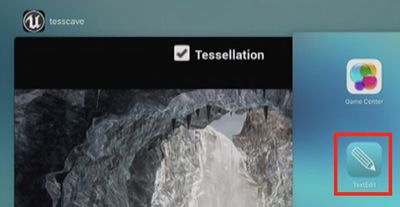
TextEdit is Apple's basic word processor preinstalled on macOS Sierra and previous OS X versions, but the company has not released a mobile version for iPhone, iPad, and iPod touch as it has done for some of its other first-party Mac apps. There are also no third-party apps that fully match the app shown in the screenshot.
TextEdit and Preview icons were previously spotted in a pre-release iOS 8 screenshot, but neither of the apps were included in the public version of the software update. An early 2014 report had said both apps would debut on iOS 8 as read-only document viewers for Preview and TextEdit files stored in iCloud from a Mac.
While there is an outside chance that Apple plans to release a basic text editor on iOS to complement Notes and Pages, the most likely explanation is that TextEdit serves as a simple "Hello World" testing app for internal developers. Apple is known to have several internal apps for use by software engineers and employees only.
Game Center is also shown, despite being removed as a standalone app on iOS 10.
Apple previewed iOS 10 at its WWDC 2016 keynote on June 13 and has seeded the first beta to developers. A public beta will be available in July ahead of an official launch in the fall. iOS 10 is compatible with most devices that can run iOS 9, excluding the iPhone 4s, iPad 2 and 3, original iPad mini, and fifth-generation iPod touch.
(Thanks, Ahmad!)
Popular Stories
Apple today announced it will be permanently closing three retail stores in the U.S. in June, including Apple Trumbull in Trumbull, Connecticut, Apple North County in Escondido, California, and Apple Towson Town Center in Towson, Maryland.
Apple Towson Town Center in Maryland
Apple issued the following statement to MacRumors:At Apple, we are constantly striving to deliver exceptional service...
Apple has released a minor iOS 26.4.1 update for the iPhone 11 and newer. While the release notes for the update only mention unspecified "bug fixes," we have since learned about two specific changes that are included in it.
First, 9to5Mac spotted an Apple Developer Forums thread suggesting that iOS 26.4.1 fixes an iOS 26.4 bug that affected iCloud syncing in some apps.
Second, an...
Last year, Apple launched CarPlay Ultra, the long-awaited next-generation version of its CarPlay software system for vehicles. Nearly a year later, CarPlay Ultra is still limited to Aston Martin's latest luxury vehicles, but that should change fairly soon.
In May 2025, Apple said many other vehicle brands planned to offer CarPlay Ultra, including Hyundai, Kia, and Genesis.
CarPlay Ultra...
Popular Stories
In late March, Apple notified the winners of the 2026 Swift Student Challenge, who each received a complimentary one-year Apple Developer Program membership, AirPods Max 2, and a special certificate. A smaller group of Distinguished Winners were also invited to a three-day experience at Apple Park during WWDC 2026 in June.
The annual Swift Student Challenge gives eligible student developers...
Students and developers who won the lottery to attend the WWDC 2026 Special Event at Apple Park on June 8 have started receiving their invites.
Apple is holding a WWDC keynote viewing at Apple Park, but space is limited so invites were done on a lottery basis. Apple accepted submissions from those interested in attending until Monday night, and winners are now being notified.
Developers...
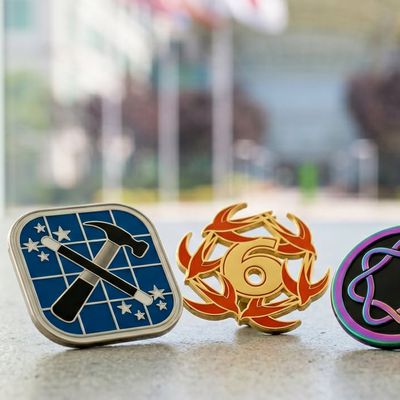
App developer Clément Sauvage has designed a set of enamel pins for Apple fans who want to commemorate WWDC 2026 and Apple's 50th anniversary. Sauvage is offering the pins on Kickstarter, and plans to start shipments in May ahead of WWDC.
The pins feature the Apple developer logo, the Apple Intelligence icon, Apple's "spaceship" and rainbow at the Apple Park campus, the entrance to Apple's...