New Apple Site Lets Users Create Custom 'Shot on iPhone' Mother's Day Video
Following the launch of its "Shot on iPhone" Mother's Day ad, Apple has created a dedicated website that allows customers to create their own Mother's Day video by uploading images of their mom.
The simple site, first shared by iPhone in Canada, opens with an upload image link, which allows users to upload a photo. The photo is then inserted into a customized version of Apple's Mother's Day video and can be uploaded directly to Facebook.
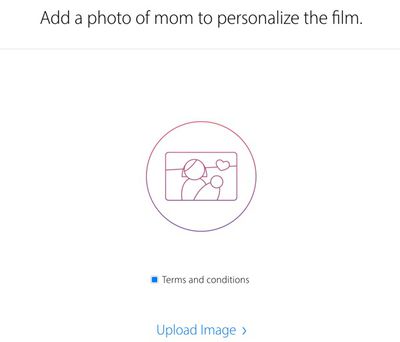
Content wise, the video is identical to Apple's Mother's Day Shot on iPhone ad, featuring photos of mothers from iPhone users around the world, with the addition of the user-uploaded photo.
The site, which is a new marketing tactic for Apple, may have been created by Apple
advertising partner Media Arts Lab, as an employee was the first person to tweet out a link to the new site. Apple's video creation tool comes just ahead of Mother's Day, which occurs on Sunday, May 8.
Popular Stories
Apple's upcoming foldable iPhone Ultra is winning over the few people who have had hands-on time with the device, though the camera setup may leave some users wanting, according to Bloomberg's Mark Gurman.
Writing in his latest Power On newsletter, Gurman says people who have used the device – which is reportedly referred to internally as the iPhone Ultra – like how it fits in your...
It is now late August, meaning that Apple's annual iPhone event is just around the corner. Below, we take a look at when the event might be held this year.
This September, Apple is expected to unveil the iPhone 18 Pro, iPhone 18 Pro Max, and an all-new foldable iPhone that will reportedly be named the iPhone Ultra. The regular iPhone 18, a lower-end iPhone 18e, and the iPhone Air 2 are not...
Apple today unveiled a new Mac mini with M6 and M5 Pro chip options, a new Mac Studio with M5 Max and M5 Ultra chip options, a new version of the Polishing Cloth with a lower price, and updated Magic Keyboards for Macs.
To learn more about these products, read our coverage below:
Apple Announces New Mac Mini With M6 and M5 Pro Chips and More
Apple Unveils New Mac Studio With M5 Max and M5...