Apple Releases 'Beats Pill+' App for Controlling Beats Pill+ Speaker on iOS and Android - MacRumors
Skip to Content

Apple Releases 'Beats Pill+' App for Controlling Beats Pill+ Speaker on iOS and Android

by

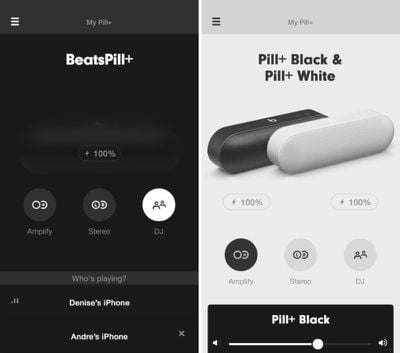
Apple today debuted a new Beats Pill+ app for both iOS and Android users, providing a way for those who own the new Beats Pill+ speakers to control the speakers, check power levels, download software updates, adjust sound levels, and link multiple speakers together for different effects. There are three modes in the app, listed below.
beatspillapp

DJ - Grab a friend and control the music from two Bluetooth(R) sources.

Amplify - Add a second Beats Pill+ into the mix and simultaneously play from both for a sound that's twice as full.

Stereo - Use two Beats Pill+ speakers as left and right output for an even more dynamic sound experience.

Beats Pill+ marks the first time Apple has released an app on both the iOS and Android platforms simultaneously, and it's the second Android app that Apple has debuted after introducing the Move to iOS app earlier this year. Apple plans to introduce additional Android apps in the future, including an Apple Music app.

The new Beats Pill+ app comes just over three weeks after Apple debuted its new Beats Pill+ speakers. The Beats Pill+ is a wireless Bluetooth speaker that's the first Apple has introduced since purchasing the Beats brand in May of 2014. Priced at $229, the speaker is now available in black or white from the Apple Online Store.

Beats Pill+ for iOS can be downloaded from the App Store for free. [Direct Link]

Beats Pill+ for Android can be downloaded from Google Play for free. [Direct Link]
Top Rated Comments

141 months ago
Whoa, check out that hamburger menu. Apple released an iOS app with a hamburger menu.
Score: 5 Votes (Like | Disagree)
Lexdexia Avatar
141 months ago
How much you wanna bet the Android version will get flooded with negative comments by people who don't even own the product?
Score: 4 Votes (Like | Disagree)
akfgpuppet Avatar
141 months ago
How much you wanna bet the Android version will get flooded with negative comments by people who don't even own the product?
It already is :O
Score: 1 Votes (Like | Disagree)
Fuchal Avatar
141 months ago
I have the speaker in my kitchen. It looks great, very Apple-like in it's simplicity (as opposed to old Beats designs). Sounds really good. Don't see any need for the app, though, but I have it connected to an Airport Express. I'd be interested in trying out the wireless stereo pairing, if they weren't so expensive and could actually afford to have 2.
Score: 1 Votes (Like | Disagree)
Mike MA Avatar
141 months ago
Just helping Beats, ah I mean the thread, to exceed 10 posts :rolleyes:
Score: 1 Votes (Like | Disagree)
gixxerfool Avatar
141 months ago
I'm shocked. This article is 30 minutes old. Not only are there no comments, no one bothered to comment the fact that there is a companion Android app.
Score: 1 Votes (Like | Disagree)

Popular Stories

android switching tool

Switching From iPhone to Android Just Got Easier With Android 17

Wednesday July 22, 2026 9:35 am PDT by
Android 17 includes a wireless native migration experience for transferring more types of data from an iPhone, making the process of switching to an Android device easier. Google says the upgraded method allows Google Accounts, passwords, Wi-Fi credentials, and eSIMs to be transferred. It also supports photos, videos, contacts, messages, and calendars, like the prior version of the switching ...
sunbird app

Sunbird's iMessage for Android App Returns to the Google Play Store

Wednesday August 5, 2026 12:43 pm PDT by
Sunbird Messaging today reintroduced its app that brings iMessage to Android users. Sunbird is now available on the Google Play Store following an early access testing period. The app allows Android users to send "blue bubble" messages to iPhone users instead of the standard green bubbles. It incorporates iMessage, RCS, and SMS/MMS messages in one app. Sunbird was previously available from...
RCS Feature 1

iOS 27 Finally Fixes Replying to Android Texts

Monday August 17, 2026 7:28 am PDT by
When iOS 27 arrives next month, you'll be able to reply to a specific green chat bubble (aka an Android message) in a Messages conversation on your iPhone. All you need to do is press and hold the message, tap Reply, then type your response. It will be received by the recipient as a real threaded reply (i.e. an inline reply), tying it directly to the message in question. It's the same with...