AT&T has flipped the switch on Wi-Fi calling, making it available to customers with eligible plans that are running iOS 9. MacRumors has received tips from customers who were able to activate Wi-Fi calling and we were able to activate the feature on our own iPhones. A number of readers in our forums are also having success activating Wi-Fi calling.
Wi-Fi calling is a feature that lets calls be placed over a wireless connection when cellular connectivity is poor, functioning much like an AT&T M-Cell does now. It's similar to Apple's own FaceTime Audio feature, which also routes calls over a Wi-Fi connection.
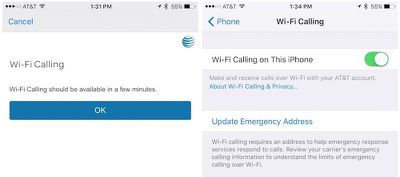
AT&T customers can turn on Wi-Fi calling by going to the Phone section of the Settings app and toggling on the Wi-Fi calling feature. From there, there are a set of steps to walk through, including entering an emergency 911 address. Wi-Fi calling is available on the iPhone 6, 6s, 6 Plus, and 6s Plus running iOS 9.
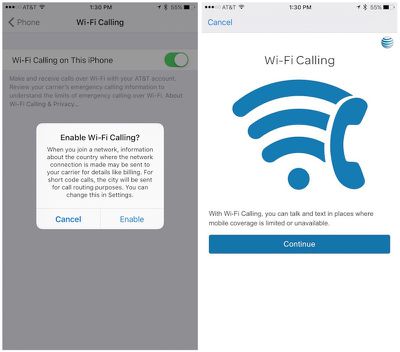
Customers who want to use Wi-Fi calling need to have AT&T HD voice features enabled, along with an Internet connection. Wi-Fi calling can be used for voice calls within the United States, Puerto Rico, and United States Virgin Islands at no charge. Long distance global voice calls will be charged standard long distance rates.
Once the setup process is complete, customers are receiving notifications letting them know the Wi-Fi calling feature will be available after a short activation period.
AT&T promised to launch Wi-Fi calling alongside iOS 9, but last week announced the feature was delayed due to its inability to get an FCC waiver that would temporarily allow the carrier to forgo offering support options for deaf and hard-of-hearing customers. On Tuesday of this week, AT&T finally received the waiver that it needed to move forward with Wi-Fi calling.

Friday December 5, 2025 9:40 am PST by Tim Hardwick
Apple is about to release iOS 26.2, the second major point update for iPhones since iOS 26 was rolled out in September, and there are at least 15 notable changes and improvements worth checking out. We've rounded them up below.
Apple is expected to roll out iOS 26.2 to compatible devices sometime between December 8 and December 16. When the update drops, you can check Apple's servers for the ...
Tuesday December 2, 2025 11:09 am PST by Juli Clover
Apple is encouraging iPhone users who are still running iOS 18 to upgrade to iOS 26 by making the iOS 26 software upgrade option more prominent.
Since iOS 26 launched in September, it has been displayed as an optional upgrade at the bottom of the Software Update interface in the Settings app. iOS 18 has been the default operating system option, and users running iOS 18 have seen iOS 18...
Friday December 5, 2025 10:08 am PST by Joe Rossignol
Intel is expected to begin supplying some Mac and iPad chips in a few years, and the latest rumor claims the partnership might extend to the iPhone.
In a research note with investment firm GF Securities this week, obtained by MacRumors, analyst Jeff Pu said he and his colleagues "now expect" Intel to reach a supply deal with Apple for at least some non-pro iPhone chips starting in 2028....
Wednesday December 3, 2025 10:33 am PST by Juli Clover
Apple today seeded the release candidate versions of upcoming iOS 26.2 and iPadOS 26.2 updates to developers and public beta testers, with the software coming two weeks after Apple seeded the third betas. The release candidates represent the final versions of iOS 26.2 and iPadOS 26.2 that will be provided to the public if no further bugs are found during this final week of testing....
Thursday December 4, 2025 9:30 am PST by Joe Rossignol
In a statement shared with Bloomberg on Wednesday, Apple confirmed that its software design chief Alan Dye will be leaving. Apple said Dye will be succeeded by Stephen Lemay, who has been a software designer at the company since 1999.
Meta CEO Mark Zuckerberg announced that Dye will lead a new creative studio within the company's AR/VR division Reality Labs.
On his blog Daring Fireball,...
Monday December 1, 2025 4:37 pm PST by Juli Clover
We're getting closer to the launch of the final major iOS update of the year, with Apple set to release iOS 26.2 in December. We've had three betas so far and are expecting a fourth beta or a release candidate this week, so a launch could follow as soon as next week.
Past Launch Dates
Apple's past iOS x.2 updates from the last few years have all happened right around the middle of the...
Monday December 1, 2025 3:00 am PST by Tim Hardwick
Apple is expected to launch a new foldable iPhone next year, based on multiple rumors and credible sources. The long-awaited device has been rumored for years now, but signs increasingly suggest that 2026 could indeed be the year that Apple releases its first foldable device.
Subscribe to the MacRumors YouTube channel for more videos.
Below, we've collated an updated set of key details that ...
A U.S. appeals court has upheld a temporary restraining order that prevents OpenAI and Jony Ive's new hardware venture from using the name "io" for products similar to those planned by AI audio startup iyO, Bloomberg Law reports.
iyO sued OpenAI earlier this year after the latter announced its partnership with Ive's new firm, arguing that OpenAI's planned "io" branding was too close to its...
The iPhone Air has recorded the steepest early resale value drop of any iPhone model in years, with new data showing that several configurations have lost almost 50% of their value within ten weeks of launch.
According to a ten-week analysis published by SellCell, Apple's latest lineup is showing a pronounced split in resale performance between the iPhone 17 models and the iPhone Air....
Thursday December 4, 2025 5:18 am PST by Tim Hardwick
iPhone 17 Pro models, it turns out, can't take photos in Night mode when Portrait mode is selected in the Camera app – a capability that's been available on Apple's Pro devices since the iPhone 12 Pro in 2020.
If you're an iPhone 17 Pro or iPhone 17 Pro Max owner, try it for yourself: Open the Camera app with Photo selected in the carousel, then cover the rear lenses with your hand to...
I can finally answer phone scammers right away at work now instead of hearing their 2-second silent voicemails later. :) Just for reference, we get no cell signal at work.

Seriously though, this will be amazing for me at home since cell signal is very weak there.
charging long distance fees when using a service that puts 0 load on their networks is criminal.
well, if its domestic long distance its just charged your regular calling rate, which is probably unlimited. calling internationally using wifi calling is the same as calling internationally with cellular. most people aren't like me, they do not have minute plans. i have 100 minutes a month. a wifi call minute is the same as a cellular call minute.
the other end of the call is a real telephone number, so i guess that is where they think its fair to treat it as a real cellular call
what is really criminal is what they do with the AT&T microcell. they have you pay $199 for one
there is an optional unlimited microcell calling plan they want you to sign up for, in case you have a plan that has limited amount of minutes. back in 2009, the unlimited calling feature for your microcell was $19.99 a month extra, this allows any of the registered phone numbers are assigned to our microcell ( up to 10 ) to be able to have unlimited calling. just in case they have legacy plans.
oh , but that is not all. any cellular data that you use on the microcell , even though you are providing them with your own internet connection, goes against your plan.
so even though you paid $199 for a microcell you still have to use wifi to prevent AT&T from charging you for going over.
and through this whole mess, little t-mobile is minding their own business and giving away wifi routers and cell phone boosters for those people who need them. they have been giving away cell phone boosters for probably 10 years, and tmo is even giving out marshmallow to all the old phones, and people just go on forums and say that t-mobile sucks.
So now I get to pay AT&T & Comcast to use my own network and the public internet to route my calls. All to make up for AT&T's crummy service coverage?
Where do I sign up?
I'm not sure why so many people are whining about this.
You've lost NOTHING by having Wi-Fi calling available to you. Before if you were in an area with good Wi-Fi but lousy cellular reception, you couldn't make calls or do SMS at all. Now you can.
So what if it's your own network that you're paying for? You don't pay extra for this.
Before: You can't make calls. Now: You CAN make calls.
Things have improved at no additional cost to you. Stop complaining. :)
How do we know when it's activated? Is there a logo at the top of the screen that says WiFi like the old M-Cell logo? I activated twenty minutes ago and nothing...
Turn on Airplane mode and turn on WiFi. Shows "AT&T Wi-Fi"