Knock, the iOS app that lets you unlock your Mac with Bluetooth instead of a password, is today being updated with Apple Watch support, bringing the same unlocking capabilities to Apple's upcoming wrist worn device.

Knock for iOS lets an iPhone pair to a Mac to bypass the need to enter a password, and Knock for Apple Watch will work in the same way. It will no longer be necessary to dig an iPhone out of a bag or a purse, because the Apple Watch with Knock Glance will also let users log into their Macs.
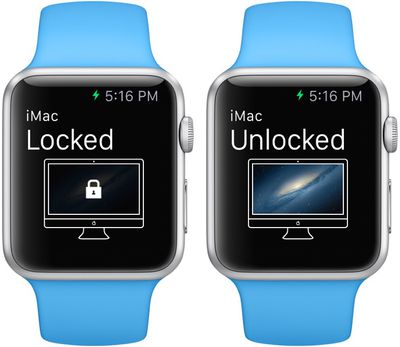
knockforapplewatch

When we saw Apple Watch, we knew immediately that we had to make Knock one of the first apps available for it. Knock and Apple Watch are a match made in heaven. With Knock 2.0, leaving your iPhone in your bag or the other room isn't a problem. Whenever you open your Mac, Knock is right there at your wrist, ready to go. And with the Knock Glance, you can even unlock your Mac while you walk over to it -- or lock it as you walk away.

Today's Knock update also includes Touch to Unlock, which aims to introduce an extra layer of security for those who need it. With Touch to Unlock, unlocking a Mac with an iPhone also requires a finger to be placed on Touch ID, so it's no longer possible to unlock the Mac with just the iPhone in the event of a theft.

The new Touch to Unlock feature works in conjunction with the Apple Watch in a unique way that's similar to how Apple Pay works. When the Apple Watch is placed on the wrist, users are prompted to use Touch ID or a PIN code to unlock a Mac, and that enables the Apple Watch to continue to unlock the Mac as long as it remains in contact with skin on the wrist.


When removed from the wrist, the Apple Watch will no longer be able to unlock the Mac, effectively preventing it from being used to open a Mac with Knock installed without the owner's permission. Touch ID Apple Watch verification through skin contact lets Knock users take advantage of two-factor security without the hassle of needing to place a fingerprint on the iPhone each time a connected Mac is unlocked.

Knock for iPhone has received some criticism because it often takes longer to unlock a Mac with the iPhone than it does when entering a password, but some users have found it to be a fun alternative to the standard password entry for Macs. It's not clear if the Apple Watch will speed up the unlocking process, but Knock provides an interesting look at one of the ways the Apple Watch can be used by developers.


Knock can be downloaded from the App Store for $3.99. [Direct Link]

Tag: Knock

Top Rated Comments

DeanL Avatar
138 months ago
Knock sucks...

In my opinion, MacID (http://macid.co) works way much better than Knock and has more features. I hope they make a similar app too!
Score: 7 Votes (Like | Disagree)
nagromme Avatar
138 months ago
I want a Watch app that uses the accelerometer to let me awaken my Mac by slapping it with a glove.
Score: 3 Votes (Like | Disagree)
ninjadex Avatar
138 months ago
Worst app promo video ever. Gives me all sorts of bad feelings.
Score: 2 Votes (Like | Disagree)
WilliamG Avatar
138 months ago
It takes, what 5 seconds to type in a password? Seems kinda pointless to me :(

Yep pointless. Agreed.

Just like TouchID on an iPhone, or anything else like this. :rolleyes:
Score: 1 Votes (Like | Disagree)
VirtualRain Avatar
138 months ago
In my opinion, MacID (http://macid.co) works way much better than Knock and has more features. I hope they make a similar app too!
+1... tried both, MacID is vastly superior to Knock... I use MacID all the time. Knock was a gimmick that didn't even last a day.
Score: 1 Votes (Like | Disagree)
Apple_Robert Avatar
138 months ago
1) That's a start but I wish that Apple had included this as a default feature of Watch.

2) Does this (or any other) allow for auto-locking when your Watch gets too far away from your Mac? Can this be used to auto-lock an iPhone or iPad. Are there safe zones? For instance, I want this to work when my Mac/iPhone is connected to my home network, but not when I'm sitting in a coffee shop using their public network. Can it use BT sensitivity (as found in iBeacons) so that it will un/lock at various distances away from the Mac based on the signal strength.
MacID already has the auto locking feature when away. Such features are slated to be included in a new version of MacID (for the Apple watch).
Score: 1 Votes (Like | Disagree)

Popular Stories

iOS 26

iOS 26.1 Available Now With These 8 New Features

Monday November 3, 2025 5:54 am PST by
Following more than a month of beta testing, Apple released iOS 26.1 on Monday, November 3. The update includes a handful of new features and changes, including the ability to adjust the look of Liquid Glass and more. Below, we outline iOS 26.1's key new features. Liquid Glass Toggle iOS 26.1 lets you choose your preferred look for Liquid Glass. In the Settings app, under Display...
Finder Siri Feature

Apple's New Siri Will Be Powered By Google Gemini

Wednesday November 5, 2025 11:57 am PST by
The smarter, more capable version of Siri that Apple is developing will be powered by Google Gemini, reports Bloomberg. Apple will pay Google approximately $1 billion per year for a 1.2 trillion parameter artificial intelligence model that was developed by Google. For context, parameters are a measure of how a model understands and responds to queries. More parameters generally means more...
Apple Logo Spotlight

Report: Apple to Launch These New Products in 2026

Sunday November 2, 2025 5:34 am PST by
Apple is planning to launch at least 15 new products in 2026, according to Bloomberg's Mark Gurman. Gurman outlined what to expect from Apple in 2026 in the latest edition of his "Power On" newsletter. He said the company is heading "into one of its most pivotal years in recent memory," with the rollout of major new Apple Intelligence features, intense regulatory pressure on the App Store,...
iOS 26

Apple Releases iOS 26.1 With Liquid Glass Toggle, Slide to Stop Alarm, New Apple Intelligence Languages and More

Monday November 3, 2025 1:11 pm PST by
Apple today released iOS 26.1, the first major update to the iOS 26 operating system that came out in September, iOS 26.1 comes over a month after iOS 26 launched. ‌iOS 26‌.1 is compatible with the ‌iPhone‌ 11 series and later, as well as the second-generation ‌iPhone‌ SE. The new software can be downloaded on eligible iPhones over-the-air by going to Settings > General >...
Early Black Friday Deals 2

The Best Early Black Friday Apple Deals

Sunday November 2, 2025 10:04 am PST by
We're officially in the month of Black Friday, which will take place on Friday, November 28 in 2025. As always, this will be the best time of the year to shop for great deals, including popular Apple products like AirPods, iPad, Apple Watch, and more. In this article, the majority of the discounts will be found on Amazon. Note: MacRumors is an affiliate partner with some of these vendors. When ...
tvOS 26 Feature

Apple Releases tvOS 26.1

Monday November 3, 2025 1:07 pm PST by
Apple today released tvOS 26.1, an update to the tvOS 26 operating system that came out in September. tvOS 26.1 is available on the Apple TV 4K and the Apple TV HD models, but Liquid Glass is only available on the second-generation Apple TV 4K or later. tvOS 26 can be downloaded using the Settings app on the ‌‌Apple TV‌‌. Open up Settings and go to System > Software Update to get the ...
apple one  cpqesecbv342 upscaled feature

Apple One Gets New Colorful Logo Following Apple TV Rebrand [Updated]

Monday November 3, 2025 3:22 pm PST by
Apple updated the logo and name for its Apple TV streaming service today, and it looks like Apple One might be next. On the revamped Apple TV website, there's a new, more colorful Apple One logo available. The logo features an Apple icon that's split into six slices, and each slice includes the color that Apple uses for one of the services included in Apple One Premium. Apple One is...
2024 iPhone Boxes Feature

Apple Adjusts Trade-In Values for iPhones, iPads, Macs, and More

Thursday November 6, 2025 11:12 am PST by
Apple today updated its trade-in values for select iPhone, iPad, Mac, and Apple Watch models. Trade-ins can be completed on Apple's website, or at an Apple Store. The charts below provide an overview of Apple's current and previous trade-in values in the U.S., according to its website. Maximum values for most devices either decreased or saw no change, but the iPad Air received a slight bump. ...